Pytrack Code not running
-
Hi, i have just uploaded the libraries on my pytrack together with lopy and try running the example code main.py from https://github.com/pycom/pycom-libraries/tree/master/pytrack and i get this :
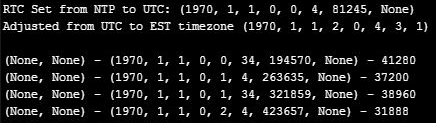
why the year are on 1970? And it show None. May i know what is the problem ?
-
First (None, None) is the coordinate you don't get, because the chip does not receive signals.
The date time is the minimal date time. The example set the RTC of the LoPy from the timeinformation of the network. By default the LoPy creates its own WiFi network and does not get any time information. Therefore it stay at the Unix minimal time. 1970-01-01 00:00:00. When you configure your LoPy to use your WiFi, it may get the time from an NTP and will set it to actual UTC. If I remenber it right, it sets the timezone for middle european summer time, as well.
The example and library does not use the time information from the GPS. I wanted to work on this, but I decided to wait until Pycom releases the firmware udpdate which enables the second core. Shall be pretty simple. The GPS sentence used by the library shall contain UTC.
-
@crumble Does it mean i need to configure my Lopy WiFi?
-
@mj said in Pytrack Code not running:
@crumble Does it mean i need to configure my Lopy WiFi?
Only if you want to see the actual date/time in this string. But remember that you have to be in the range of a WiFi which has the actual time. If you want to use it as a tracking device, it will be better to parse the time from the GPS sentence.
If you start tracking in reach of your network and use only the normal sleep commands it will be fine. But this will cost you a lot of your battery power. If you send the LoPy to deepsleep, you need to get the time again, because the LoPy will boot on wake-up. In this case the GPS signal will be the best source.
-
@crumble How can i get the coordinates instead of (None, None) ?
-
@mj said in Pytrack Code not running:
@crumble How can i get the coordinates instead of (None, None) ?
use a power bank and have a walk ;)
You cannot use an external antenna with the LoPy, so you have to move the LoPy to place where it receives the signals. If you are smart, you write the GPS output to an SD card, so that you have some test data while your working inside. But therefore you have to change the example library. Don't forget to share your changes to the library.
-
@crumble Sorry if i ask silly questions again. I just upload the code to pytrack and connect it to the laptop through USB port. Can i get the coordinates ? Or i have to program another Lopy with expansion board and make the pytrack to send the coordinates to Lopy and the coordinates will appear on the REPL console?
-
@mj your PyTrack shall receive GPS data where your mobile receives it. You don't need to send the coordinates to another LoPy. The coordinates will be printed to the REPL as soon as the PyTrack receives enough signals. Either you can simply place your LoPy at or outside a window or you have to go outside for this.
Don't use a metal case. Maybe you have to increase the timeout in the library, if you live in an area where you have problems to receive GPS data.
I have tested my PyTrack only during nice and shiny days. If it's raining cats and dogs you may have to wait until its sunny again.
-
my main.py of the PyTrack-LoPy. I removed the part for the DHT-22 on the fly but not the switch on Pin10 and removed unused parts. If the LoPy runs the loop only once, you have to invert the if statement for the switchor solder one onto your board ;)
from network import LoRa
from network import WLAN
import socket
import time
import pycom
import utime
from machine import RTC
from machine import SD
from machine import Timer
from machine import Pin
from L76GNSS import L76GNSS
#from LIS2HH12 import LIS2HH12
from pytrack import Pytrack
import gc

gc.enable()

wlan = WLAN(mode=WLAN.STA)
wlan.connect('SSID', auth=(WLAN.WPA2, 'password'))
cnt = 1
while (not wlan.isconnected()) and cnt <100:
    time.sleep_ms(50)
    cnt = cnt + 1
print(wlan.ifconfig())

rtc = machine.RTC()
rtc.ntp_sync("pool.ntp.org")
utime.sleep_ms(750)
print('\nRTC Set from NTP to UTC:', rtc.now())

utime.timezone(7200) #summer time
print('Adjusted from UTC to EST timezone', utime.localtime(), '\n')

lora = LoRa(mode=LoRa.LORA, frequency=863000000)
s = socket.socket(socket.AF_LORA, socket.SOCK_RAW)
s.setblocking(True)

pycom.heartbeat(False)
pycom.rgbled(0x000008)

p_in = Pin('P10', mode=Pin.IN, pull=Pin.PULL_DOWN)
print('Pin10 enabled')
if p_in() == 1:
    sendIntervall = 60
else:
    sendIntervall = 600
print('sendIntervall = {}'.format(sendIntervall))

py = Pytrack()
l76 = L76GNSS(py, timeout=30)
chrono = Timer.Chrono()
chrono.start()

loop = True
while loop:
    result = th.read()
    if result.is_valid():
        pycom.rgbled(0x001000) # green
        coord = l76.coordinates()
        line = '{{"time": "{}", "loc": "{}" }}'.format(rtc.now(), coord)
        print(line)
        s.send(line)
        gc.collect()
    pycom.rgbled(0x000000) # out
    if p_in() == 1:
        loop = False
    else:
        print("Wait for next mesuarement")
        if sendIntervall < 500:
            time.sleep(sendIntervall)
        else:
            py.setup_sleep(sendIntervall)
            py.go_to_sleep(False)


line = 'EnDe'
s.send(line)
print(line)
pycom.heartbeat(True)
The main.py of the receiving LoPy
from network import LoRa from network import WLAN import socket import time import pycom import utime from machine import RTC from machine import SD from machine import Timer from machine import Pin from L76GNSS import L76GNSS from pytrack import Pytrack from dth import DTH import gc gc.enable() wlan = WLAN(mode=WLAN.STA) wlan.connect('SSID', auth=(WLAN.WPA2, 'password')) cnt = 1 while (not wlan.isconnected()) and cnt <100: time.sleep_ms(50) cnt = cnt + 1 print(wlan.ifconfig()) rtc = machine.RTC() rtc.ntp_sync("pool.ntp.org") utime.sleep_ms(750) print('\nRTC Set from NTP to UTC:', rtc.now()) utime.timezone(7200) #summer time print('Adjusted from UTC to EST timezone', utime.localtime(), '\n') #wlan.close() #wlan.deinit() lora = LoRa(mode=LoRa.LORA, frequency=863000000) s = socket.socket(socket.AF_LORA, socket.SOCK_RAW) s.setblocking(True) pycom.heartbeat(False) loop = True while loop: print('Waiting for line...') pycom.rgbled(0x0000) line = s.recv(255) pycom.rgbled(0xff00) f = open('/sd/test.log', 'a') time_str = str(rtc.now()) f.write(time_str) f.write(line) f.write('\n') f.close() print(line) if line == b'EnDe': loop = False print('Hope to quit') pycom.heartbeat(True) -
@mj just to be clear, a GPS receiver needs to receive a good signal from several satellites for several minutes before it can give a position. The TTFF (time to first fix) may be even longer in some cases.
This generally means you need to be outside (preferably not in a narrow street with tall buildings on both sides), with a good view of the open sky.
In some situations you may be able to get a fix while inside close to a window, but YMMV significantly.
Note that this applies to any GPS receiver. Phones are not good examples, as they more often get their position from wireless networks (cellular, Wi-Fi...) around them coupled with a database which maps visible networks to a position, and only revert to actual GPS in limited situations. That is not the case of a “pure” GPS receiver like the Pytrack which uses only GPS data received from the satellites.
Haven’t used the Pytrack myself, but I suppose that like most receivers there’s a mode that would give you information about the satellites it sees, this can be helpful. Also don’t know if the Pytrack can save some of the information received (almanac, ephemeris...) and/or if there’s a way to supply it to the chip (A-GPS). If it doesn’t the TTFF can be very very long as some of the information required is broadcast by the GPS satellites at a very very slow rate and it can take over 30 minutes to receive the whole thing.
Hello! It looks like you're interested in this conversation, but you don't have an account yet.
Getting fed up of having to scroll through the same posts each visit? When you register for an account, you'll always come back to exactly where you were before, and choose to be notified of new replies (either via email, or push notification). You'll also be able to save bookmarks and upvote posts to show your appreciation to other community members.
With your input, this post could be even better 💗
Register Login