Welcome to the Pycom forum Forum
    • \[\[global:header.categories\]\]
    • \[\[global:header.recent\]\]
    • \[\[global:header.tags\]\]
    • \[\[global:header.popular\]\]
    • Login

    Explore Pybytes | Official Documentation | Report a Firmware Bug/Issue | GitHub

    Simple MQTT Tutorial

    Scheduled Pinned Locked Moved WiPy 2&3
    34 Posts 13 Posters 30.0k Views 16 Watching
    Loading More Posts
    • Oldest to Newest
    • Newest to Oldest
    • Most Votes
    Reply
    • Reply as topic
    Log in to reply
    This topic has been deleted. Only users with topic management privileges can see it.
    • R Offline
      RSK
      last edited by

      @MrPy Thanks!

      Adjusting the timeout period in simple.py is helping to make the setup work consistent.

      0_1481187961439_upload-e25fcf75-b2f3-4f2b-ae79-aafb824f0594

      This might help.

      Thanks & Regards,
      Satish Kumar. R.

      1 Reply Last reply Reply Quote 0
      • L Offline
        lcgeldenhuys
        last edited by

        What version of the micropython-umqtt.simple library are you using? I'm trying the latest 1.3.2. It doesn't have the same bug on line 57 anymore, in fact it doesn't seem to use the same timeout mechanism.

        I'm not able to connect successfully to the HiveMQ public broker:

        Traceback (most recent call last):
        File "main.py", line 10, in <module>
        File "/flash/lib/umqtt.py", line 74, in connect
        OSError: [Errno 113] EHOSTUNREACH

        Using:

        client = MQTTClient("MQTT_lcg_Client", "broker.hivemq.com", port=1883)
        client.settimeout = settimeout
        client.connect()

        I can pub / sub using the MQTT.fx client on my laptop, and the WiPy is on the same network (I can ping and ftp to WiPy from laptop).

        Any ideas?

        1 Reply Last reply Reply Quote 0
        • P Offline
          pwest
          last edited by

          I'm also using the same apparently current 1.3.2 simple.py file, and having the exact issue described by lcgeldenhuys 3 months ago. Any suggestions on how to get past this?

          -Phil

          1 Reply Last reply Reply Quote 0
          • B Offline
            bucknall
            last edited by

            Hi @pwest,

            It might be work checking out https://youtu.be/3NDPSbr5J14?list=PLS09TA19umCOavPeP_FoMHoCuCzjJUWQk, where I talk about MQTT and how to get set up with it.

            Currently, the documentation on MQTT that we have online is out of date and I am re-writing it as we speak. I'll post back once it has been published!

            Thanks,

            Alex

            Developer Evangelist - Pycom

            1 Reply Last reply Reply Quote 0
            • A Offline
              achide
              last edited by

              Hi,

              I'm new with pycom. Maybe it's a stupid question, I would like to know how to import umqtt library.
              I've put it in lib folder of sys.path, but when I import this module, it told me no module named 'umqtt'?

              B 1 Reply Last reply Reply Quote 0
              • B Offline
                bucknall @achide
                last edited by

                @achide How are you uploading code to your device? Are you using the Pymakr Plugin?

                Developer Evangelist - Pycom

                A 1 Reply Last reply Reply Quote 0
                • A Offline
                  achide @bucknall
                  last edited by

                  @bucknall yes, I use Pymakr.

                  L 1 Reply Last reply Reply Quote 0
                  • L Offline
                    livius @achide
                    last edited by livius

                    @achide
                    Pymakr IDE or Pymakr Atom Plugin?
                    If First then do not use it.

                    think about people first, then computers

                    A 1 Reply Last reply Reply Quote 0
                    • A Offline
                      achide @livius
                      last edited by

                      @livius
                      Hi, thanks for reply!
                      It's Pymakr Atom Plugin I use.
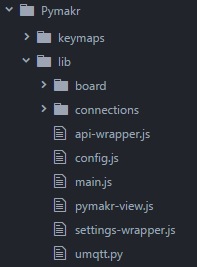
                      I've copy umqtt.py under lib file. Like this :
                      0_1497965611638_upload-c188ec33-a802-43fc-a0ae-d3f359495e3e
                      Then when I run the code, it shows like that :
                      0_1497965697277_upload-c689486e-f0b6-43cf-87dc-2f5694e8644b
                      What should I do ?

                      L 1 Reply Last reply Reply Quote 0
                      • L Offline
                        livius @achide
                        last edited by

                        @achide
                        I do not use pymakr
                        but if i understand screen correctly you put it into
                        \flash\lib\connections
                        but you should into
                        \flash\lib

                        think about people first, then computers

                        1 Reply Last reply Reply Quote 0

                        Hello! It looks like you're interested in this conversation, but you don't have an account yet.

                        Getting fed up of having to scroll through the same posts each visit? When you register for an account, you'll always come back to exactly where you were before, and choose to be notified of new replies (either via email, or push notification). You'll also be able to save bookmarks and upvote posts to show your appreciation to other community members.

                        With your input, this post could be even better 💗

                        Register Login
                        • 1
                        • 2
                        • 2 / 2
                        • First post
                          Last post

                        Pycom on Twitter

                        Pycom