Pymakr warning on program start
-
Hi,
every time i open Pymakr i get this warning:
Warning: QStackedWidget::setCurrentWidget: widget 0x5db5bf8 not contained in stack.
The problem occurs since i have updated to Pymakr 1.0.0b6, my OS is Windows 10 Pro 64-Bit.
Any suggestions how to solve this?Thank you!
-
Hi @iotGeek, Sorry about this, we are working on solving this bug. Expect a fix in the next release.
-
@Ralph Hi Ralph - I am having the exact same issue. When is the next release planned?
-
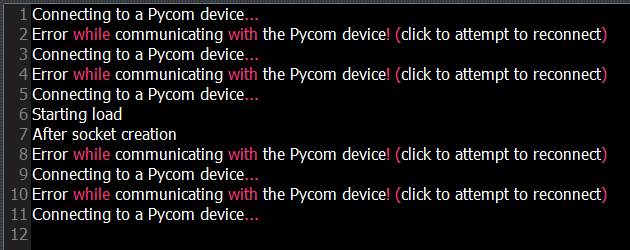
@Ralph Hi Ralph - it seems that my Pymakr is not keeping a stable connection with the LoPy.
I have inserted several print statements to monitor the progress through the code - as you can see that connection falls away. The connection is re-established when I apply it the menu opotion 'Settings/Preferences/Pycom Device' again. The connection drop whenever I run the code.
-
Hi @KDHeard, A few questions that might help you getting there:
- Did you update the device to the latest firmware?
- Are you connecting to the LoPy using the comport or an IP address?
- Are you running any wifi related code in the boot.py and are you sure you added the SOFT_RESET check?
- Is there an infinite while loop running while you are trying to connect?
Let me know and I can support you with figuring it out. One helpful tactic is to connect over USB from Pymakr and have a telnet session open as well on the commandline, so you can see any potential errors coming that Pymakr might be triggering.
To answer the other question, there is no date planned for this release, but I'll try to get it out there it this week, otherwise the next.
Hello! It looks like you're interested in this conversation, but you don't have an account yet.
Getting fed up of having to scroll through the same posts each visit? When you register for an account, you'll always come back to exactly where you were before, and choose to be notified of new replies (either via email, or push notification). You'll also be able to save bookmarks and upvote posts to show your appreciation to other community members.
With your input, this post could be even better 💗
Register Login