lopy to raspberry pi 3 serial connection
-
@testos If you look at the code and pictures below by @thomand1000, it is actually using UART1 with TX1, RX1 and GND connected to the rPi.
-
@robert-hh THanks for your quick answerr, yes I agree, but on the first picture, it's not the expansion board that he use ?
Br, Testos
-
@testos Yes, that's right. The picture shown an expansion board. On the pytrack, P3 and P4 are not that easily accessible. The connector below the Lopy has P4, P8, P10 and P11 available. So you have to re-assign the UART pin when you init the UART with the pins parameter, like:
from machine import UART uart1 = UART(1, 115200, pins=("P8", "P4")) # P8=Tx, P4=Rx -
@robert-hh Thanks for the guidance, I will give a try during my holiday next week.
Just for clarification, the P3/P4 that you talk about are from the fipy ? and by doing the following ...
from machine import UART
uart1 = UART(1, 115200, pins=("P8", "P4")) # P8=Tx, P4=Rx
... it will re-assign them on the pytrack on the 2 pin P4/P8 on the External IO Header shown on the picture ?
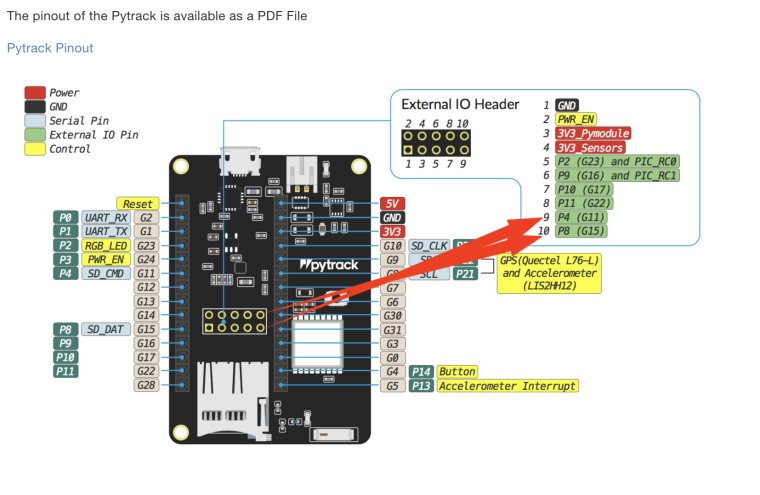
Thanks again for your time.
-
Please note that P8 (G15) is used by the SD-Card interface. So you can't use them at the same time.
-
@crumble But then still P10 and P11 are available.
-
Hello again,
@crumble, @robert-hh I can not use P11 (G22) instead of P8 ?
From the fipy documentation I can see that P11 is use by SPI ( MOSI ) but it's written :
Please note that the PIN assignments for UART1 (TX1/RX1), SPI (CLK, MOSI, MISO) and I2C (SDA, SCL) are defaults and can be changed in Software.I can not just re-assign the mosi on a different pin ? I did not find yet doc on that.
Thanks
-
@testos As long as you do not use SPI this does not matter. And the SPI pins can be reassigned too. And P11 (External IO 8) seems not to be connected on pytrack. Using I diode tester, I cannot detect any connection. At P10 (external IO 7) seems to be used. At least is show something like a ESD diode behavior of an active chip pin.

Hello! It looks like you're interested in this conversation, but you don't have an account yet.
Getting fed up of having to scroll through the same posts each visit? When you register for an account, you'll always come back to exactly where you were before, and choose to be notified of new replies (either via email, or push notification). You'll also be able to save bookmarks and upvote posts to show your appreciation to other community members.
With your input, this post could be even better 💗
Register Login