• 1.20.2.r6 L01 Firmware image size exceeds avialable space

    Firmware lopy
    2
    0 Votes
    2 Posts
    41 Views
    C
    @robert-hh helped me on this. many thanx to him !!!!!! WE need to modify the tools/size_check.sh I did IMG_MAX_SIZE_4MB=1810000 (added in my case increased with ~40000 bytes from1761280 partition size) then go to boards/lopy/script_4MB and change factory and ota_0 size .. then otadata begin adress { "version" : "2.1", "partitions" : { "factory" : ["0x10000", "0x1B9E50"], "ota_0" : ["0x1CBE50", "0x1B9E50"], "otadata" : ["0x1C9E50", "0x1000"] }, "script" : [ ["w", "bootloader", "bootloader.bin"], ["w", "partitions", "partitions_4MB.bin"], ["w", "factory", "lopy.bin"] ] }
  • 0 Votes
    1 Posts
    17 Views
    No one has replied
  • Checking LoRa connection after connect it

    LoPy lopy lopy4 lora
    3
    0 Votes
    3 Posts
    59 Views
    M
    @jcaron Wow! I was totally confused with the concept! Thank you very much :)
  • Red led

    LoPy lopy lopy4
    5
    1
    0 Votes
    5 Posts
    77 Views
    G
    The 'erase all' is indeed different from the 'erase flash' and 'clear CONFIG / NVS partitions' in the firmware updater tool. Im not sure exactly, but in most cases the 'erase all' in the command line works better than the latter methods, and could indeed provide a solution here
  • Capture and save the traceback from error

    LoPy lopy lopy4 traceback
    4
    0 Votes
    4 Posts
    54 Views
    K
    @M-m I put mine in a function def logtraceback(e): which I call from any Exception as e: where I want to log the traceback.
  • OSError: [Errno 11] EAGAIN problems

    LoPy lopy lopy4 oserror
    8
    0 Votes
    8 Posts
    123 Views
    G
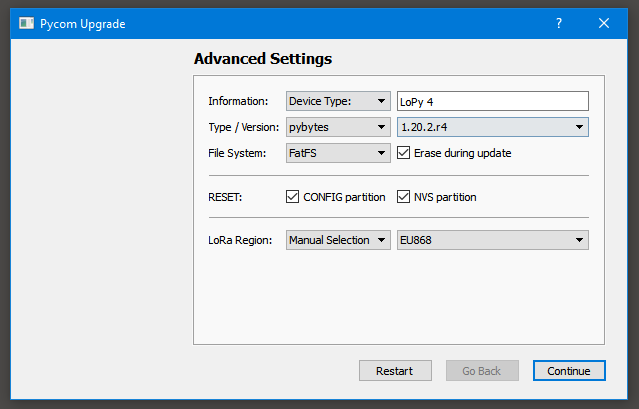
    Hi, I compiled a firmware for you to use on a Lopy4 (here) to check the EAGAIN error cause. For a case without error, it will output the following: Pycom MicroPython 1.20.2.r4 [v1.20.1.r2-357-g6153b01d3-dirty] on 2021-01-18; LoPy4 with ESP32 Type "help()" for more information. >>> Running selected lines >>> >>> Not yet joined... Not yet joined... Not yet joined... Joined b'' [TASK_LoRa] CMD TX [LoRaMAC] returning status 0 > Pycom MicroPython 1.20.2.r4 [v1.20.1.r2-357-g6153b01d3-dirty] on 2021-01-18; LoPy4 with ESP32 Type "help()" for more information. >>> You should be able to use the script you already wrote, but if you want to use the example I used: from network import LoRa import socket import time import ubinascii # Initialise LoRa in LORAWAN mode. # Please pick the region that matches where you are using the device: # Asia = LoRa.AS923 # Australia = LoRa.AU915 # Europe = LoRa.EU868 # United States = LoRa.US915 lora = LoRa(mode=LoRa.LORAWAN, region=LoRa.EU868) # create an OTAA authentication parameters, change them to the provided credentials app_eui = ubinascii.unhexlify('') app_key = ubinascii.unhexlify('') #uncomment to use LoRaWAN application provided dev_eui dev_eui = ubinascii.unhexlify('') # join a network using OTAA (Over the Air Activation) #uncomment below to use LoRaWAN application provided dev_eui #lora.join(activation=LoRa.OTAA, auth=(app_eui, app_key), timeout=0) lora.join(activation=LoRa.OTAA, auth=(dev_eui, app_eui, app_key), timeout=0) # wait until the module has joined the network while not lora.has_joined(): time.sleep(2.5) print('Not yet joined...') print('Joined') # create a LoRa socket s = socket.socket(socket.AF_LORA, socket.SOCK_RAW) # set the LoRaWAN data rate s.setsockopt(socket.SOL_LORA, socket.SO_DR, 5) # make the socket blocking # (waits for the data to be sent and for the 2 receive windows to expire) s.setblocking(False) # send some data s.send(bytes([0x01, 0x02, 0x03])) # make the socket non-blocking # (because if there's no data received it will block forever...) s.setblocking(False) # get any data received (if any...) data = s.recv(64) print(data)
  • 0 Votes
    11 Posts
    78 Views
    I
    @jcaron Thanks, I will keep that in mind !
  • Bad OTAA login or no network?

    LoPy lopy lorawan otaa ttn
    2
    0 Votes
    2 Posts
    37 Views
    J
    @Widget Contrary to cellular networks, LoRaWAN networks usually don’t transmit much, if at all. Other than the odd join accept, confirmed frame ack, or downlink, all of which should be very rare, they don’t transmit anything, and definitely no beacons, advertisements or broadcasts. So it’s not possible to check if there’s a network around, just by listening, unless you plan to wait a very long time or get very lucky. But have you checked TTN’s coverage map? Also remember that radio waves don’t like obstacles. Find the closest active gateway(s) and check the path between them and you, taking into account terrain/elevation, buildings, vegetation, etc. There are tools that allow you to simulate all that. TTN being an open initiative, coverage varies widely. Some areas have lots of outdoor gateways in very good (high) locations, others may be the proverbial desert...
  • create dbf files with Micropython?

    WiPy 2&3 wipy lopy
    1
    0 Votes
    1 Posts
    20 Views
    No one has replied
  • Date Time convert to Microsoft Access

    WiPy 2&3 time lopy wipy
    5
    0 Votes
    5 Posts
    44 Views
    W
    @railmonitor thank you
  • Cannot import lora library

    LoPy lopy lora import library pycom
    2
    0 Votes
    2 Posts
    105 Views
    ShanevanJS
    @Kcsss Read the documentation here more carefully. The case is important! from network import LoRa import socket import ubinascii import struct # Initialise LoRa in LORAWAN mode. # Please pick the region that matches where you are using the device: # Asia = LoRa.AS923 # Australia = LoRa.AU915 # Europe = LoRa.EU868 # United States = LoRa.US915 lora = LoRa(mode=LoRa.LORAWAN, region=LoRa.EU868)
  • time change for Germany

    WiPy 2&3 wipy lopy time
    8
    0 Votes
    8 Posts
    240 Views
    J
    @Wolli01 Don't have a Pycom module at hand to test, but does that actually return local time by default? If so, I wonder where it could possibly get the timezone from... But a quick glance through the code makes me think it doesn't, does it? You can control the timezone used by localtime (and mktime) using utime.timezone, but it's simplistic (just an offset from UTC), it does not handle automatic DST changes. If you want that to be handled for you (which seems overkill on such a device IMHO) you'll probably have to use an external library that supports it.
  • 0 Votes
    7 Posts
    223 Views
    W
    @Eric73 Thanks for the info
  • OSError: in error.log file

    WiPy 2&3 wipy lopy
    6
    0 Votes
    6 Posts
    277 Views
    W
    @jcaron Many thanks for your info
  • Send message from LoPy through BLE

    Getting Started lopy ble
    7
    0 Votes
    7 Posts
    732 Views
    G
    @Eric73 I updated the firmware to 1.18 too and it works now. Thank you very much for your precious help and time!
  • Reread Setting.py while the program is running.

    WiPy 2&3 wipy lopy import
    8
    0 Votes
    8 Posts
    517 Views
    W
    @robert-hh That's how it works perfectly! Thank you very much. import sys del sys.modules['settings'] time.sleep(1) import settings
  • Online Update?

    WiPy 2&3 wipy lopy update upgrade
    3
    0 Votes
    3 Posts
    261 Views
    W
    @robert-hh Thank you