• 0 Votes
    2 Posts
    26 Views
    J
    @Chandan-Verma can you clarify which example you are using, which region you are in, and where exactly the error happens (the full log/trace would be useful)?
  • OSError: [Errno 11] EAGAIN problems

    LoPy lopy lopy4 oserror
    8
    0 Votes
    8 Posts
    116 Views
    G
    Hi, I compiled a firmware for you to use on a Lopy4 (here) to check the EAGAIN error cause. For a case without error, it will output the following: Pycom MicroPython 1.20.2.r4 [v1.20.1.r2-357-g6153b01d3-dirty] on 2021-01-18; LoPy4 with ESP32 Type "help()" for more information. >>> Running selected lines >>> >>> Not yet joined... Not yet joined... Not yet joined... Joined b'' [TASK_LoRa] CMD TX [LoRaMAC] returning status 0 > Pycom MicroPython 1.20.2.r4 [v1.20.1.r2-357-g6153b01d3-dirty] on 2021-01-18; LoPy4 with ESP32 Type "help()" for more information. >>> You should be able to use the script you already wrote, but if you want to use the example I used: from network import LoRa import socket import time import ubinascii # Initialise LoRa in LORAWAN mode. # Please pick the region that matches where you are using the device: # Asia = LoRa.AS923 # Australia = LoRa.AU915 # Europe = LoRa.EU868 # United States = LoRa.US915 lora = LoRa(mode=LoRa.LORAWAN, region=LoRa.EU868) # create an OTAA authentication parameters, change them to the provided credentials app_eui = ubinascii.unhexlify('') app_key = ubinascii.unhexlify('') #uncomment to use LoRaWAN application provided dev_eui dev_eui = ubinascii.unhexlify('') # join a network using OTAA (Over the Air Activation) #uncomment below to use LoRaWAN application provided dev_eui #lora.join(activation=LoRa.OTAA, auth=(app_eui, app_key), timeout=0) lora.join(activation=LoRa.OTAA, auth=(dev_eui, app_eui, app_key), timeout=0) # wait until the module has joined the network while not lora.has_joined(): time.sleep(2.5) print('Not yet joined...') print('Joined') # create a LoRa socket s = socket.socket(socket.AF_LORA, socket.SOCK_RAW) # set the LoRaWAN data rate s.setsockopt(socket.SOL_LORA, socket.SO_DR, 5) # make the socket blocking # (waits for the data to be sent and for the 2 receive windows to expire) s.setblocking(False) # send some data s.send(bytes([0x01, 0x02, 0x03])) # make the socket non-blocking # (because if there's no data received it will block forever...) s.setblocking(False) # get any data received (if any...) data = s.recv(64) print(data)

  • 0 Votes
    2 Posts
    112 Views
    M
    Hi, Did you check whether your WiPy is connected to wifi? If WiPy is not connected to wifi, you can receive oserror. After being sure that your WiPy connected to wifi, please try your code. Best,
  • 0 Votes
    2 Posts
    176 Views
    robert-hhR
    @jc_serg If you are looking for a ping.py script: there is one here: https://gist.github.com/91cc8979e33e82af6d99ec34c38195fb.git
  • lte OSError

    GPy gpy oserror
    1
    0 Votes
    1 Posts
    185 Views
    No one has replied
  • 0 Votes
    3 Posts
    294 Views
    G
    Indeed we have the "socket.accept ()" method in the first LoPy, but the problem was in the pointing address to the other LoPy which was wrong. It's already solved, thank you!
  • OSerror with rgbled

    Comments & Feedback oserror rgbled lopy pymakr
    3
    0 Votes
    3 Posts
    512 Views
    S
    import time time.sleep(2) import pycom pycom.heartbeat(False) print('main MAC1') print('LED test') print (0xffffff) pycom.rgbled(0x0) Try this code. This should run perfectly fine.
  • OSError: -29312

    MicroPython oserror urequests
    2
    0 Votes
    2 Posts
    258 Views
    M
    Where did you get the urequests library from? You'll need to check the source code and search for that error code.
  • <class 'OSError'> Avialable Interfaces are down

    LoPy lopy4 oserror lopy interfaces
    15
    0 Votes
    15 Posts
    1k Views
    M
    @johand After I've set IP for HTTP server wlan.ifconfig(id=1, config=('192.168.4.10', '255.255.255.0', '192.168.4.1', '192.168.4.1')) i've tried to read IP address of HTTP Server and that was the problem, it's keep returning me '0.0.0.0'. IP address was set properly to '192.168.4.10' but function returns '0.0.0.0'. print('Network config:', wlan.ifconfig()) Network config: ('0.0.0.0', '0.0.0.0', '0.0.0.0', '0.0.0.0') Thank you for your help. @pigamonte I've managed to do it with 1.18.2.
  • OSError -80 in ussl?

    WiPy 2&3 ussl oserror wipy
    2
    0 Votes
    2 Posts
    404 Views
    M
    And one more: File "urequests.py", line 54, in request OSError: [Errno 9] EBADF which might be #define EBADF 9 /* Bad file number */ I have a gc.collect() after the upload, but no .close on the connection. Adding this now to see how things go. -- Martin
  • Socket errors

    LoPy pycom wifi oserror
    1
    0 Votes
    1 Posts
    484 Views
    No one has replied
  • EMSGSIZE error

    LoPy lopy lora lorawan error oserror
    2
    0 Votes
    2 Posts
    718 Views
    J
    @sameerchouksey do you know if the network is sending MAC commands to the device? If so there could be acknowledgements to send back, which would reduce the max available packet size. Not sure if those ACKs have priority over the payload though.
  • 0 Votes
    8 Posts
    2k Views
    J
    @livius Thanks for your help, the gc.collect() has worked and the loop has remained stable for a few hours now.
  • MQTT: OSError: -1 from line 160, in wait_msg

    WiPy 2&3 mqtt wipy oserror
    2
    1 Votes
    2 Posts
    1k Views
    D
    @semireg We'll have a look to see if there's a bug in the socket implementation.
  • List of OSErrors

    MicroPython oserror wipy micropython
    3
    0 Votes
    3 Posts
    1k Views
    T
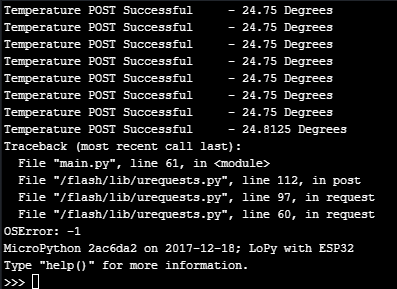
    See my answer regarding oserror from tls in the post: https://forum.pycom.io/topic/2164/lopy-http-post-request-oserror/9
  • LoPy HTTP POST request: OSError!

    LoPy http post oserror ssl lopy urequest.py
    11
    0 Votes
    11 Posts
    3k Views
    V
    Same problem happened to me. @ahmedkalnaggar solution solved, memory is not being freed properly.
  • urequests with ussl causes an OSError

    MicroPython urequests oserror post
    6
    1 Votes
    6 Posts
    2k Views
    D
    @this-wiederkehr You've got the point. I've tried this and finally, it works without any error. Thanks a lot.