Welcome to the Pycom forum Forum
    • \[\[global:header.categories\]\]
    • \[\[global:header.recent\]\]
    • \[\[global:header.tags\]\]
    • \[\[global:header.popular\]\]
    • Login
    1. Home
    2. Tags
    3. json

    Explore Pybytes | Official Documentation | Report a Firmware Bug/Issue | GitHub

    Log in to post

    • All categories
    • J

      Send data with JSon

      Watching Ignoring Scheduled Pinned Locked Moved Projects json pycom lopy sipy
      2
      0 Votes
      2 Posts
      1k Views
      J
      @juan_peroza JSON is not a protocol, it’s just a data representation. You can send whatever you want, but JSON is not very space efficient, and is usually not the best choice for data sent over a (very) low bandwidth link such as LoRa, SigFox, NB-IoT, or BLE. It’s usually better to use an optimised binary format in those cases.

    • K

      How to add more than 1 Wifi Network to pybytes_config.json ?

      Watching Ignoring Scheduled Pinned Locked Moved Support & Troubleshooting json pybytes wifi wipy3.0
      2
      0 Votes
      2 Posts
      772 Views
      danD
      Hi @klaus, Currently, you can only configure one WiFi network, and save multiple in the Pybytes console.
    • S

      Invalid json returned by urequests get

      Watching Ignoring Scheduled Pinned Locked Moved Discussion urequests http get json
      7
      0 Votes
      7 Posts
      2k Views
      K
      @paul-thornton I got that sorted by modifying line 53 in urequests as per a suggestion I found online somewhere Paul. I could really use some help withhttps://forum.pycom.io/topic/4014/gpy-in-deep-sleep though.
    • J

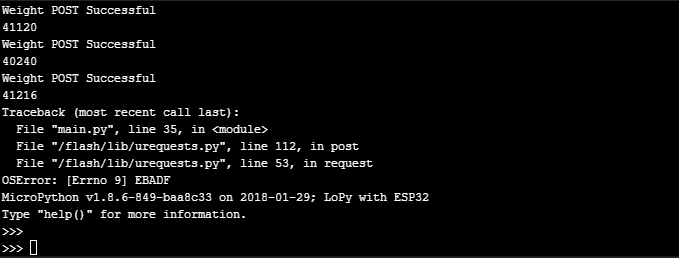
      Sensor JSON Post stops after a few hours

      Watching Ignoring Scheduled Pinned Locked Moved Expansion Board json uart post
      14
      1
      0 Votes
      14 Posts
      2k Views
      T
      @jimpower ok, so why do you get no module found when you call urequests.post now when you didn't before. I can't see all your code, just snippets. The vaious sample bits of code are being changed. Oh I see now what the problem is, when you import urequests you are importing as requests hence the module not found error. You will need to change the sample to requests.post Also as an aside why do you execfile('/flash/Wi-Fi/Wi-Fi.py') rather than importing. This seems odd thing to do.
    • S

      Creating a JSON structure for PySense

      Watching Ignoring Scheduled Pinned Locked Moved Expansion Board json
      10
      0 Votes
      10 Posts
      2k Views
      J
      @smbunn It's probably much easier if you use a single pack with a single format string and all the values you want to pack in there. Otherwise you'll end up with issues of incorrect offsets or lengths at some point when you'll edit formats.
    • J

      Serial to UART POST JSON

      Watching Ignoring Scheduled Pinned Locked Moved Expansion Board uart1 json post
      5
      0 Votes
      5 Posts
      1k Views
      J
      @livius I added tmp = uart1.readall() and it works thanks again I managed to do this before your reply thanks again you are always very helpful
    • J

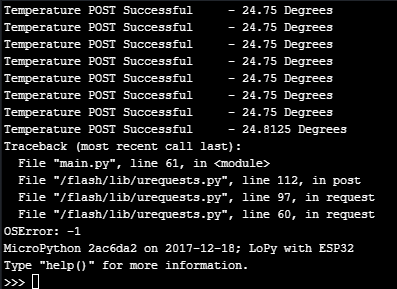
      HTTP Post with urequests OSError: -1

      Watching Ignoring Scheduled Pinned Locked Moved Comments & Feedback http post json urequest.py oserror
      8
      1
      0 Votes
      8 Posts
      2k Views
      J
      @livius Thanks for your help, the gc.collect() has worked and the loop has remained stable for a few hours now.
    • B

      [SOLVED] import json: AttributeError: 'module' object has no attribute 'VERBOSE'

      Watching Ignoring Scheduled Pinned Locked Moved Getting Started json
      1
      0 Votes
      1 Posts
      2k Views
      No one has replied
    • 1 / 1