Welcome to the Pycom forum Forum
    • \[\[global:header.categories\]\]
    • \[\[global:header.recent\]\]
    • \[\[global:header.tags\]\]
    • \[\[global:header.popular\]\]
    • Login

    Explore Pybytes | Official Documentation | Report a Firmware Bug/Issue | GitHub

    Sensor JSON Post stops after a few hours

    Scheduled Pinned Locked Moved Expansion Board
    jsonuartpost
    14 Posts 3 Posters 2.4k Views 3 Watching
    Loading More Posts
    • Oldest to Newest
    • Newest to Oldest
    • Most Votes
    Reply
    • Reply as topic
    Log in to reply
    This topic has been deleted. Only users with topic management privileges can see it.
    • J Offline
      jimpower
      last edited by seb

      Re: Serial to UART POST JSON

      My sensor runs for a few hours and stops with following error.
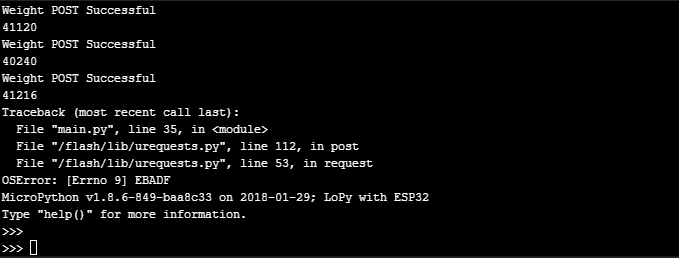
      0_1522053912470_7c3b39d0-4fd8-4c9f-b4b1-4261824a4a98-image.png ![alt text](image url)

      Could anyone please direct me as to where I might be going wrong please find code below

      import network
      import time
      import pycom
      import machine
      import gc
      import urequests
      
      from network import WLAN
      
      execfile('/flash/Wi-Fi/Wi-Fi.py')								
      
      f_device = open('/flash/Config/Device_Details.txt', 'r')     	
                                                                      
      device_setting = f_device.readline()
      device_strings = [i.strip() for i in device_setting.split(',')]
      f_device.close()


      gc.enable()
      pycom.heartbeat(False)
      uart1 = machine.UART(1, baudrate=9600, bits=8, parity=None, stop=1)
      time.sleep(2)
      
      while True:
      
          tmp = uart1.readall()
      
          res = urequests.post('https://mywebsite', json={'Weight': str(tmp)})
          res.close()
          if (res.status_code - 200) < 100: # check that response code is in the 200 range
              print("Weight POST Successful")
          else:
              print('there was some error')
          gc.collect()
          print(gc.mem_free())
          time.sleep(57)
      
      sebS 1 Reply Last reply Reply Quote 0
      • sebS Offline
        seb @jimpower
        last edited by seb

        @jimpower

        You can see here that EBADF means bad file number which would suggest an issue with sockets.

        I tried to match the error above to the code you posted by line 35 is gc.collect(), is the code you posted the same code that causes the issue?

        Edit: And line 112 in urequests is the get function which I dont see anywhere in your code, this is certainly not the same code

        J 2 Replies Last reply Reply Quote 0
        • J Offline
          jimpower @seb
          last edited by

          This post is deleted!
          1 Reply Last reply Reply Quote 0
          • J Offline
            jimpower @seb
            last edited by seb

            RS232 Weigh Sensor [Rinstrum_2100]

            import network
            import time
            import pycom
            import machine
            import gc
            import urequests

            from network import WLAN

            #INITIALISE LAN
            execfile('/flash/Wi-Fi/Wi-Fi.py') # connect to wifi

            #INITIALISE DEVICE DETAILS
            f_device = open('/flash/Config/Device_Details.txt', 'r') # read device details from file
            # file format is: Device Type, Device Location ie Fridge, Workshop A, Damp Pump
            device_setting = f_device.readline()
            device_strings = [i.strip() for i in device_setting.split(',')]
            f_device.close()

            #INITIALISE LIBRARIES

            gc.enable()
            pycom.heartbeat(False)
            uart1 = machine.UART(1, baudrate=9600, bits=8, parity=None, stop=1)
            time.sleep(2)

            #INITIALISE VARIABLES

            while True:

            tmp = uart1.readall()
            
            res = urequests.post('mywebsite', json={'Weight': str(tmp)})
            res.close()
            if (res.status_code - 200) < 100: # check that response code is in the 200 range
                print("Weight POST Successful")
            

            print("Weight POST Successful - " + str(tmp))

            else:
                print('there was some error')
            gc.collect()
            print(gc.mem_free())
            time.sleep(57)
            
            sebS 1 Reply Last reply Reply Quote 0
            • sebS Offline
              seb @jimpower
              last edited by

              @jimpower

              Are you using urequests from here? https://github.com/micropython/micropython-lib/blob/master/urequests/urequests.py

              J 2 Replies Last reply Reply Quote 0
              • J Offline
                jimpower @seb
                last edited by

                @seb

                This seems like a different version to mine there were only 122 lines in mine, so I updated to this version and got the following error.
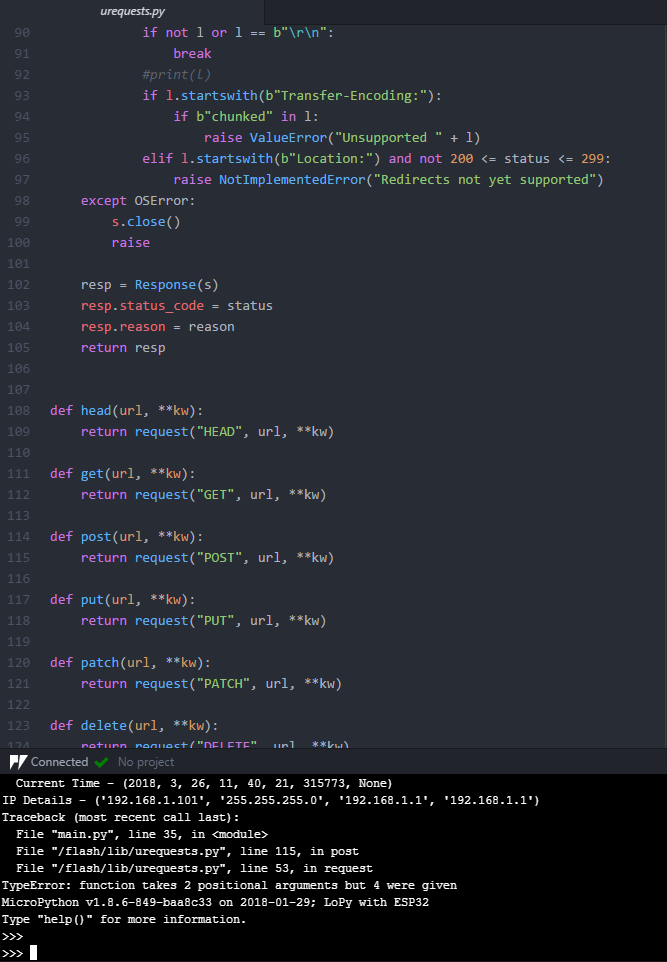
                0_1522064565945_12a3bfb0-cc2e-45f2-80c2-3a1ba84264a6-image.png

                1 Reply Last reply Reply Quote 0
                • J Offline
                  jimpower @seb
                  last edited by

                  @seb

                  I used latest urequests.py and changed line 53 to

                  ai = usocket.getaddrinfo(host, port)

                  I still get the same error
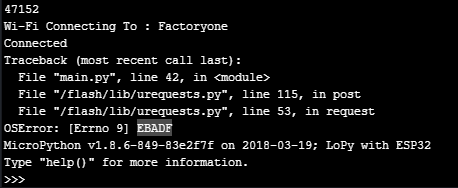
                  0_1522124608381_ececda8b-22e7-449c-bccf-06b7e9c99f24-image.png

                  T 1 Reply Last reply Reply Quote 0
                  • T Offline
                    timh @jimpower
                    last edited by timh

                    @jimpower I would suggest you wrap that call in a try/except block. Catch the exception.
                    At that point (line 53, you are trying to resolve an address). My guess is wifi might have dropped out.

                    It might be worth in the exception handler checking to see if wifi is still connected, and potentially checking you can resolve the name. If all is good retry, or reconnect wifi etc..

                    My feeling is you should expect the link to fail at some point and your code be able to deal with it.

                    J T 2 Replies Last reply Reply Quote 0
                    • J Offline
                      jimpower @timh
                      last edited by

                      @timh

                      I was leaning towards this however I'm not sure how to go about the try/except block. Would you be able to help me understand how to check if wifi is still connected and also if I can resolve name as wifi could be good without active internet access.

                      1 Reply Last reply Reply Quote 0
                      • T Offline
                        timh @timh
                        last edited by

                        @timh This is very rough (and to be honest not well structured) but for instance you could implement a check for connectivity, and if you get an error then try reconnecting.

                        def linkup()
                            
                                if wlan.isconnected():
                        
                                     try:
                                          usocket.getaddrinfo("someaddress.com", someport, 0, usocket.SOCK_STREAM)
                                     except OSError as e:
                                          return False
                                     return True
                              
                                return False
                        

                        Then in your main loop

                        try:
                            res = urequests.post('https://mywebsite', json={'Weight': str(tmp)})
                            res.close()
                        except OSError as e:
                            if linkup():
                                continue
                            else:
                                do_something_to_reconnect()
                                # if this fails then may be machine.reset()
                        
                        J 1 Reply Last reply Reply Quote 0
                        • J Offline
                          jimpower @timh
                          last edited by

                          @timh

                          I have tried to emulate what you have done but get an error could you help me to identify

                          def linkup():

                              if wlan.isconnected():
                          
                                   try:
                                        usocket.getaddrinfo("https://my.website.io", 8082, 0, usocket.SOCK_STREAM)
                                   except OSError as e:
                                        return False
                                   return True
                          
                              return False
                          

                          while True:

                          try:
                              res = urequests.post('https://my.website', json={'Weight': str(tmp)})
                              res.close()
                              print(str(tmp))
                          except OSError as e:
                              if linkup():
                                  continue
                          else:
                              wlan = WLAN(mode=WLAN.STA)
                              wlan.connect(wifi_strings[0],  auth=(WLAN.WPA2, wifi_strings[2]), timeout = 5000)
                              print('Wi-Fi Connecting To :', wifi_strings[0],)
                              while not wlan.isconnected():
                              	machine.idle()
                          
                          gc.collect()
                          print(gc.mem_free())
                          time.sleep(50)
                          

                          getting following error
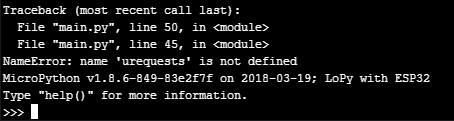
                          0_1522128315209_0beb1779-1d17-4e24-93b5-9e0569ce4cfa-image.png

                          T 1 Reply Last reply Reply Quote 0
                          • T Offline
                            timh @jimpower
                            last edited by

                            @jimpower Umm your earlier sample code shows it being imported.

                            Make sure you still have

                             import urequests
                            

                            somewhere, and it's in your deployed code.

                            J 1 Reply Last reply Reply Quote 0
                            • J Offline
                              jimpower @timh
                              last edited by

                              @timh

                              yes

                              import network
                              import time
                              import pycom
                              import machine
                              import gc
                              import urequests as requests

                              from network import WLAN

                              #INITIALISE LAN
                              execfile('/flash/Wi-Fi/Wi-Fi.py') # connect to wifi

                              #INITIALISE DEVICE DETAILS
                              f_device = open('/flash/Config/Device_Details.txt', 'r') # read device details from file
                              # file format is: Device Type, Device Location ie Fridge, Workshop A, Damp Pump
                              device_setting = f_device.readline()
                              device_strings = [i.strip() for i in device_setting.split(',')]
                              f_device.close()

                              #INITIALISE LIBRARIES

                              gc.enable()
                              pycom.heartbeat(False)
                              uart1 = machine.UART(1, baudrate=9600, bits=8, parity=None, stop=1)
                              time.sleep(2)
                              tmp = uart1.readall()

                              is above the I just didn't include it in previous post

                              T 1 Reply Last reply Reply Quote 0
                              • T Offline
                                timh @jimpower
                                last edited by timh

                                @jimpower ok, so why do you get no module found when you call urequests.post now when you didn't before.
                                I can't see all your code, just snippets. The vaious sample bits of code are being changed.

                                Oh I see now what the problem is, when you import urequests you are importing as requests hence the module not found error.

                                You will need to change the sample to requests.post

                                Also as an aside why do you execfile('/flash/Wi-Fi/Wi-Fi.py') rather than importing. This seems odd thing to do.

                                1 Reply Last reply Reply Quote 0

                                Hello! It looks like you're interested in this conversation, but you don't have an account yet.

                                Getting fed up of having to scroll through the same posts each visit? When you register for an account, you'll always come back to exactly where you were before, and choose to be notified of new replies (either via email, or push notification). You'll also be able to save bookmarks and upvote posts to show your appreciation to other community members.

                                With your input, this post could be even better 💗

                                Register Login
                                • 1 / 1
                                • First post
                                  Last post

                                Pycom on Twitter

                                Pycom