• 0 Votes
    3 Posts
    29 Views
    robert-hhR
    @Julia-Steiwer As you should have noticed, Pycom Inc ceased it's operation, and there is no service any more for Pycom products, be it hardware or software like Pymakr. The latter should still work with the older VSCode versions. So if you want to use PyMakr, you have to stick with an working combo of an older VSCode version and PyMakr.
  • 0 Votes
    14 Posts
    97 Views
    J
    @robert-hh Thank you
  • Guru Meditation error on nanogateway example

    1
    0 Votes
    1 Posts
    11 Views
    No one has replied
  • LTE-M with Magenta Austria does not attach

    lte-m magenta gsm fipy gpy
    5
    1 Votes
    5 Posts
    58 Views
    A
    I think I finally found an answer on how to properly reset the modem in case it just won't attach to a network. Reset the modem by sending following AT-command: lte.send_at_cmd('AT+SQNSFACTORYRESET=?') Unlike lte.factory_reset() - which seems to use AT-command AT+SQNSFACTORYRESET - this command will successfully reset the modem to factory state. A reboot of the device is necessary to finalize the reset! After this process the modem should attach to the network without any issues! Also, for further information see: AT Commands Reference Manual, 15.1 Device Reset to Factory State
  • LoRaWAN Gateway using CatM1

    5
    0 Votes
    5 Posts
    203 Views
    L
    @Dylan hi, were u able to resolve the reset issue? we r facing the same issue... after connection to the LTE network it send the data; get stacked for a while and then reset. we get the following log on runtime: [ 168.495] attached! [ 169.890] ] connected! [ 169.902] Syncing time with time.google.com ... [ 170.318] RTC NTP sync complete [ 170.334] Opening UDP socket to XX.XX.XX.XX port 1700... [ 171.365] Watchdog started [ 171.378] Setting up the LoRa radio at 868.1 Mhz using SF7BW125 [ 171.397] LoRaWAN nano gateway online Pycom MicroPython 1.20.1.r3 [v1.11-58398d3] on 2019-12-12; FiPy with ESP32 Pybytes Version: 1.3.0 Type "help()" for more information. >>> b'\x02\xd4j\x01' [ 171.456] Push ack [ 178.293] Received packet: {"rxpk": [{"data": "QCh1kQEAAAACWlrOb9z6ZwLt0lCqQYGl7PdNqZYjIhhsl023jWO9aEaDIb5UR/0=", "time": "2022-12-16T13:00:43.310577Z", "chan": 0, "tmst": 48778374, "stat": 1, "modu": "LORA", "lsnr": 6.0, "rssi": -26, "rfch": 0, "codr": "4/5", "freq": 868.1, "datr": "SF7BW125", "size": 47}]} b'\x02\x8dF\x04' [ 198.001] Pull ack b'\x025\x1a\x01' [ 198.057] Push ack b'\x027\x83\x03{"txpk":{"imme":false,"rfch":0,"powe":14,"ant":0,"brd":0,"tmst":49778374,"freq":868.1,"modu":"LORA","datr":"SF7BW125","codr":"4/5","ipol":true,"size":36,"data":"YCh1kQGbCgAHA8iFhFAFANKthAGS20VgfuoTknRW6SotrPdh"}}' [ 198.613] Downlink timestamp error!, t_us: 19360015 [ 198.633] Pull rsp [ 211.877] UDP recv Exception: tmst b'\x02\xa3Q\x01' [ 212.035] Push ack b'\x02\x96I\x03{"txpk":{"imme":false,"rfch":0,"powe":14,"ant":0,"brd":0,"tmst":83213604,"freq":868.1,"modu":"LORA","datr":"SF7BW125","codr":"4/5","ipol":true,"size":36,"data":"YCh1kQGbCgAHA8iFhFAFANKthAGS20VgfuoTknRW6SotrPdh"}}' [ 212.924] Pull rsp ets Jun 8 2016 00:22:57 rst:0x7 (TG0WDT_SYS_RESET),boot:0x13 (SPI_FAST_FLASH_BOOT) @robert-hh we already have the changes u proposed in the code we are using for the connection. Could u take a look and let me know if u have any idea about our problem? another thing that is bothering me is why I get the timestamp of Jun 8 2016 00:22:57?

  • Current LTE Firmware update process bricks FiPy's

    1
    0 Votes
    1 Posts
    24 Views
    No one has replied
  • No module named requests

    2
    2
    0 Votes
    2 Posts
    14 Views
    J
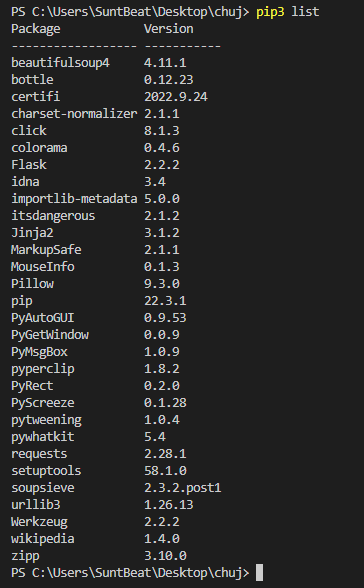
    @Sunt-Beat you need to install modules on the device, not on your computer. You’ll probably need to use the “micro” version of the module, urequests.
  • Is there a way to use an ethernet board with Fipy?

    1
    0 Votes
    1 Posts
    18 Views
    No one has replied
  • Does not attach LTE

    2
    0 Votes
    2 Posts
    33 Views
    T
    So I got this working. The problem was that the SIM was never initiated. I put the SIM inside a Android phone to check if the SIM works (it did work) and after that it worked inside the FiPy. So the problem might be that the Pycom library does not know how to register the SIM on the network for the first time.
  • Problem with start programming.

    1
    3
    0 Votes
    1 Posts
    23 Views
    No one has replied
  • Couldn't connect to Modem (modem_state=disconnected)

    15
    0 Votes
    15 Posts
    394 Views
    T
    @Gijs said in Couldn't connect to Modem (modem_state=disconnected): sqnsupgrade.info(debug=True) I have the same problem. The current delay is 1000 Response (+++ #1): None Response (AT #1) None Response (AT #3) b'\x00' Response (AT #4) None Response (AT #1 @ 115200) None Response (AT #2 @ 115200) b'\x00' The current delay is 2000 Response (+++ #1): None Response (AT #1) None Response (AT #3) b'\x00' Response (AT #4) b'\x00' Response (AT #1 @ 115200) b'\x00' Response (AT #2 @ 115200) b'\x00' The current delay is 3000 Response (+++ #1): None Response (AT #1) b'\x00' Response (AT #2) None Response (+++ #2): None Response (AT #3) b'\x00' Response (AT #4) b'\x00\x00' Response (AT #1 @ 115200) b'\x00' Response (AT #2 @ 115200) b'\x00' The current delay is 4000 Response (+++ #1): b'\x00' Response (AT #1) None Response (AT #3) b'\x00\x00' Response (AT #4) b'\x00' Response (AT #1 @ 115200) b'\x00' Response (AT #2 @ 115200) b'\x00\x00' The current delay is 5000 Response (+++ #1): None Response (AT #1) b'\x00' Response (AT #2) None Response (+++ #2): None Response (AT #3) b'\x00\x00' Response (AT #4) b'\x00\x00\x00' Response (AT #1 @ 115200) b'\x00\x00' Response (AT #2 @ 115200) b'\x00\x00' Modem state: None Cannot determine modem state!
  • OSError: the requested operation is not possible when using send_raw()

    1
    0 Votes
    1 Posts
    15 Views
    No one has replied
  • FiPy Firmware Update Results in no REPL / serial response

    2
    1
    0 Votes
    2 Posts
    23 Views
    robert-hhR
    @Antman You can always load any firmware of your choice using the pycom downloader. That include the most recent PyBytes firmware versions.
  • PyMesh manifest

    6
    0 Votes
    6 Posts
    51 Views
    P
    This issue has been fixed, so mesh deployment should be working
  • PyMesh Config.json

    4
    0 Votes
    4 Posts
    51 Views
    P
    This issue has been fixed, so mesh deployment should be working
  • Sync Time offline - RTC

    7
    0 Votes
    7 Posts
    39 Views
    J
    @Miguel-Moreno Thanks a lot! Indeed currently I am syncing the RTC with the NTP server by connecting the FiPy to the internet. But sometimes I am in places with no coverage (I connected it to my phone's hotspot), and since my application is to scan for WiFi and Bluetooth outside, the internet is not always available. That's why I need to get the current time offline and not to be hard coded.
  • Cannot connect terminal to FiPy

    7
    1
    0 Votes
    7 Posts
    27 Views
    R
    Update. Going for broke, I used the fwtool to erase the flash and reset the CONFIG and NVS areas. working, connected to REPL etc. I don't see a pyscan DFU listed and wasn't able to grope for it. Seems to be working now after a spring clean. R
  • FiPy wlan promiscuous, channel, packet format

    3
    0 Votes
    3 Posts
    49 Views
    M
    @Pete-Allen-0 Hi Pete, thank you. In scanning mode (sta/promiscious), the FyPi is not attached to an access point, so it should switch to each wifi channel for a certain time and sniff the packages. The question is, how can I switch the channels in sta-mode? If channel switching is not possible, the sniff function will mis a lot of packages because it is bound to one channel. Best regards, Martin
  • FiPy - Device busy on Pysense, unable to interact with device

    3
    0 Votes
    3 Posts
    24 Views
    J
    I have this problem too. Latest firmware applied to PySense 1.1 and LoPy4, doesn't work on Mac (attaches to VSCode as tty. not cu. and busy as tty) and on Linux I see it as ACM0 and it's always busy. I've tried multiple instances of PySense 1.1 and LoPy4 - I have ten units that have been sitting in storage for a few years. None working now that the old tools are all gone.
  • Bootloader on FiPy

    9
    0 Votes
    9 Posts
    65 Views
    K
    @jcaron Are there any list of compatible jtag that can be used with FiPy. I am trying to connect with IAR J-Link jtag but I am not able to find the Xtensa® dual–core 32–bit LX6 microprocessor.

Pycom on Twitter