What is needed to link up with WiPy 2?
-
I would like to start by saying I’m a complete newbie and I just can’t seem to find the information I need while looking around. I think this is partly because I don’t know exactly what to search for.
So I stumbled across Pycom at CES this year ( got a lanyard and started doing some googling ) and found the WiPy 2.0 with BLE.
I have a project the required 2 separate units. One unit will read information from a potentiometer ( this would be the wipy2 ). The other separate unit, which cannot be connect by wires, will report the data on a lcd receiving the data via BLE. What is needed to receive the data from wipy2.
Any help would be greatly appreciated!
-
Hi,
Thanks for getting in touch. From my understanding this is what you are trying to achieve (please correct me if I am wrong). You already have an existing device that has a LCD to display data it receives via BLE and you wish to use a WiPy to collect data from a pedometer and send it over BLE to this LCD?
If thats the case you will need to know how the device expects the data to be structured and you can use our BLE libraries to send this data to the device (https://docs.pycom.io/chapter/firmwareapi/pycom/network/bluetooth/). What interface does the pedometer have to allow you to collect data?
-
@d2xhale
look at link provided by @seb and alsoif you need only send position of your potentiometer
then simple circut required andADC
look at sample
https://docs.pycom.io/chapter/tutorials/all/adc.htmlAnd what is this second device - also wipy2 with LCD or different device?
-
woops I misread "potentiometer" as "pedometer"
-
@seb I currently do not have the LCD device picked out. I was unsure if there would be any compatibility issues. Basically I'm staring with the WiPy and plan to add the components that will compliment the WiPy in functionality. Thank you for the link, it will be a great starting point for the programing.
@livius The second device would ideally be something different than the WiPy2. The LCD I plan to use is just a 2 digit screen, so I'm looking for a unit that is a little smaller.
-
@d2xhale said in What is needed to link up with WiPy 2?:
The LCD I plan to use is just a 2 digit screen, so I'm looking for a unit that is a little smaller
I do not know details about your project but starting point and final point many times provide different result :)
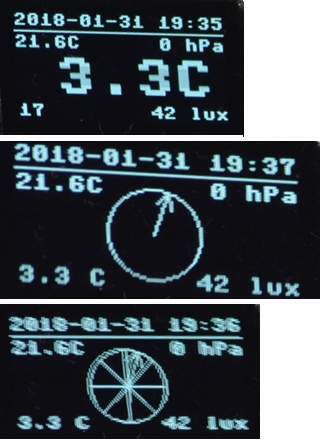
e.g. you start with two digit but maybe better is OLED ;-)
You can draw there what you need and show more details on it.

Hello! It looks like you're interested in this conversation, but you don't have an account yet.
Getting fed up of having to scroll through the same posts each visit? When you register for an account, you'll always come back to exactly where you were before, and choose to be notified of new replies (either via email, or push notification). You'll also be able to save bookmarks and upvote posts to show your appreciation to other community members.
With your input, this post could be even better 💗
Register Login