Fipy Firmware
-
Hi,
Problem
I have just received my 2 x FiPy and Expansion Board yesterday.
When I perform firmware update according to the pycom doc, only one of them update firmware successfully. May I know what is the cause? And is there other way to update firmware manually? Thanks.Wiring
- Wired G23 to GND pins on Expansion Board.
- TX & RX connectors on Expansion Board are secured.
- Insert FiPy module in Expansion Board (same Board for both FiPy).
- Connect Expansion Board to Windows PC via USB.
- Run pycom-fwtool.exe to perform firmware update.
Result
1st FiPy (after successful update)
>>> os.uname()
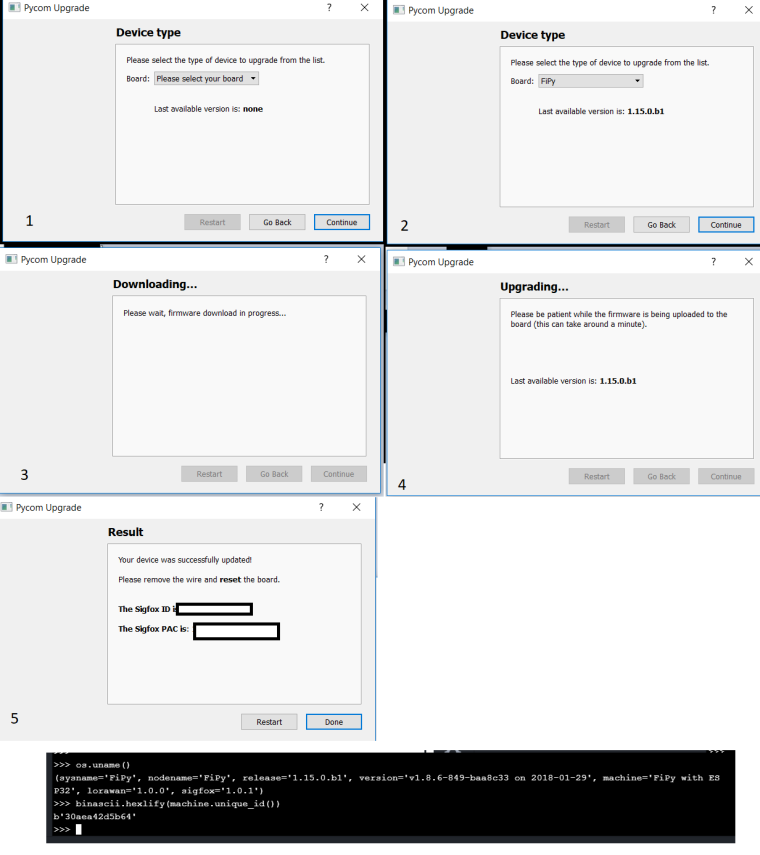
(sysname='FiPy', nodename='FiPy', release='1.15.0.b1', version='v1.8.6-849-baa8c33 on 2018-01-29', machine='FiPy with ESP32', lorawan='1.0.0', sigfox='1.0.1')
2nd FiPy (unsuccessful update)
>>> os.uname() (sysname='FiPy', nodename='FiPy', release='1.10.0.b1', version='v1.8.6-834-g5677703c on 2017-11-13', machine='FiPy withESP32', lorawan='1.0.0') >>> binascii.hexlify(machine.unique_id()) b'30aea42d5b64' -
I have similar problem. FIPY doesn't work.
I tried also building from GIT and enabling logs. Seems that is HW/power issue and the modem is not responding . On GPY same actions have results in modem GSM initialized.rst:0x1 (POWERON_RESET),boot:0x13 (SPI_FAST_FLASH_BOOT) configsip: 0, SPIWP:0xee clk_drv:0x00,q_drv:0x00,d_drv:0x00,cs0_drv:0x00,hd_drv:0x00,wp_drv:0x00 mode:DIO, clock div:1 load:0x3fff9028,len:8 load:0x3fff9030,len:1060 load:0x4009fa00,len:0 ho 12 tail 0 room 4 load:0x4009fa00,len:14084 entry 0x400a05d4 GPIO direction configured uart_set_pin done uart_driver_install done MicroPython baa8c33-dirty on 2018-02-09; FiPy with ESP32 Type "help()" for more information. >>> AT COMMAND: [AT..] AT: TIMEOUT ONLINE, DISCONNECTING... AT COMMAND: [ATH..] AT: TIMEOUT AT COMMAND: [ATH..] AT: TIMEOUT AT COMMAND: [ATH..] AT: TIMEOUT AT COMMAND: [ATH..] AT: TIMEOUT STILL CONNECTED. AT COMMAND: [ATH..] AT: TIMEOUT AT COMMAND: [ATH..] AT: TIMEOUT -
Hi,
When you tried to update the firmware on the second FiPy, what error did you receive? Are you using the latest updater? (https://software.pycom.io/findupgrade?product=pycom-firmware-updater&type=all&platform=win32&redirect=true)
-
@seb I bought and received both FiPy at the same time and try to update both FiPy modules using same Expansion Board with same pycom firmware update software using same Windows PC.
The first FiPy updated successfully.
The second FiPy unsuccessfully in updating.The error is as follows:-
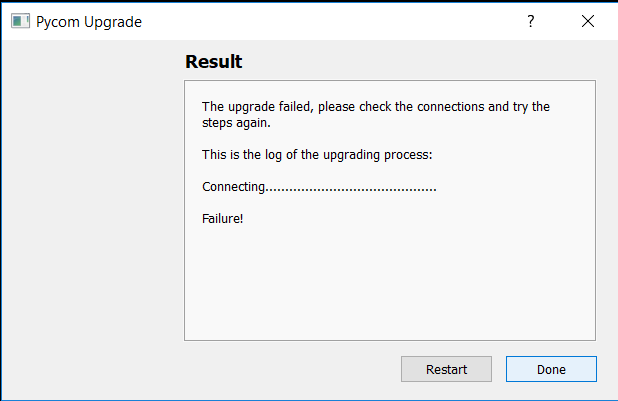
Note: I had try to uninstall and reinstall the pycom firmware update software with the url link provided by you (i.e. pycom_firware_update_1.1.6.b0.exe), but same error message appears.
I have also just realize the following:-
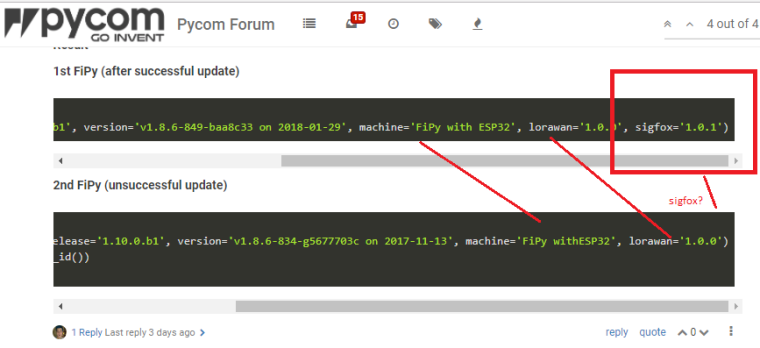
Please advice.
Thanks.
-
Hi,
In regards to the older firmware not mentioning sigfox, this is due to the firmware thats shipped with the device not supporting sigfox. This was added in a firmware update that was released shortly after the device was released.
Could you please connect to the serial port of device thats giving you trouble (either via pymakr or putty), this should show you an interactive prompt you can type code into. If you then connect a wire between
GndandG23of the expansion board and press the reset button on your fipy, it should reboot into download mode. You should see the following on the serial port, can you confirm?rst:0x1 (POWERON_RESET),boot:0x2 (DOWNLOAD_BOOT(UART0/UART1/SDIO_REI_FEO_V2)) waiting for download -
@seb !
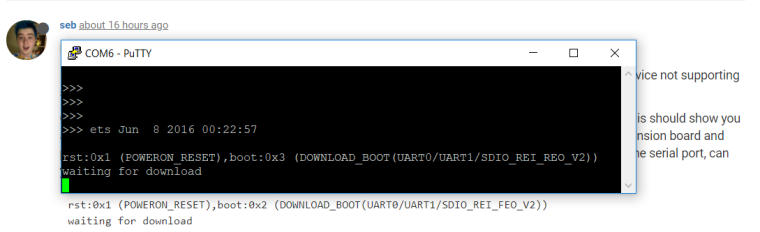
Please note that there is difference in console message displayed:
Yours : boot:0x2 (DOWNLOAD_BOOT(UART0/UART1/SDIO_REI_FEOV2))
Mine : boot:0x3 (DOWNLOAD_BOOT(UART0/UART1/SDIO_REI_REO_V2))I manage to reboot into download mode as advice. Whats next please?
Thanks.
-
@philip_teoph said in Fipy Firmware:
Yours : boot:0x2 (DOWNLOAD_BOOT(UART0/UART1/SDIO_REI_FEOV2))
Mine : boot:0x3 (DOWNLOAD_BOOT(UART0/UART1/SDIO_REI_REO_V2))Hi,
The difference in the messages does not matter, most devices I have checked display the message the same way yours does (I'm not sure what the differences actually signify). The fact you see the
waiting for downloadmessage means your FiPy is successfully entering the firmware download mode. Once you see this message can you then close all open connections to the device and try the firmware update tool again. It is important that no other application has the serial port open. -
@seb It solved! Thank a lot.
Steps : close PuTTY (put to download mode) and start firmware update tool.

Hello! It looks like you're interested in this conversation, but you don't have an account yet.
Getting fed up of having to scroll through the same posts each visit? When you register for an account, you'll always come back to exactly where you were before, and choose to be notified of new replies (either via email, or push notification). You'll also be able to save bookmarks and upvote posts to show your appreciation to other community members.
With your input, this post could be even better 💗
Register Login