WiPy FW update OTA
-
Hi, I am trying to do FW update to WiPy module.
I am getting Exception: Failed to downloadhttp://192.168.0.87:8000/1.0.1/flash\config.py
But, if I type the same url in browser, config.py gets downloaded.
As there is no LoRa on WiPy, I altered the code in terms of trigger for update.
If "123" is entered through serial comm, it triggers the fw update.from network import WLAN import socket import time from OTA import WiFiOTA from time import sleep import pycom import binascii WIFI_SSID = "#####" WIFI_PW = "#######" SERVER_IP = "192.168.0.87" from config import WIFI_SSID, WIFI_PW, SERVER_IP # Turn on GREEN LED pycom.heartbeat(False) pycom.rgbled(0xff00) # Setup OTA ota = WiFiOTA(WIFI_SSID, WIFI_PW, SERVER_IP, # Update server address 8000) # Update server port # Turn off WiFi to save power w = WLAN() w.deinit() # Initialize LoRa in LORAWAN mode. #lora = LoRa(mode=LoRa.LORAWAN) #app_eui = binascii.unhexlify('ENTER_ME') #app_key = binascii.unhexlify('ENTER_ME') # join a network using OTAA (Over the Air Activation) #lora.join(activation=LoRa.OTAA, auth=(app_eui, app_key), timeout=0) # wait until the module has joined the network #while not lora.has_joined(): # time.sleep(2.5) # print('Not yet joined...') # create a LoRa socket #s = socket.socket(socket.AF_LORA, socket.SOCK_RAW) # create tcp socket for non-lora #s=socket.socket(socket.AF_INET, socket.SOCK_STREAM) # set the LoRaWAN data rate #s.setsockopt(socket.SOL_LORA, socket.SO_DR, 5) #tcp socket #s.connect((SERVER_IP, 3000)) #s.send(MESSAGE) # make the socket blocking # (waits for the data to be sent and for the 2 receive windows to expire) #s.setblocking(True) print("created socket..now listening") print("ip addr is", w.ifconfig()) while True: # send some data #s.send(bytes([0x04, 0x05, 0x06])) print(bytes([0x04, 0x05, 0x06])) # make the socket non-blocking # (because if there's no data received it will block forever...) #s.setblocking(False) # get any data received (if any...) #data = s.recv(64) data=input("enter 123 for firmware update") print("data", data) # Some sort of OTA trigger #if data == bytes([0x01, 0x02, 0x03]): if data=="123": print("Performing OTA") # Perform OTA ota.connect() print("OTA connect") ota.update() sleep(5) -
Please edit your post and add ˋ`ˋ on separate lines before and after your code so it gets properly formatted.
-
It could be due to the backslash rather than a forward slash. What OS are you running the server on? When the WiPy tries to download this file do you see a message from the server that it has tried?
-
@seb Yes, I see message that it requested. I am running server on my windows system.
I thought the same that issue is with backward slash. But, if I copy-paste the same url i.e. with backward slash, the file gets downloaded.
So, I thought something might be wrong on client running on pycom board.
It is getting manifest.json successfully.
The issue is with "Get file".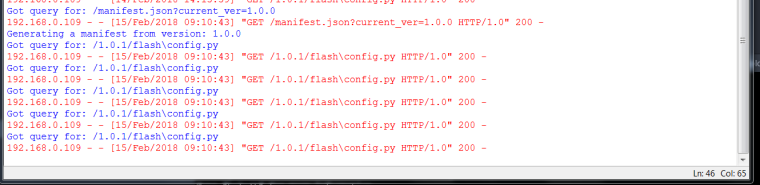
Thank you,
Sanika -
Hi,
It's likely that your web browser is automatically correcting this but the wipy is not, the manifest downloads ok because it has no backslashes in the URL. Could you add the following line to OTA_server.py and let me know if it fixes the issue:
def generate_manifest_entry(host, path, version):
    path = "/".join(path.split(os.path.sep))  # Add this line
    entry = {}

Hello! It looks like you're interested in this conversation, but you don't have an account yet.
Getting fed up of having to scroll through the same posts each visit? When you register for an account, you'll always come back to exactly where you were before, and choose to be notified of new replies (either via email, or push notification). You'll also be able to save bookmarks and upvote posts to show your appreciation to other community members.
With your input, this post could be even better 💗
Register Login