Welcome to the Pycom forum Forum
    • \[\[global:header.categories\]\]
    • \[\[global:header.recent\]\]
    • \[\[global:header.tags\]\]
    • \[\[global:header.popular\]\]
    • Login

    Explore Pybytes | Official Documentation | Report a Firmware Bug/Issue | GitHub

    LoPy 1 does not boot

    Scheduled Pinned Locked Moved LoPy
    deadresetdebug
    19 Posts 5 Posters 3.3k Views 5 Watching
    Loading More Posts
    • Oldest to Newest
    • Newest to Oldest
    • Most Votes
    Reply
    • Reply as topic
    Log in to reply
    This topic has been deleted. Only users with topic management privileges can see it.
    • peterkzP Offline
      peterkz
      last edited by

      I recently got a LoPy with the expansion board and started testing it today. I updated the firmware and wrote some code that worked nicely. But now, after a couple of hours, the LoPy does not start.

      When I connect it to USB the green USB light lits up but there is no blinking blue light. Trying to set it to firmware update mode with GND-G23 jumper also didn't help (not detected by firmware updater).

      Is there any other way to do a hard reset? What could have gone wrong? Is my device defective?

      robert-hhR 1 Reply Last reply Reply Quote 0
      • robert-hhR Offline
        robert-hh @peterkz
        last edited by

        @peterkz Try to connect the device to a terminal and push the reset button (next to the RGB led). What do you get as output?

        peterkzP 1 Reply Last reply Reply Quote 0
        • peterkzP Offline
          peterkz @robert-hh
          last edited by

          @robert-hh Do you mean a terminal like the one the Atom editor plugin provides? I get no output. The terminal just says "Connecting on /dev/cu.usbserial-DO003A44..." but it does not seem to go through. Reset button does nothing.

          robert-hhR 1 Reply Last reply Reply Quote 0
          • robert-hhR Offline
            robert-hh @peterkz
            last edited by

            @peterkz Yes, as terminal something like that atom thing. If the green LED stays, it means that the device starts the bootloader, but not the python app. Normally I would suggest to try a firmware update, but it seems like the communication via USB is broken. So try another USB cable. That typically would not prevent the firmware to start, but ats least it's worth a try. Also, look at the jumpers on the expansion board.

            1 Reply Last reply Reply Quote 0
            • peterkzP Offline
              peterkz
              last edited by peterkz

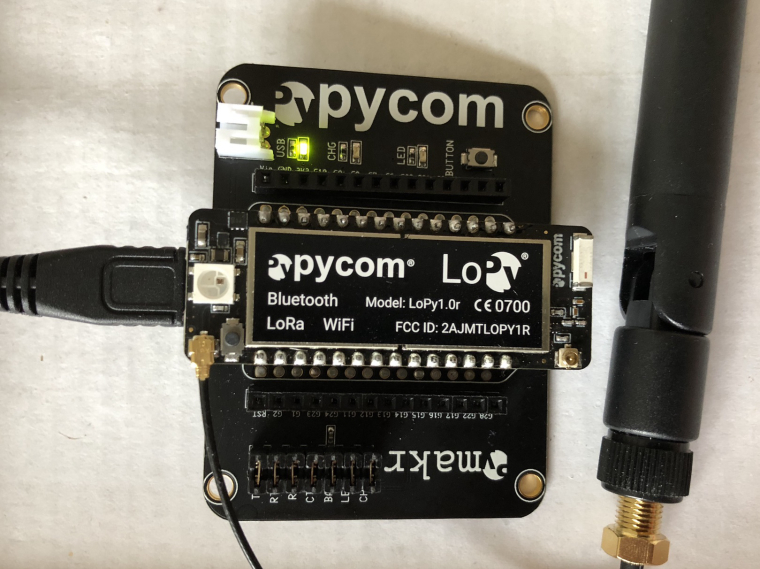
              To clarify it is the LED marked "USB" on the expansion board that stays green. No LED light on the actual LoPy is lit. All jumpers on the expansion board are in place.0_1520149651861_lopy.jpg

              1 Reply Last reply Reply Quote 0
              • peterkzP Offline
                peterkz
                last edited by

                Same result when I power it up through a different USB cable. Maybe the expansion board is broken?

                L robert-hhR 2 Replies Last reply Reply Quote 0
                • L Offline
                  livius @peterkz
                  last edited by

                  @peterkz
                  what if you connect only expansion board without lopy?

                  think about people first, then computers

                  1 Reply Last reply Reply Quote 0
                  • robert-hhR Offline
                    robert-hh @peterkz
                    last edited by

                    @peterkz If you pull of the LoPy and connect RX and TX at the jumpers, then everything you type at the Terminal (Atom) on you PC should be echoed. That's a simple test for the expansion board. It confirms that the USB/Serial bridge is working. If you have a voltage meter, check the voltage with the LoPy properly inserted at VIn, 3.3V and RST Pins of (for) the Lopy against GND. It should be about 5V at Vin, 3.3V at the 3.3V Pin and about 3.3V at the RST pin. Then you know that the LoPy is properly powered, the Regulator is working and the Deviec is not held in Reset.

                    peterkzP 1 Reply Last reply Reply Quote 1
                    • peterkzP Offline
                      peterkz
                      last edited by

                      Expansion board echos characters typed when bridging tx/rx without LoPy inserted. Will get voltage meter and check levels later. (thank you for replying to my newbie questions).

                      1 Reply Last reply Reply Quote 0
                      • peterkzP Offline
                        peterkz @robert-hh
                        last edited by peterkz

                        @robert-hh Measured voltages seem correct:

                        VIn - GND = 5.2V
                        3V3 - GND = 3.31V
                        RST - GND = 3.29V

                        But this is very weird. After measuring I was about to write that the LoPy seems dead but then I see the blue flashing light come on and now it booted! Did not touch it for several minutes and did not change anything?

                        Sorry to bother you all. Not sure what changed (metal fragment short?, stuck reset button?)

                        robert-hhR 1 Reply Last reply Reply Quote 0
                        • robert-hhR Offline
                          robert-hh @peterkz
                          last edited by

                          @peterkz That looks good. Again, if you connect your device to the terminal (atom), connect G23 to GND, and push reset. Then you shouls see a message like:

                          ets Jun  8 2016 00:22:57
                          
                          rst:0x1 (POWERON_RESET),boot:0x3 (DOWNLOAD_BOOT(UART0/UART1/SDIO_REI_REO_V2))
                          waiting for download
                          
                          peterkzP J 2 Replies Last reply Reply Quote 0
                          • peterkzP Offline
                            peterkz @robert-hh
                            last edited by peterkz

                            @robert-hh Weird but I'm back at it not booting properly again after a couple of days. Did not use it since last time.

                            Measuring voltages I now get:

                            VIn - GND = 5.2V
                            3V3 - GND = 1.29V
                            RST - GND = 1.3V

                            2V missing. Do I have a broken voltage regulator somewhere?

                            sebS 1 Reply Last reply Reply Quote 0
                            • sebS Offline
                              seb @peterkz
                              last edited by

                              @peterkz

                              Have you perhaps changed USB cables or USB ports, its possible that one of these is faulty and not delivering enough current to the module.

                              peterkzP 1 Reply Last reply Reply Quote 0
                              • peterkzP Offline
                                peterkz @seb
                                last edited by

                                @seb Tried different cables but still the same voltages. I am thinking I should send this back to where I bought it.

                                1 Reply Last reply Reply Quote 0
                                • J Offline
                                  jclo13 @robert-hh
                                  last edited by jclo13

                                  @robert-hh, what does the lopy expect to download?, I have a similar problem, well I made a mistake, I was trying to mount the sd and it appears an os.error, so y put the code in the boot.py file and I restarted the lopy, now I cant access, I think there is a booting problem, I tried connecting G23 to GND and pushing reset and appears the message, Is there a way to reset it to the factory default manually?

                                  </
                                  rst:0x1 (POWERON_RESET),boot:0x13 (SPI_FAST_FLASH_BOOT)
                                  ets Jun 8 2016 00:22:57

                                  rst:0x10 (RTCWDT_RTC_RESET),boot:0x13 (SPI_FAST_FLASH_BOOT)
                                  configsip: 0, SPIWP:0xee
                                  clk_drv:0x00,q_drv:0x00,d_drv:0x00,cs0_drv:0x00,hd_drv:0x00,wp_drv:0x00
                                  mode:DIO, clock div:1
                                  load:0x3fff9028,len:8
                                  load:0x3fff9030,len:1060
                                  load:0x4009fa00,len:0
                                  ho 12 tail 0 room 4
                                  load:0x4009fa00,len:14084
                                  entry 0x400a05d4
                                  Traceback (most recent call last):
                                  File "boot.py", line 8, in <module>
                                  OSError: the requested operation failed
                                  Traceback (most recent call last):
                                  File "main.py", line 8
                                  SyntaxError: invalid syntax
                                  MicroPython v1.8.6-849-86da809 on 2018-01-17; LoPy with ESP32
                                  Type "help()" for more information.

                                  thank you in advance.

                                  robert-hhR 1 Reply Last reply Reply Quote 0
                                  • robert-hhR Offline
                                    robert-hh @jclo13
                                    last edited by

                                    @jclo13 If you connect P12 to 3.3v and push reset, boot.py and main.py are not executed on boot. Then you could try to modify boot.py & main.py, or just rename them. The last resort is to erase flash or just the file system, and the updater.py tool allows to do that.

                                    J 1 Reply Last reply Reply Quote 0
                                    • J Offline
                                      jclo13 @robert-hh
                                      last edited by

                                      @robert-hh thank you very much, it worked!!!, I use the telnet connections, in the other hand I am having problems whit the com port, It doesn't connect, when I pushed the reset button it boots but I can´t write anything.

                                      robert-hhR 1 Reply Last reply Reply Quote 0
                                      • robert-hhR Offline
                                        robert-hh @jclo13
                                        last edited by

                                        @jclo13 Do you see not message from the com port? Then the cable may be bad. If you see only the output from the unit, but cannot type, then check the jumpers on the expansion board (if you use one).

                                        J 1 Reply Last reply Reply Quote 0
                                        • J Offline
                                          jclo13 @robert-hh
                                          last edited by

                                          @robert-hh thank you, I reinstalled ATOM and checked the jumpers on the expansion board and the problem solved. thank you


                                          1 Reply Last reply Reply Quote 0

                                          Hello! It looks like you're interested in this conversation, but you don't have an account yet.

                                          Getting fed up of having to scroll through the same posts each visit? When you register for an account, you'll always come back to exactly where you were before, and choose to be notified of new replies (either via email, or push notification). You'll also be able to save bookmarks and upvote posts to show your appreciation to other community members.

                                          With your input, this post could be even better 💗

                                          Register Login
                                          • 1 / 1
                                          • First post
                                            Last post

                                          Pycom on Twitter

                                          Pycom