Welcome to the Pycom forum Forum
    • \[\[global:header.categories\]\]
    • \[\[global:header.recent\]\]
    • \[\[global:header.tags\]\]
    • \[\[global:header.popular\]\]
    • Login

    Explore Pybytes | Official Documentation | Report a Firmware Bug/Issue | GitHub

    Lopy4 FileZilla Could not connect to server

    Scheduled Pinned Locked Moved LoPy
    lopy filezilla
    7 Posts 4 Posters 1.4k Views 4 Watching
    Loading More Posts
    • Oldest to Newest
    • Newest to Oldest
    • Most Votes
    Reply
    • Reply as topic
    Log in to reply
    This topic has been deleted. Only users with topic management privileges can see it.
    • R Offline
      robmarkcole
      last edited by

      Hi all
      have followed the docs, and my Lopy4 is not reachable via FileZilla (Wipy gave no problems). I get the following, what's the advice?
      Cheers
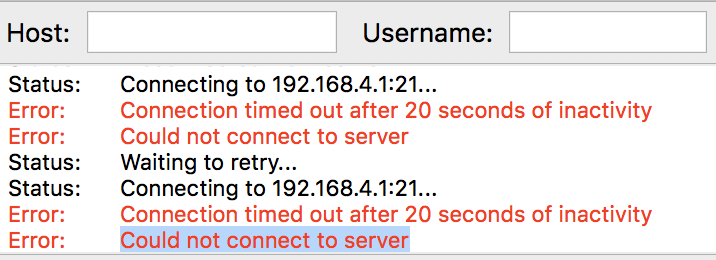
      0_1520457463795_17977552-c119-4630-8aeb-d240dd0190d8-image.png

      1 Reply Last reply Reply Quote 0
      • R Offline
        robmarkcole
        last edited by

        OK it works when I connect to the Lopy wifi, of course I then loose my internet connection which is a massive pain

        L B C 4 Replies Last reply Reply Quote 0
        • L Offline
          livius @robmarkcole
          last edited by

          @robmarkcole said in Lopy4 FileZilla Could not connect to server:

          then loose my internet connection which is a massive pain

          It depend how your setup looks like
          I never do setup to loos main internet connection..

          think about people first, then computers

          1 Reply Last reply Reply Quote 0
          • B Offline
            Burgeh @robmarkcole
            last edited by

            This post is deleted!
            1 Reply Last reply Reply Quote 0
            • L Offline
              livius @robmarkcole
              last edited by

              @robmarkcole
              Change connection to STA or STA_AP and connct Lopy to your wifi and then your computer throught wifi connected to the router can connect to your Lopy4 throught router.

              think about people first, then computers

              1 Reply Last reply Reply Quote 0
              • C Offline
                crumble @robmarkcole
                last edited by

                @robmarkcole

                Check if you have set the single connection check box in FileZilla. I ran into something similar before the multi core update. Maybe its still exists. If you do not run a script, the LoPy accepts more than one connection. When running a script, it can handle only one connection.

                If this does not help, check your firewall settings. FTP will use a lot of ports, if you do not limit the amount of connections.

                1 Reply Last reply Reply Quote 0
                • R Offline
                  robmarkcole
                  last edited by

                  OK I realise I hadn't configured my Lopy to connect to my Wifi - all good now, thanks for your help!

                  1 Reply Last reply Reply Quote 0

                  Hello! It looks like you're interested in this conversation, but you don't have an account yet.

                  Getting fed up of having to scroll through the same posts each visit? When you register for an account, you'll always come back to exactly where you were before, and choose to be notified of new replies (either via email, or push notification). You'll also be able to save bookmarks and upvote posts to show your appreciation to other community members.

                  With your input, this post could be even better 💗

                  Register Login
                  • 1 / 1
                  • First post
                    Last post

                  Pycom on Twitter

                  Pycom