US915 OTAA - Cannot communicate with packet forwarder
-
Hi all,
i'd like to ask for some help to connect a lopy device to a packet forwarder running on a raspberry pi.
The frustrating part on this communication problem is that it's at the very beginning, the endpoint RF packets aren't arriving correctly into the gateway. I want to clarify that the endpoint and the gateway are separated by 10 cms, and both have antennas... impossible not to work because of that.I remember that a few months ago, the last time i worked on this project, each time the endpoint tried to communicate with the gateway it received the packets almost immediately. Now i check the packet forwarder console and i get a device message each 10 minutes.
Please help!
To give you some context:
os.uname()
(sysname='LoPy', nodename='LoPy', release='1.17.0.b1', version='v1.8.6-849-d0dc708 on 2018-02-27', machine='LoPy with ESP32', lorawan='1.0.2')LOPY CODE
from network import LoRa
import socket
import time
import binascii

# Initialize LoRa in LORAWAN mode.
lora = LoRa(mode=LoRa.LORAWAN, region=LoRa.US915, frequency=903400000, bandwidth=LoRa.BW_500KHZ, power_mode=LoRa.ALWAYS_ON, public=True, sf=10)

#remove all channels
for channel in range(3, 72):
    lora.remove_channel(channel)

lora.add_channel(4, frequency=903400000-300000, dr_min=0, dr_max=4)
lora.add_channel(5, frequency=903400000-100000, dr_min=0, dr_max=4)
lora.add_channel(6, frequency=903400000+100000, dr_min=0, dr_max=4)
lora.add_channel(7, frequency=903400000+300000, dr_min=0, dr_max=4)

# create an OTAA authentication parameters
app_eui = binascii.unhexlify('AD A4 DA E3 AC 12 67 6B'.replace(' ',''))
app_key = binascii.unhexlify('11 B0 28 2A 18 9B 75 B0 B4 D2 D8 C7 FA 38 54 8B'.replace(' ',''))

# # join a network using OTAA (Over the Air Activation)
lora.join(activation=LoRa.OTAA, auth=(app_eui, app_key), timeout=0, dr=0)

# wait until the module has joined the network
while not lora.has_joined():
    time.sleep(2.5)
    print('Not yet joined...')

print('Joined!')
packet forwarder 'global_conf.json'
{ "SX1301_conf": { "lorawan_public": true, "antenna_gain": 0, "clksrc": 1, "radio_0": { "enable": true, "freq": 902600000, "rssi_offset": -165, "tx_enable": true, "tx_freq_max": 928000000, "tx_freq_min": 902000000, "type": "SX1257" }, "radio_1": { "enable": true, "freq": 903400000, "rssi_offset": -165, "tx_enable": false, "type": "SX1257" }, "chan_FSK": { "enable": false, "radio": 0 }, "chan_Lora_std": { /* Lora MAC channel, 250kHz, SF7, 868.3 MHz */ "enable": true, "radio": 1, "if": -200000, "bandwidth": 250000, "spread_factor": 7 }, "chan_multiSF_0": { "enable": true, "if": -300000, "radio": 0 }, "chan_multiSF_1": { "enable": true, "if": -100000, "radio": 0 }, "chan_multiSF_2": { "enable": true, "if": 100000, "radio": 0 }, "chan_multiSF_3": { "enable": true, "if": 300000, "radio": 0 }, "chan_multiSF_4": { "enable": true, "if": -300000, "radio": 1 }, "chan_multiSF_5": { "enable": true, "if": -100000, "radio": 1 }, "chan_multiSF_6": { "enable": true, "if": 100000, "radio": 1 }, "chan_multiSF_7": { "enable": true, "if": 300000, "radio": 1 }, "lbt_cfg": { "enable": false, "nb_channel": 1, "rssi_target": 160, "scan_time_us": 5000, "start_freq": 869525000, "tx_delay_1ch_us": 4000000, "tx_delay_2ch_us": 4000000 }, "tx_lut_0": { "pa_gain": 0, "mix_gain": 8, "rf_power": -6, "dig_gain": 3 }, "tx_lut_1": { "pa_gain": 0, "mix_gain": 10, "rf_power": -3, "dig_gain": 3 }, "tx_lut_2": { "pa_gain": 0, "mix_gain": 12, "rf_power": 0, "dig_gain": 3 }, "tx_lut_3": { "pa_gain": 1, "mix_gain": 8, "rf_power": 3, "dig_gain": 3 }, "tx_lut_4": { "pa_gain": 1, "mix_gain": 10, "rf_power": 6, "dig_gain": 3 }, "tx_lut_5": { "pa_gain": 1, "mix_gain": 12, "rf_power": 10, "dig_gain": 3 }, "tx_lut_6": { "pa_gain": 1, "mix_gain": 12, "rf_power": 11, "dig_gain": 3 }, "tx_lut_7": { "pa_gain": 2, "mix_gain": 9, "rf_power": 12, "dig_gain": 3 }, "tx_lut_8": { "pa_gain": 1, "mix_gain": 15, "rf_power": 13, "dig_gain": 3 }, "tx_lut_9": { "pa_gain": 2, "mix_gain": 10, "rf_power": 14, "dig_gain": 3 }, "tx_lut_10": { "pa_gain": 2, "mix_gain": 11, "rf_power": 16, "dig_gain": 3 }, "tx_lut_11": { "pa_gain": 3, "mix_gain": 10, "rf_power": 20, "dig_gain": 3 }, "tx_lut_12": { "pa_gain": 3, "mix_gain": 11, "rf_power": 23, "dig_gain": 3 }, "tx_lut_13": { "pa_gain": 3, "mix_gain": 12, "rf_power": 24, "dig_gain": 3 }, "tx_lut_14": { "pa_gain": 3, "mix_gain": 13, "rf_power": 25, "dig_gain": 3 }, "tx_lut_15": { "pa_gain": 3, "mix_gain": 15, "rf_power": 26, "dig_gain": 3 } }, "gateway_conf": { "forward_crc_disabled": false, "forward_crc_error": false, "forward_crc_valid": true, "gateway_ID": "0102030405060708", "keepalive_interval": 12, "push_timeout_ms": 120, "serv_port_down": 1700, "serv_port_up": 1700, "server_address": "192.168.0.110", "stat_interval": 20, "synch_word": 52 } } -
My first advice would be to try separating the nodes more than 10cm. It is possible for the receiver to be swamped by the incoming signal and not be able to understand it. If increasing the separation doesn't help we can look into it further.
-
Hey @seb, thx for your rapid response.
I followed your advice of separate the gateway and the endpoint, they are like 3 meters away from each other but still no luck. I'll try to continue configuring the lopy with different values and see what happens.I'll keep this thread up to date if i find a solution.
Thx!
Pablo Caviglia
-
Hi @pablocaviglia,
I think I can see some problems with that channel (frequency) configuration, but let me ask first what is the LoRaWAN network server you're using and more importantly what is the channel map it is expecting?
-
@jmarcelino said in US915 OTAA - Cannot communicate with packet forwarder:
LoRaWAN network server
Hi @jmarcelino. Thanks for your help.
I'm using the brocaar's one network server https://www.loraserver.io/I have copied below the docker-compose config file content:
version: "2"
services:
  app:
    build: .
    expose:
     - "8090"
    ports:
     - "8090:8090"
    volumes:
     - .:/app
    depends_on:
      - gatewaybridge
      - loraserver
      - appserver
      - postgres
      - mosquitto
      - redis

  postgres:
    image: library/postgres:10.2
    volumes:
      - ./db/pgdata:/pgdata
    ports:
      - "54322:5432"
    environment:
      - POSTGRES_PASSWORD=loraserver
      - POSTGRES_USER=loraserver
      - POSTGRES_DB=loraserver
      - PGDATA=/pgdata
    command:
      -p 5432

  elasticsearch:
    image: elasticsearch:2.4
    container_name: elasticsearch
    environment:
      - cluster.name=docker-cluster
      - bootstrap.memory_lock=true
      - "ES_JAVA_OPTS=-Xms512m -Xmx512m"
    ulimits:
      memlock:
        soft: -1
        hard: -1
    mem_limit: 1g
    volumes:
      - esdata1:/usr/share/elasticsearch/data
    ports:
      - 9200:9200
#
# STARTS BROCAAR SERVERS
#
  loraserver:
    image: loraserver/loraserver
    environment:
      - DB_AUTOMIGRATE=true
      - LOG_NODE_FRAMES=true
      - NET_ID=010203
      - BAND=US_902_928
      - REDIS_URL=redis://redis:6379
      - GW_MQTT_SERVER=tcp://mosquitto:1883
      - GW_SERVER_JWT_SECRET=verysecret
      - POSTGRES_DSN=postgres://loraserver_ns:loraserver_ns@postgresql_ns/loraserver_ns?sslmode=disable
      - JS_SERVER=http://appserver:8003

  appserver:
    image: loraserver/lora-app-server
    ports:
      - 8080:8080
    environment:
      - DB_AUTOMIGRATE=true
      - REDIS_URL=redis://redis:6379
      - POSTGRES_DSN=postgres://loraserver_as:loraserver_as@postgresql_as/loraserver_as?sslmode=disable
      - MQTT_SERVER=tcp://mosquitto:1883
      - JWT_SECRET=verysecret
      - HTTP_TLS_CERT=/etc/lora-app-server/certs/http.pem
      - HTTP_TLS_KEY=/etc/lora-app-server/certs/http-key.pem
      - AS_PUBLIC_SERVER=appserver:8001

  gatewaybridge:
    ports:
      - 1700:1700/udp
    image: loraserver/lora-gateway-bridge
    environment:
      - MQTT_SERVER=tcp://mosquitto:1883

  postgresql_ns:
    image: postgres:9.6-alpine
    ports:
      - 5432
    environment:
      - POSTGRES_PASSWORD=loraserver_ns
      - POSTGRES_USER=loraserver_ns
      - POSTGRES_DB=loraserver_ns

  postgresql_as:
    image: postgres:9.6-alpine
    ports:
      - 5432
    environment:
      - POSTGRES_PASSWORD=loraserver_as
      - POSTGRES_USER=loraserver_as
      - POSTGRES_DB=loraserver_as

  redis:
    ports:
      - 6379
    image: redis:4-alpine

  mosquitto:
    ports:
      - 1883:1883
    image: eclipse-mosquitto

volumes:
  esdata1:
    driver: local
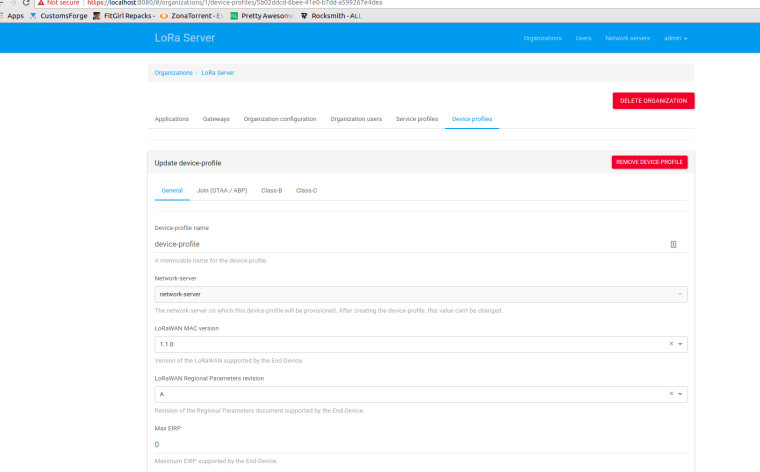
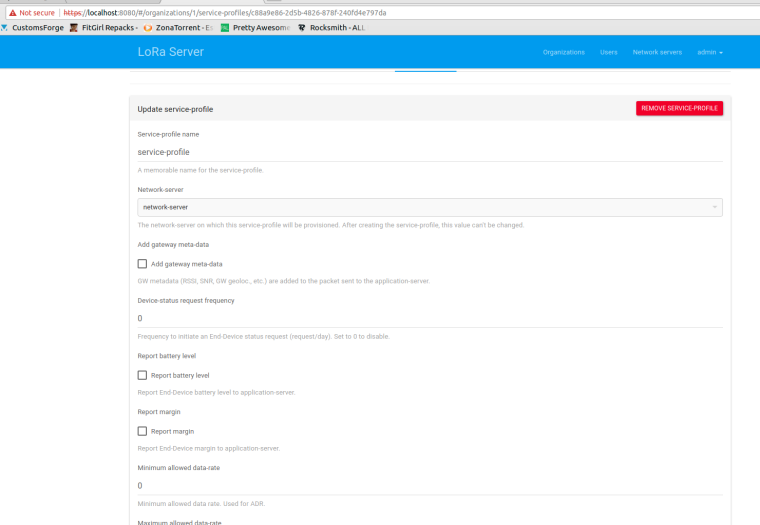
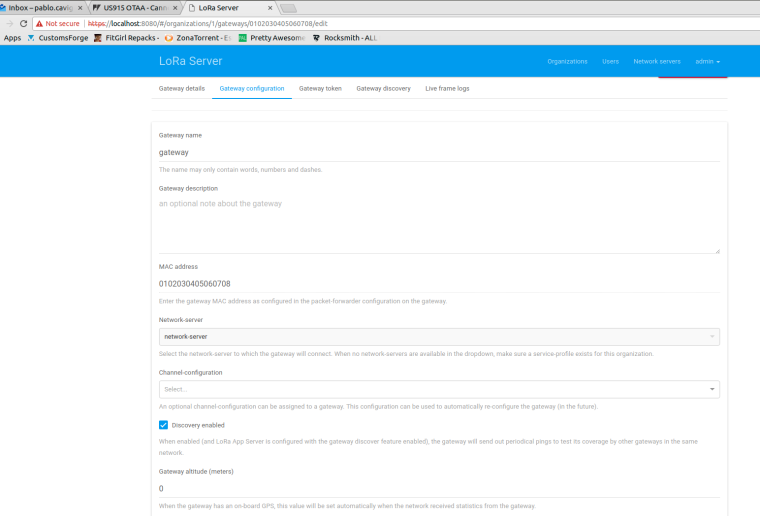
Then, once the docker servers are running I config the lorawan platform through the web admin ui like this:
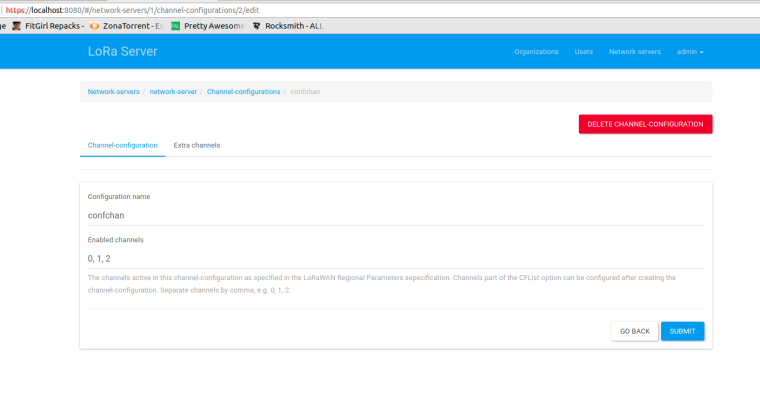
Device profile
Service profile
Gateway configuration
Not sure if that's enough @jmarcelino . Let me know if you need some extra data.
Thanks!

Hello! It looks like you're interested in this conversation, but you don't have an account yet.
Getting fed up of having to scroll through the same posts each visit? When you register for an account, you'll always come back to exactly where you were before, and choose to be notified of new replies (either via email, or push notification). You'll also be able to save bookmarks and upvote posts to show your appreciation to other community members.
With your input, this post could be even better 💗
Register Login