SMS and Ctrl-Z
-
Ok so having fun with the Gpy - burning some hrs with a few beers & reds, I've digressed from my intended path and run into a brick wall. So I'm wondering if someone may enlighten a noob or 2 :)
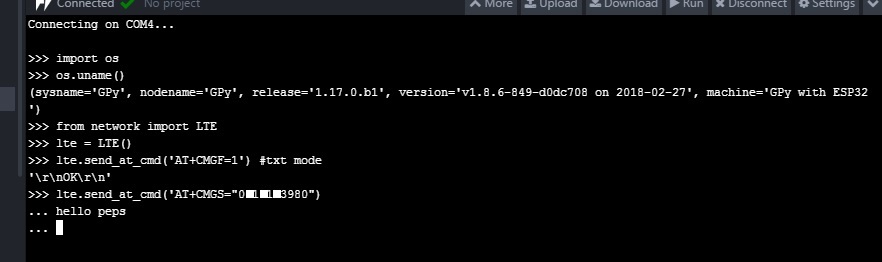
Trying to send SMS I have below (see image)

Flicking through Sequans manuals / ran heaps of AT cmds against modem & sim & googling myself silly, I think I'm just chasing a way to send 'ctrl-z' through to the modem via REPL console.
Any ideas, thoughts or fruitful comments would be appreciated.
regards
M--- > Thks Guy's - had a crack at those, putty / 0x1a, newer fw and a few others, so I'll pop this on the BBQ for later.. rskoniec nice link "thks". cheers M
-
Maybe this link would be helpful. Also there is newer f/w version v1.17.3.b1
-
@micksta Ctrl-Z is 0x1a, so you could just put it in a string using
\x1a. -
@micksta Use a different terminal emulator which allows Ctrl-Z to pass, like Putty.

Hello! It looks like you're interested in this conversation, but you don't have an account yet.
Getting fed up of having to scroll through the same posts each visit? When you register for an account, you'll always come back to exactly where you were before, and choose to be notified of new replies (either via email, or push notification). You'll also be able to save bookmarks and upvote posts to show your appreciation to other community members.
With your input, this post could be even better 💗
Register Login