Welcome to the Pycom forum Forum
    • \[\[global:header.categories\]\]
    • \[\[global:header.recent\]\]
    • \[\[global:header.tags\]\]
    • \[\[global:header.popular\]\]
    • Login

    Explore Pybytes | Official Documentation | Report a Firmware Bug/Issue | GitHub

    GPy with Hologram.io SIM

    Scheduled Pinned Locked Moved GPy
    hologram.io
    100 Posts 10 Posters 40.1k Views 12 Watching
    Loading More Posts
    • Oldest to Newest
    • Newest to Oldest
    • Most Votes
    Reply
    • Reply as topic
    Log in to reply
    This topic has been deleted. Only users with topic management privileges can see it.
    • ChrisGammellC Offline
      ChrisGammell
      last edited by

      @jmarcelino ah, that makes sense. Sorry, I should have explained I tried doing the attach command again after I noted that the lte.connect() function did not function properly. It still throws an error. Here is the entirety of the code I'm using:

      import socket
      import ssl
      import time
      from network import LTE
      
      def pretty(cmd):
          response = lte.send_at_cmd(cmd).split('\r\n')
          for line in response:
              print(line)
      
      lte = LTE()         # instantiate the LTE object
      
      pretty('AT+CGDCONT=1,"IP","hologram"')
      
      pretty('AT+CFUN=0')
      pretty('AT+SQNCTM="verizon"')
      
      pretty('AT+CGDCONT=1,"IP","hologram"')
      pretty('AT+CEREG=2')
      pretty('AT+CFUN=1')
      
      pretty('AT!="showinit"')
      
      while not lte.isattached():
          time.sleep(1)
          pretty('AT!="showphy"')
          pretty('AT!="fsm"')
          pretty('AT+CEREG?')
      
      
      lte.connect()
      while not lte.isconnected():
          time.sleep(1)
      print("Connected!")


      And I still get the following response:
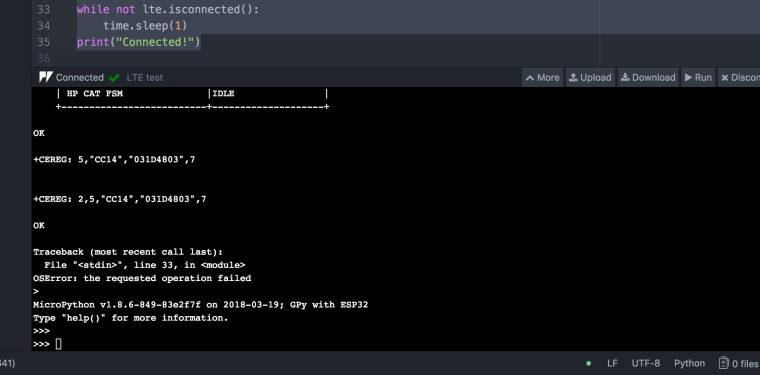
      0_1523551242826_Screenshot 2018-04-12 11.40.07.png

      I believe the connect function isn't working because the modem is still not attached.

      1 Reply Last reply Reply Quote 0
      • ChrisGammellC Offline
        ChrisGammell
        last edited by

        Ah, and re-reading, I saw I should check on "lte.isattached()" which in my case returns true:
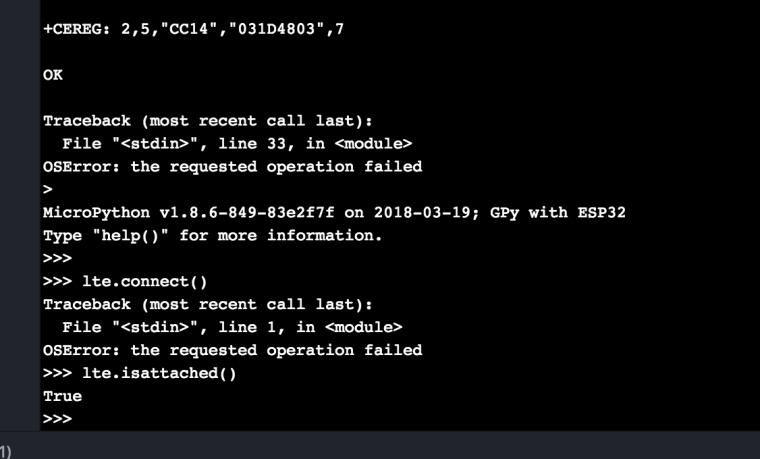
        0_1523551425502_Screenshot 2018-04-12 11.43.31.png

        So is the lte.connect() function the problem here Or are there other hints of what I should be trying?

        J 1 Reply Last reply Reply Quote 0
        • J Offline
          jmarcelino @ChrisGammell
          last edited by

          Thank you so much @chrisgammell That is really crucial "field" information for us!

          From a quick look it seems AT+CGDATA is timing out but maybe we just don't give it enough time to complete. I'll check with our LTE team.

          Thanks again

          T 1 Reply Last reply Reply Quote 0
          • T Offline
            tlanier @jmarcelino
            last edited by tlanier

            @jmarcelino

            Have any conclusions been reached about the connection problem?

            Possibilities:

            • Coverage problem?
              I've tried in multiple locations in my town of 35,000. We've contacted Verizon and they indicate that CAT-M1 coverage is everywhere that 4G LTE CAT-1 coverage is at. Also, since Chris is in Chicago and is also having trouble leads me to think that coverage is not the problem. Tonight I will take the device to a larger town to see if I have the same connection problem.

            • SIM card issue?
              Is it possible that the Hologram SIM card is somehow incompatible with the GPy? Would some other SIM card from another vendor possibly work?

            • GPy firmware issue?
              Is it possible that the GPy has a firmware issue that can be corrected? When we update the firmware to the GPy does that update both the MicroPython firmware and the cell modem firmware also?

            • GPy hardware issue?
              Is it possible that the GPy isn't compatible with current Verizon CAT-M1 service?

            Thanks for any insights you may have concerning the problem.

            J 1 Reply Last reply Reply Quote 0
            • J Offline
              jmarcelino @tlanier
              last edited by jmarcelino

              @tlanier
              I understand you concern but there is no incompatibility with SIMs or hardware issues. The modem has been certified by and works correctly with Verizon and for them (with a Cat M1 SIM) you can just do

              lte = LTE(carrier=“verizon”)

              and everything is setup correctly. For other configurations including MVNOs like Hologram we still need to do some manual tuning on the current modem firmware. This will no doubt improve as certification and firmware work continues.

              The modem firmware is separate from the MicroPython code. Currently the only way to update the modem firmware is loading from SD card using this tool: https://github.com/pycom/pycom-libraries/tree/master/lib/sqnsupgrade . This will also be much simplified in the near future.

              Regarding your specific case Chris was seeing +CEREG: 2,5 which means the modem actually found and registered on the network, the issue he had was with connect (establishing the PPP session).

              However you got +CEREG: 2,4 which means the modem did not find a network to connect, this suggests to me there is coverage issue and it would be interesting to know if you get a different result elsewhere.

              N T 2 Replies Last reply Reply Quote 0
              • N Offline
                nathanh @jmarcelino
                last edited by

                @jmarcelino said in GPy with Hologram.io SIM:

                However you got +CEREG: 2,4 which means the modem did not find a network to connect, this suggests to me there is coverage issue and it would be interesting to know if you get a different result elsewhere.

                For what it is worth and not trying to take this off the current topic/carrier. But from my attempts at trying to use my FiPy on Telstra where I am under full coverage, I also get the 2,4 result from CEREG but it will also sometimes connect (for a time before it crashes). I have left my modem in the same spot all day and it appears totally random if I can connect or not. Even when I connect, I will force a disconnect or reboot my FiPy and try and reconnect and next attempt will typically result with a 2,4 from CEREG even though less than 20 seconds earlier I was connected and sending JSON data off to my server.

                J 1 Reply Last reply Reply Quote 0
                • T Offline
                  tealbrains
                  last edited by tealbrains

                  @nathanh I got it to connect to Telstra thanks to @micksta and his other post. But it breaks after that. I would suggest to @tlanier to configure the LTE with some commands, otherwise it does not know what to do. See the code below (modification of @micksta 's):

                  [sorry about the format, the "Insert Code Block" button does not work for me] Edit: thanks @tlanier I fixed it.

                  #import os
                  #os.mkfs('/flash')
                  
                  import time
                  import socket
                  import gc
                  from network import LTE
                  import ssl
                  
                  def send_at_cmd_pretty(cmd):
                      response = lte.send_at_cmd(cmd).split('\r\n')
                      for line in response:
                          print(line)
                  
                  
                  print('Starting LTE...')
                  lte = LTE() # instantiate LTE object
                  print('LTE instantiated')
                  time.sleep(4.0)
                  
                  if lte.isattached():
                      #important, otherwise it can get stuck
                      lte.disconnect()
                      lte.dettach()
                      print("LTE was still attached. Disconnecting it.")
                  
                  
                  lte.reset()
                  print ('LTE has been reset')
                  time.sleep(5.0)
                  
                  send_at_cmd_pretty('AT+CGDCONT=1,"IP","telstra.internet"')
                  print ('APN set') 
                  time.sleep(1.0)
                  
                  send_at_cmd_pretty('AT!="addscanfreq band=28 dl-earfcn=9410"') # lte frequency band - from forum
                  print ('Chose frequency band') 
                  time.sleep(1.0)
                  
                  send_at_cmd_pretty('AT+CFUN=1') # Set the full functionality mode with a complete software reset
                  print ('Writing configuration...') 
                  time.sleep(1.0)
                  
                  print('LTE initialised')
                  
                  #show wireless parameters
                  send_at_cmd_pretty('AT!="showphy"')     # get the PHY status
                  send_at_cmd_pretty('AT!="fsm"')         # get the System FSM
                  
                  print("Attaching...")
                  lte.attach() # attach the cellular modem to a base station
                  while not lte.isattached():
                      time.sleep(0.25)
                  print ('Attached!') 
                  
                  print("Connecting...")
                  lte.connect() # start a data session and obtain an IP address
                  while not lte.isconnected():
                      time.sleep(0.25) 
                  print ('Connected!') 
                  
                  #LTE Connection established
                  print("LTE is working")
                  
                  s = socket.socket()
                  addr_info = socket.getaddrinfo('httpbin.org', 80)
                  addr = addr_info[0][-1]
                  
                  print(addr)
                  s.connect(addr)
                  print("socket is ready")
                  
                  s.send(b"GET / HTTP/1.0\r\n\r\n")
                  print(b"GET / HTTP/1.0\r\n\r\n")
                  print("Sent GET request")
                  
                  print(s.recv(4096))
                  print("Received something")
                  
                  lte.disconnect()
                  lte.dettach()
                  s.close()
                  gc.collect()
                  
                  T 1 Reply Last reply Reply Quote 0
                  • T Offline
                    tlanier @tealbrains
                    last edited by

                    @tealbrains said in GPy with Hologram.io SIM:

                    Thanks for the input.

                    I think the trick to get the code to be properly formatted is to surround it with with three back-ticks (key to left of the "1" key). See a better description at (https://github.com/adam-p/markdown-here/wiki/Markdown-Cheatsheet) under the section titled "Code and Syntax Highlighting".

                    Looking at your code I'm not sure what I should use for the send_at_cmd_pretty('AT!="addscanfreq band=28 dl-earfcn=9410"') command. That looks like a region specific setting.

                    1 Reply Last reply Reply Quote 0
                    • T Offline
                      tlanier @jmarcelino
                      last edited by

                      @jmarcelino

                      One interesting piece of information is that the AT+CFUN=0 or AT_CFUN=1 commands do not return an "OK" response from the modem. The commands configure the control of the LED according to the manual.

                      1 Reply Last reply Reply Quote 0
                      • J Offline
                        jmarcelino @nathanh
                        last edited by jmarcelino

                        @nathanh said in GPy with Hologram.io SIM:

                        For what it is worth and not trying to take this off the current topic/carrier. But from my attempts at trying to use my FiPy on Telstra where I am under full coverage, I also get the 2,4 result from CEREG but it will also sometimes connect (for a time before it crashes).

                        For Telstra/Australia you need to set the correct EARFCN (with 'AT!="addscanfreq band=28 dl-earfcn=9410"'). For the US the modem knows the Verizon network already so you don't need to.

                        @tlanier said in GPy with Hologram.io SIM:

                        One interesting piece of information is that the AT+CFUN=0 or AT_CFUN=1 commands do not return an "OK" response from the modem. The commands configure the control of the LED according to the manual.

                        I'm not sure which manual you're following but on the one we provide CFUN is definitely used to enable/disable the radio: see "2.4 Set Phone Functionality: +CFUN:".

                        N T 3 Replies Last reply Reply Quote 0
                        • N Offline
                          nathanh @jmarcelino
                          last edited by

                          @jmarcelino said in GPy with Hologram.io SIM:

                          For Telstra/Australia you need to set the correct EARFCN (with 'AT!="addscanfreq band=28 dl-earfcn=9410"'). For the US the modem knows the Verizon network already so you don't need to.

                          Which is what we are using and documented in the several Telstra posts on the forum and are still waiting on you/Pycom to refer back from meeting with Telstra as @daniel indicated on this thread (https://forum.pycom.io/topic/2769/telstra-lte-cat-m-working-on-fipy-just/21)

                          My point was that while the report of 2,4 from CEREG typically indicates no coverage, the actual reason according to the documentation is unknown error and even if it was lack of coverage it did not make sense since I could also get connectivity randomly in the same location with the same device, and the signal strength reporting as good/excellent when it did connect. Which in my mind could potentially indicate other issues with how the modem itself communicates on different networks.

                          1 Reply Last reply Reply Quote 0
                          • T Offline
                            tlanier @jmarcelino
                            last edited by

                            @jmarcelino
                            Sorry, my mistake. I was reading the description of the AT+SQNLED=<mode> command (see below) and thought it was describing the purpose of the AT+CFUN command instead of describing how the LED behaved with the different CFUN values.

                            From manual:

                            This command configures the control of light of a connected LED. The mode
                            setting is persistent after reboot.
                            The LED is turned on only when AT+CFUN=1 or 4. It is turned off when
                            AT+CFUN=0.
                            LED is steadily turned on when the ME is registered to the network and either
                            awake or in power saving state. LED flashes when the ME is registered to the
                            network and either awake or in power saving state. In this mode, the duration
                            of flashing means various states, listed below:
                            • AT+CFUN=0 or 4. The ME is stopped or in Airplane mode. The LED is
                            permanently turned off.
                            • AT+CFUN=1. LTE PS data transfer. The LED is permanently turned on.
                            • AT+CFUN=1. The ME is registered to a network, No call, no data transfer
                            (in RRC Idle). The LED blinks (typically 1280 ms on, 3840 ms off).
                            • AT+CFUN=1. Limited Network Service (no SIM, no PIN, network search).
                            The LED blinks (typically 500 ms on, 500 ms off).
                            • AT+CFUN=1. The ME is in deep SLEEP (eDRX or PSM). The LED is permanently
                            turned off.

                            1 Reply Last reply Reply Quote 0
                            • T Offline
                              tlanier @jmarcelino
                              last edited by tlanier

                              @jmarcelino
                              Below is the code I'm going to use in the GPy plugged into my car USB port. The LED will show me the attach/connection state. This evening I plan to drive to multiple locations to see if I can make it work.

                              import pycom
                              import socket
                              import ssl
                              import sys
                              import time
                              from network import LTE
                              
                              # send AT command to modem and display response
                              def at(cmd):
                                  print("modem command: {}".format(cmd))
                                  response = lte.send_at_cmd(cmd).split('\r\n')
                                  for line in response:
                                      print(line)
                              
                              #####################################################################
                              print("CAT M1 Test - V0.2")
                              
                              print("disable MicroPython contorl of LED")
                              pycom.heartbeat(False)
                              pycom.rgbled(0xFFFFFF)  # White
                              
                              print("instantiate LTE object")
                              lte = LTE(carrier="verizon")
                              print("delay 4 secs")
                              time.sleep(4.0)
                              
                              if lte.isattached():
                                  print("LTE was already attached, disconnecting...")
                                  lte.disconnect()
                                  lte.detach()
                                  print("resetting modem...")
                                  lte.reset()
                                  print("delay 5 secs")
                                  time.sleep(5.0)
                              
                              # using hologram SIM
                              at('AT+CGDCONT=1,"IP","hologram"')
                              
                              # enable network registration and location information unsolicited result code
                              # +CEREG: <stat>[,[<tac>],[<ci>],[<AcT>]]
                              at('AT+CEREG=2')
                              
                              print("full functionality level")
                              at('AT+CFUN=1')
                              time.sleep(1.0)
                              
                              print("attempt to attach cell modem to base station...")
                              lte.attach()
                              i = 0
                              while not lte.isattached():
                                  i = i + 1
                                  print("not attached: {} secs".format(i))
                              
                                  if (i % 2 == 0):
                                      pycom.rgbled(0xFF0000)  # Red
                                  else:
                                      pycom.rgbled(0x000000)  # Off
                              
                                  # get EPS Network Registration Status:
                                  # 0 - not registered
                                  # 1 - registered, home network
                                  # 2 - not registered, but searching...
                                  # 3 - registration denied
                                  # 4 - unknown (out of E-UTRAN coverage)
                                  # 5 - registered, roaming
                                  at('AT+CEREG?')
                                  time.sleep(1)
                              
                              print("connect: start a data session and obtain an IP address")
                              lte.connect()
                              i = 0
                              while not lte.isconnected():
                                  i = i + 1
                                  print("not connected: {}".format(i))
                              
                                  if (i % 2 == 0):
                                      pycom.rgbled(0x00FF00)  # Green
                                  else:
                                      pycom.rgbled(0x000000)  # Off
                              
                                  time.sleep(1.0)
                              
                              pycom.rgbled(0x0000FF)  # Blue
                              
                              s = socket.socket()
                              s = ssl.wrap_socket(s)
                              s.connect(socket.getaddrinfo('www.google.com', 443)[0][-1])
                              s.send(b"GET / HTTP/1.0\r\n\r\n")
                              print(s.recv(4096))
                              s.close()
                              
                              lte.disconnect()
                              lte.dettach()
                              
                              # end of test
                              print("end of test")
                              pycom.rgbled(0xFFFF00)    # Yellow
                              
                              while True:
                                  pass
                              
                              
                              J T 2 Replies Last reply Reply Quote 0
                              • J Offline
                                jmarcelino @tlanier
                                last edited by jmarcelino

                                @tlanier

                                I'm afraid the manual is written by Sequans (who make the modem) and is more of a general guide for all possible implementations.

                                The LED on the FiPy/GPy is only connected to the ESP32/MicroPython and not to the modem. The SQNLED command will have no effect.

                                The correct way to check for correctly registration is via AT commands and specifically the status check AT+CEREG? Valid registration stats are 2,1 or 2,5 (for MVNOs)

                                T 1 Reply Last reply Reply Quote 0
                                • T Offline
                                  tlanier @jmarcelino
                                  last edited by

                                  @jmarcelino

                                  Thanks, I've updated the code.

                                  1 Reply Last reply Reply Quote 0
                                  • T Offline
                                    tlanier @tlanier
                                    last edited by

                                    @tlanier
                                    I took the Gpy 50 miles down Interstate 85 through West Point, GA and Opelika, AL. The device never attached to a cell tower during the entire trip.

                                    J 2 Replies Last reply Reply Quote 0
                                    • J Offline
                                      jmarcelino @tlanier
                                      last edited by

                                      @tlanier
                                      Were you using the code you posted below? I didn't notice you had changed the code you to calling lte.attach() again. Have you been doing the other tests with this?

                                      For setups like Hologram where you do a custom init you need to remove lte.attach() and use AT+CEREG=2 and AT+CFUN=1 manually.

                                      As you already have those in the code you need to remove lte.attach() otherwise it will cause problems.

                                      T 1 Reply Last reply Reply Quote 0
                                      • T Offline
                                        tlanier @jmarcelino
                                        last edited by

                                        @jmarcelino

                                        Thanks for catching the misunderstanding!

                                        Here's my revised code. The at(cmd) function has been improved to return the modem response as a list making it easier to parse. I've also added logic to break on <tac> = 1 or 5 just in case the isattached() function is not working.

                                        I will take the GPy north towards Atlanta today and see if I can connect there.

                                        import pycom
                                        import socket
                                        import ssl
                                        import sys
                                        import time
                                        from network import LTE
                                        
                                        # send AT command to modem and return response as list
                                        def at(cmd):
                                            print("modem command: {}".format(cmd))
                                            r = lte.send_at_cmd(cmd).split('\r\n')
                                            r = list(filter(None, r))
                                            print("response={}".format(r))
                                            return r
                                        
                                        #######################################################
                                        print("CAT M1 Test - V0.3 - 4/15/18")
                                        
                                        print("disable MicroPython control of LED")
                                        pycom.heartbeat(False)
                                        pycom.rgbled(0xFFFFFF)  # White
                                        
                                        print("instantiate LTE object")
                                        lte = LTE(carrier="verizon")
                                        print("delay 4 secs")
                                        time.sleep(4.0)
                                        
                                        if lte.isattached():
                                            print("LTE was already attached, disconnecting...")
                                            lte.disconnect()
                                            lte.detach()
                                            print("resetting modem...")
                                            lte.reset()
                                            print("delay 5 secs")
                                            time.sleep(5.0)
                                        
                                        # enable network registration and location information, unsolicited result code
                                        at('AT+CEREG=2')
                                        
                                        print("full functionality level")
                                        at('AT+CFUN=1')
                                        time.sleep(1.0)
                                        
                                        # using Hologram SIM
                                        at('AT+CGDCONT=1,"IP","hologram"')
                                        
                                        print("attempt to attach cell modem to base station...")
                                        # lte.attach()  # do not use attach with custom init for Hologram SIM
                                        
                                        i = 0
                                        while True:
                                            # get EPS Network Registration Status:
                                            # +CEREG: <stat>[,[<tac>],[<ci>],[<AcT>]]
                                            # <tac> values:
                                            # 0 - not registered
                                            # 1 - registered, home network
                                            # 2 - not registered, but searching...
                                            # 3 - registration denied
                                            # 4 - unknown (out of E-UTRAN coverage)
                                            # 5 - registered, roaming
                                            r = at('AT+CEREG?')
                                            r0 = r[0]  # +CREG: 2,<tac>
                                            r0x = r0.split(',')     # ['+CREG: 2',<tac>]
                                            tac = int(r0x[1])       # 0..5
                                            print("tac={}".format(tac))
                                        
                                            if lte.isattached():
                                                print("Modem attached (isattached() function worked)!!!")
                                                break
                                        
                                            if (tac==1) or (tac==5):
                                                print("Modem attached!!!")
                                                break
                                        
                                            i = i + 1
                                            print("not attached: {} secs".format(i))
                                        
                                            if (i % 2 == 0):
                                                pycom.rgbled(0xFF0000)  # Red
                                            else:
                                                pycom.rgbled(0x000000)  # Off
                                        
                                            time.sleep(1)
                                        
                                        print("connect: start a data session and obtain an IP address")
                                        lte.connect()
                                        i = 0
                                        while not lte.isconnected():
                                            i = i + 1
                                            print("not connected: {}".format(i))
                                        
                                            if (i % 2 == 0):
                                                pycom.rgbled(0x00FF00)  # Green
                                            else:
                                                pycom.rgbled(0x000000)  # Off
                                        
                                            time.sleep(1.0)
                                        
                                        
                                        pycom.rgbled(0x0000FF)  # Blue
                                        
                                        s = socket.socket()
                                        s = ssl.wrap_socket(s)
                                        s.connect(socket.getaddrinfo('www.google.com', 443)[0][-1])
                                        s.send(b"GET / HTTP/1.0\r\n\r\n")
                                        print(s.recv(4096))
                                        s.close()
                                        
                                        lte.disconnect()
                                        lte.dettach()
                                        
                                        # end of test, Red LED
                                        print("end of test")
                                        pycom.rgbled(0xFFFF00)  # Yellow
                                        
                                        while True:
                                            pass
                                        
                                        T 1 Reply Last reply Reply Quote 0
                                        • T Offline
                                          tlanier @tlanier
                                          last edited by

                                          @tlanier

                                          I drove through both Newnan, GA and Peachtree City, GA with the GPy running in my car. The device never attached to any tower even though I passed by many towers within visible sight.

                                          1 Reply Last reply Reply Quote 0
                                          • J Offline
                                            jmarcelino @tlanier
                                            last edited by

                                            Thanks @tlanier

                                            Are you able to try it with a Verizon Cat M1 SIM?

                                            T 1 Reply Last reply Reply Quote 0

                                            Hello! It looks like you're interested in this conversation, but you don't have an account yet.

                                            Getting fed up of having to scroll through the same posts each visit? When you register for an account, you'll always come back to exactly where you were before, and choose to be notified of new replies (either via email, or push notification). You'll also be able to save bookmarks and upvote posts to show your appreciation to other community members.

                                            With your input, this post could be even better 💗

                                            Register Login
                                            • 1
                                            • 2
                                            • 3
                                            • 4
                                            • 5
                                            • 5 / 5
                                            • First post
                                              Last post

                                            Pycom on Twitter

                                            Pycom