GPy with Hologram.io SIM
-
Thanks for catching the misunderstanding!
Here's my revised code. The at(cmd) function has been improved to return the modem response as a list making it easier to parse. I've also added logic to break on <tac> = 1 or 5 just in case the isattached() function is not working.
I will take the GPy north towards Atlanta today and see if I can connect there.
import pycom import socket import ssl import sys import time from network import LTE # send AT command to modem and return response as list def at(cmd): print("modem command: {}".format(cmd)) r = lte.send_at_cmd(cmd).split('\r\n') r = list(filter(None, r)) print("response={}".format(r)) return r ####################################################### print("CAT M1 Test - V0.3 - 4/15/18") print("disable MicroPython control of LED") pycom.heartbeat(False) pycom.rgbled(0xFFFFFF) # White print("instantiate LTE object") lte = LTE(carrier="verizon") print("delay 4 secs") time.sleep(4.0) if lte.isattached(): print("LTE was already attached, disconnecting...") lte.disconnect() lte.detach() print("resetting modem...") lte.reset() print("delay 5 secs") time.sleep(5.0) # enable network registration and location information, unsolicited result code at('AT+CEREG=2') print("full functionality level") at('AT+CFUN=1') time.sleep(1.0) # using Hologram SIM at('AT+CGDCONT=1,"IP","hologram"') print("attempt to attach cell modem to base station...") # lte.attach() # do not use attach with custom init for Hologram SIM i = 0 while True: # get EPS Network Registration Status: # +CEREG: <stat>[,[<tac>],[<ci>],[<AcT>]] # <tac> values: # 0 - not registered # 1 - registered, home network # 2 - not registered, but searching... # 3 - registration denied # 4 - unknown (out of E-UTRAN coverage) # 5 - registered, roaming r = at('AT+CEREG?') r0 = r[0] # +CREG: 2,<tac> r0x = r0.split(',') # ['+CREG: 2',<tac>] tac = int(r0x[1]) # 0..5 print("tac={}".format(tac)) if lte.isattached(): print("Modem attached (isattached() function worked)!!!") break if (tac==1) or (tac==5): print("Modem attached!!!") break i = i + 1 print("not attached: {} secs".format(i)) if (i % 2 == 0): pycom.rgbled(0xFF0000) # Red else: pycom.rgbled(0x000000) # Off time.sleep(1) print("connect: start a data session and obtain an IP address") lte.connect() i = 0 while not lte.isconnected(): i = i + 1 print("not connected: {}".format(i)) if (i % 2 == 0): pycom.rgbled(0x00FF00) # Green else: pycom.rgbled(0x000000) # Off time.sleep(1.0) pycom.rgbled(0x0000FF) # Blue s = socket.socket() s = ssl.wrap_socket(s) s.connect(socket.getaddrinfo('www.google.com', 443)[0][-1]) s.send(b"GET / HTTP/1.0\r\n\r\n") print(s.recv(4096)) s.close() lte.disconnect() lte.dettach() # end of test, Red LED print("end of test") pycom.rgbled(0xFFFF00) # Yellow while True: pass -
I drove through both Newnan, GA and Peachtree City, GA with the GPy running in my car. The device never attached to any tower even though I passed by many towers within visible sight.
-
Thanks @tlanier
Are you able to try it with a Verizon Cat M1 SIM?
-
Anybody know how to get an evaluation Cat M1 SIM that will work.
On the Verizon web page they state: "Machine to Machine Plans are available only to business customers with five or more CLEU lines that have signed a Major Account Agreement. "
Verizon Machine to Machine Plans
I talked to Kore about a month ago, and they did not offer Cat M1 SIM's at that time.
-
We've talked to the Verizon open development team and they indicated that CAT M1 is on ALL Verizon LTE towers in the country.
There's got to be some explanation as to why we cannot connect with the GPy.
-
The Verizon Wireless HelpDesk @ 800-525-0481 has now told us our Hologram SIM is not a valid SIM on their network. We have contacted Hologram to try to determine what could be the problem. No word yet from Hologram.
-
@tlanier said in GPy with Hologram.io SIM:
The Verizon Wireless HelpDesk @ 800-525-0481 has now told us our Hologram SIM is not a valid SIM on their network
Yep, still trying things here as well. As Ryan said over on our forum, it's possible that Verizon does not have direct records of our SIMs on their network and we encourage everyone to contact us directly for connectivity. We understand you're frustrated while we try to get this sussed out, we are as well. The problem with SIM cards that normally "just work"...is when they don't.
-
Speaking of frustrated, I'm still getting errors from lte.connect(), is there a way to get a more verbose output?
I just saw in the docs that there is a firmware update for the modem as well as as the Pycom boards themselves, going to try that now. Is it possible that that could be contributing to the problem?
-
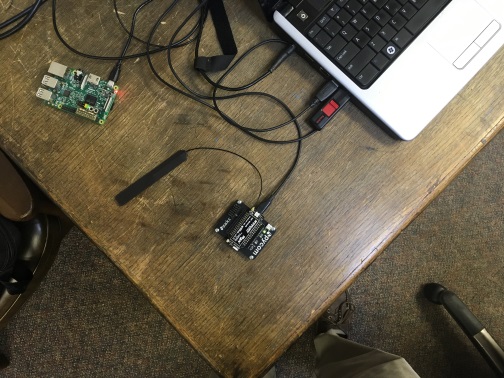
I added at('at+csq') into the loop and saw that as the device eventually finds its way onto the network here locally, it goes from "99, 99" to "11, 99" or so. Does yours change if you insert that into the loop, @tlanier? Also could you post a picture of your mobile rig? I'm curious about how you have it all hooked up and powered and such.
-
I did do the firmware update from:
I have not done the modem firmware update. Thanks for the link. I will try that first thing in the morning.
-
I'm just using the expansion board 2.0 with the GPy powered using the USB port to my computer desktop. I've also drove around in the car with the unit plugged into the USB port on my car.
I'll try the AT+CSQ command in the morning and post the results.
As a new user the system will only allow me to post every 10 mins so I sitting here waiting for the 10 mins to expire so I can send this post...
-
Thank you both so much for your continued tests.
@ChrisGammell We're investigating your .connect() problems. I think our command timeouts were very short for some situations and I've let the LTE team know, hope to see an improvement on the next release.
Modem firmware could have an impact but it's hard for us to tell because our modem manufacturer, very much like Verizon, just doesn't understand roaming MVNOs like Hologram. They only think in terms of carrier certification with the carrier's own SIM card.
That said it won't harm anything to try a newer modem firmware as long as you are careful with the upgrade - give it lots of time to complete even when it seems nothing is happening!
We should be releasing a more streamlined modem upgrade process soon so you can also wait for that instead.
If anyone else can help us run some tests with Hologram especially in a known good coverage area where you already see 2,5 and valid CSQ let us know. It would help if perhaps someone can give us remote access (e.g. TeamViewer) to check out a few parameters.
-
@chrisgammell
I'm getting a +CSQ: 11,99 here indoors. -
-
@tlanier
Which antenna is that? Do you have a link?
Is it suitable for 746-787Mhz (Band 13) operation? -
I've moved the unit to a front office where I'm now getting +CSQ: 15,99 signal strength.
You may have discovered my problem about the antenna.
My hardware guy is not here at this moment, but this is the part number I got off our last order which is what we use for our 4G LTE modems connecting to T-Mobile.
Would the fact that I'm now getting a signal strength of 15 not indicate that the antenna is sufficient?
-
After moving the unit to a different office, I'm now getting:
+CEREG: 2,4
+CSQ: 99,99@jmarcelino has indicated that I have the wrong type of antenna.
-
@tlanier
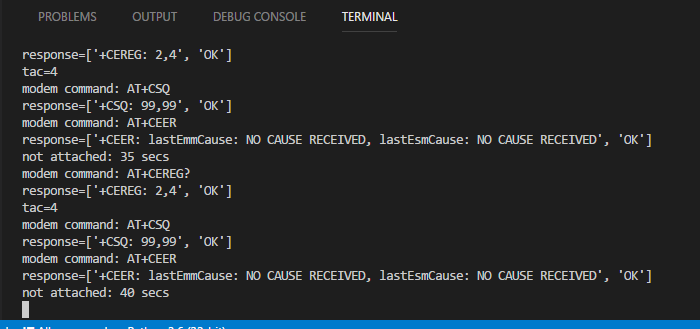
RSSI (from CSQ) is only one measurement. Are you still not seeing CEREG returning 2,5 ?Ideally you'd use an antenna supporting 700Mhz bands, of course your antenna works on that frequency but doesn't appear designed for it so you may be losing some signal.
Can you increase the delay on your attach loop to 5s
time.sleep(5)and addat('AT+CEER')at each iteration to see if there's any error reported? -
I'm available to allow you to remote into our system anytime.
I'll order a new antenna today if you want to wait until I have the correct antenna.
-
Here's what I'm getting now after increasing the delay to 5 secs in loop with the AT+CEER command. I updated the image to show the correct time counter.

Hello! It looks like you're interested in this conversation, but you don't have an account yet.
Getting fed up of having to scroll through the same posts each visit? When you register for an account, you'll always come back to exactly where you were before, and choose to be notified of new replies (either via email, or push notification). You'll also be able to save bookmarks and upvote posts to show your appreciation to other community members.
With your input, this post could be even better 💗
Register Login