Power Consumption Issue
-
Hi,
I got my Gpy to do what it is supposed to on the network side of things (the LTE modem sometimes hangs at the lte.connect() but that's for another thread). I am running into some issues on the power consumption side. The GPy is consuming way power more than expected.
The Gpy essentially does a GET HTTP request of a small file, using the LTE. It blinks for 2.5s (10 out of 255 on the RGB LED) when it has read the data, writes some info to the SD card such as the timestamp, the data itself and the raw ADC value for the battery voltage. This string of data that is appended to a file on the SD card is no longer than 50 characters.
The LTE is then de-initialised and the SD card unmounted. After this, the GPy goes to deepsleep for 10 minutes and repeats the whole process.
I use the WDT timer to reset the device if the modem gets stuck, see my other post: [https://forum.pycom.io/topic/3073/lte-analysis-of-connectivity](link url)
Some other info:
- I disable the WiFi on boot in boot.py
- I have the GPy on the Expansion board (v2.1) and the LED, RTS and CTS jumpers are removed.
I will upload a battery discharge graph in my next post, but here is the thing: the module is WARM the whole time. So something is definitely not going into deepsleep. Is there a special procedure for the Sequans modem? What am I missing?
Any help is appreciated. Thanks!
-
@tealbrains you should probably share the relevant parts of your code, as well as the current draw you see during sleep, and possibly console output.
Also, do you have upgraded the FiPy to the latest firmware, and the modem as well?
How are you powering the board?
-
@tealbrains
The SD card is always consuming power even when idle (during deepsleep) about 5mA. For low power applications using the SD card is not recommended.How are you de-initiliasing the modem and going into deepsleep?
-
@jmarcelino @jcaron
Thanks for getting back to me!@jmarcelino
Thanks for the specific number on the consumption of the SD card, it is a good thing to know. It still does not really explain why the modules get warm though...@jcaron
My Gpy board has the most recent firmware, as well as the Sequans modem (I upgraded both less than 10 days ago with the most recent versions : '1.17.3.b1' and 'FIPY_GPY_CATM1_33988.dup').
The board is powered with a 2000mAh 3.7V LiPo connected to the Expansion board.Here is my boot.py:
import pycom
pycom.wifi_on_boot(False);
pycom.heartbeat(False);
Here is main.py
import time import socket import gc from network import LTE import ssl import urequest import pycom import machine import os from machine import ADC #Configuration DEBUG = False #Initialisation #pycom.heartbeat(False) already in boot.py wdt = machine.WDT(timeout=20000) sleepminutes = 10 def dprint(argument): if DEBUG == True: return print(argument) else: pass def contains_word(s, w): return (w) in (s) def send_at_cmd_pretty(cmd): response = lte.send_at_cmd(cmd).split('\r\n') for line in response: dprint(line) #Battery Voltage ADC adc = ADC() bat_pin = adc.channel(pin='P16', attn=ADC.ATTN_11DB) def getBatteryVoltage(): bat_voltage = bat_pin() dprint("Voltage = %d " % (bat_voltage)) return bat_voltage while True: wdt.feed() dprint('Starting LTE...') lte = LTE() # instantiate LTE object dprint('LTE instantiated') #time.sleep(4.0) if lte.isattached(): #important, otherwise it can get stuck lte.disconnect() lte.dettach() dprint("LTE was still attached. Disconnecting it.") # lte.reset() # dprint ('LTE has been reset') # time.sleep(5.0) # wdt.feed() send_at_cmd_pretty('AT+CGDCONT=1,"IP","telstra.internet"') # Telstra network dprint ('APN set') # used for debugging time.sleep(0.1) wdt.feed() send_at_cmd_pretty('AT!="addscanfreq band=28 dl-earfcn=9410"') # lte frequency band - from forum dprint ('Chose frequency band') time.sleep(0.1) wdt.feed() send_at_cmd_pretty('AT+CFUN=1') # Set the full functionality mode with a complete software reset dprint ('Writing configuration...') time.sleep(5.0) wdt.feed() #Feed the watchdog if we made it wdt.feed() dprint('LTE initialised') #show wireless parameters send_at_cmd_pretty('AT!="showphy"') # get the PHY status send_at_cmd_pretty('AT!="fsm"') # get the System FSM dprint("Attaching...") lte.attach() # attach the cellular modem to a base station while not lte.isattached(): time.sleep(0.25) dprint ('Attached!') wdt.feed() dprint("Connecting...") lte.connect() # start a data session and obtain an IP address while not lte.isconnected(): time.sleep(0.25) dprint ('Connected!') #LTE Connection established dprint("LTE is working") #Feed the watchdog if we made it wdt.feed() rtc = machine.RTC() rtc.init() #sync time with ntp server rtc.ntp_sync('pool.ntp.org') while rtc.synced() is False: time.sleep(1) wdt.feed() #adjust to Melbourne time (+3600 * number of hours) time.timezone(+36000) dprint(time.localtime()) #Create HTTP request statusString = "iuhqiurfeqhierufhqiuh" #changed for posting on forum (originally a link to a .txt file) ms = str(time.ticks_ms()) statusReq = statusString + '?ms=' + ms rawPage = urequest.get(statusReq) dprint(rawPage) #Declare status variable status = 'OFF' #Action if contains_word(rawPage, 'ON') is True: pycom.rgbled(0x000500) time.sleep(2.5) pycom.rgbled(0x050000) status = 'ON' elif contains_word(rawPage, 'OFF') is True: pycom.rgbled(0x050000) status = 'OFF' else: pycom.rgbled(0x000005) status = "Undefined" wdt.feed() newLine = str(time.localtime()) + ' ' + status + ' ' + str(getBatteryVoltage()) + '\r\n' dprint(newLine) sd = machine.SD() os.mount(sd, '/sd') f = open('/sd/LTE_failures.txt', 'a') f.write(newLine) f.close() os.unmount('/sd') sd.deinit() # f = open('/sd/LTE_failures.txt', 'r') # f.readlines() # f.close() #Disconnect LTE, collect garbage lte.disconnect() lte.dettach() gc.collect() #going into deep sleep dprint("Going to deep sleep") lte.deinit() #Go to deep sleep for 10 mn aprox. machine.deepsleep(sleepminutes * 60000 - 35000) -
@jmarcelino any plans to change that 5ma sleep consumption?
It makes using the SD card impossible for low power use, which seems a bit odd compared to the rest of the pycom design principles
-
I found the main issue.
The WDT was resetting the board more often than it should, interrupting the process of saving data to the SD card. The WDT was resetting the board which lead to LTE connections being made every minute (or attempted...). The board was essentially ON most of the time.
Now, there is a potential issue related to the modem. It could be the network but that would be quite surprising. You will find in the following discharge graph a drop in the voltage around the 11pm mark. This is due to a series of failed connection attempts conducted by the LTE modem. As per my current script (soon to be modified), nothing prevents the WDT from resetting the board until a connection has been established and the board has been put to (deep) sleep.
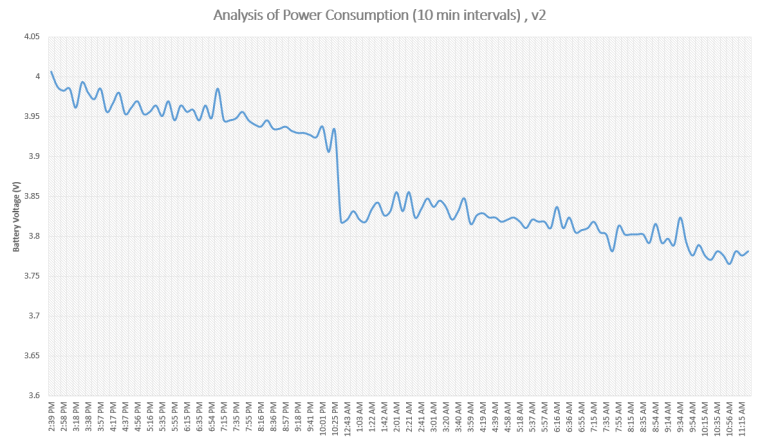
To be more precise, between 10:25pm and 12:33am the board has been unable to talk to the internet. At a rate of roughly 1 min per attempt (between WDT resets + delays), that is a LOT of failed attempts.
I will run another test with two boards in parallel to discard a network issue (which is highly unlikely). Maybe a higher delay between connection attempts would help but still...
Any ideas?
[@administrators If you would like me to keep this thread clean and start another one let me know]
-
@tealbrains Did you ever solve this issue. We are seeing the same problem with a FiPy/Pysense combination both with the latest firmware. Below is a snip from AdaFruit IO...
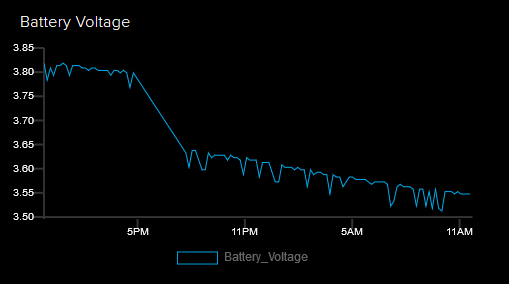
When we checked the connection log to the telecommunications provider, there were not active connections between 5pm and 7pm, at which time we restarted the system.
-
@SiMoS-IoT I improved the way the GPys were handling network failures and ended up implementing a function that manages delays between retries. So if the device can't connect it keeps waiting longer and longer to save power...
Delays between attempts : {1,1,1,2,2,2,4,8,16,32} in minutes. You get the idea.
Unfortunately I had to ditch all pycom boards for now and find an alternative solution. We faced major issues about 9 months ago, and did not get a prompt reply/support. See this thread: https://forum.pycom.io/topic/3390/potential-device-lockdown-network-providers/37
The Sequans modem is (STILL) not supported by Telstra : https://www.telstra.com.au/content/dam/tcom/business-enterprise/machine-to-machine/pdf/telstra-m2m-certified-devices-modules.pdf
Hello! It looks like you're interested in this conversation, but you don't have an account yet.
Getting fed up of having to scroll through the same posts each visit? When you register for an account, you'll always come back to exactly where you were before, and choose to be notified of new replies (either via email, or push notification). You'll also be able to save bookmarks and upvote posts to show your appreciation to other community members.
With your input, this post could be even better 💗
Register Login