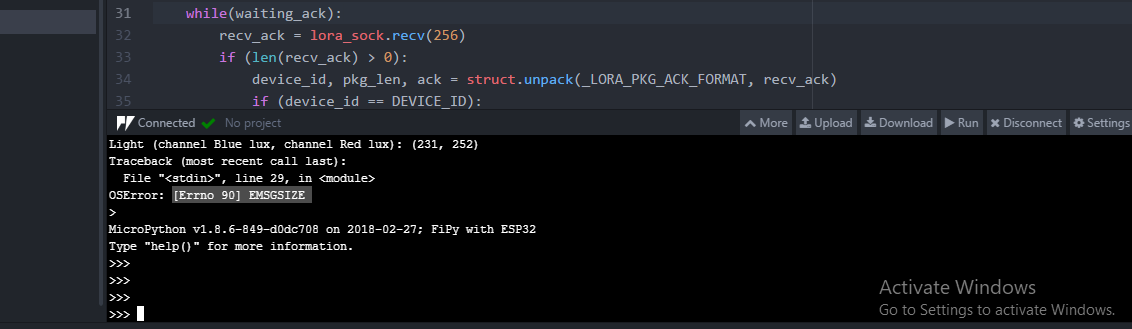
OS Error [Errno 90] EMSGSIZE
-
Hello,
We are using pysense and fipy to send sensor data using LoRa as a node and a gateway setup. We are the attached node code in atom , but after some iteration we are getting below error0_1524648642915_Node1.py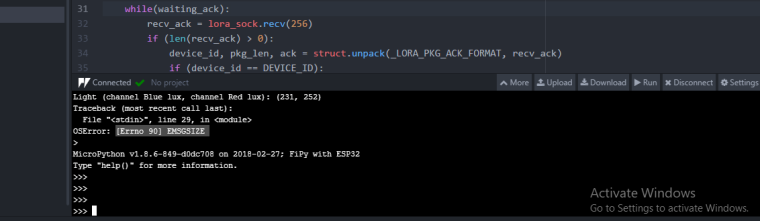
-
Hello,
Reply as soon as possiible for the above query.
Thank you -
@archana-kadam The error message tells you, that the length of the data in recv_ack is too short to unpack it with struct.unpack(). Please check if sufficient data was sent.
-
I am having the same problem.
I have narrowed it down to when ADR is used, and a downlink message is sent (an ADR downlink message I believe.). I'm using the Things Network.
The downlink message is:
{
  "gw_id": "rg1xxxxxxxx",
  "payload": "YH0nAiaKAAADQAIAcQMVAP8BXn2pRg==",
  "lora": {
    "spreading_factor": 12,
    "bandwidth": 500,
    "air_time": 329728000
  },
  "coding_rate": "4/5",
  "timestamp": "2018-08-22T18:11:06.175Z",
  "dev_addr": "xxxxxxx",
  "frequency": 923300000
}
This is what is sent to the LoPy device, the error actually seems to occur on sending data via the uplink (but downlink messages arrive when an uplink occurs so...)
The thing I noticed is that the SF is set to 12 with BW 500, not sure if the is valid for US915 or not, as min dr (0) is SF 10. Also not sure why the SF would be set to 12, the loPy is close to my gateway, and works fine at SF7 (would have thought that the ADR message would set SF7, not 12).
Any ideas?
-
@nick_w SF12, BW500 at 923.3 MHz are the setting for the RX2 window (DR8).
@Archana-Kadam Try to shorten the message. How long is msg? And what is the data rate? here are the allowed payload sizes depending on the data rate.
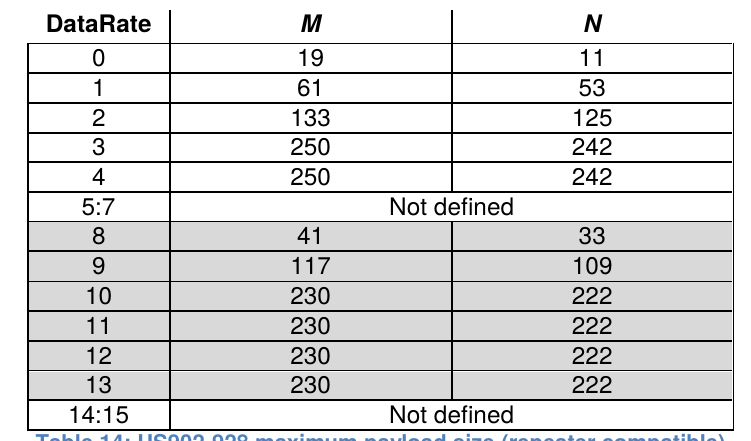
Edit: @Archana-Kadam I see in the code, that in line 26 it reads:
msg += "Light (channel Blue lux, channel Red lux): " + str(lt.light()) + '\n'
So the message gets longer and longer and will be shortly too long for a packet. It sure should be:
msg = "Light (channel Blue lux, channel Red lux): " + str(lt.light()) + '\n' -
@robert-hh
The message I send (uplink) is 11 bytes, 24 bytes shown in the TTN console. it never changes in size.the message I posted is the one TTN sends to my LoPy (A system message I think, as I'm not sending anything to the LoPy), it only gets sent after the OTAA Join is successful if ADR is enabled. If ADR is disabled, all works with no issue.
If I send a test message with 4 dummy bytes in it from the TTN console to the LoPy, it works just fine.
So the error only occurs if ADR is enabled, and happens immediately after the OTAA Join, when the first data bytes are sent. I have experimented, and if you ignore the error, and send data again, it works correctly (no error) until some time later when TTN again sends the mystery data, then again, you get the error.
This is why I think the problem is with the downlink, not the uplink. I don't know what the payload of the mystery data "YH0nAiaKAAADQAIAcQMVAP8BXn2pRg==" decodes as, I'm assuming it's some sort of ADR control packet, as it only gets sent with ADR enabled.
I'm thinking it's a bug in the LoPy LoRaWAN stack, not handling ADR contol messages correctly.
-
@nick_w The message you see in the TTN console is base64 encoded. But you did not tell us which error you get and at which line in the code. The error @Archana-Kadam got is caused by his script.
-
@robert-hh
Ok, to be clear,
the TTN message that is sent ("YH0nAiaKAAADQAIAcQMVAP8BXn2pRg==") decodes to"`}'\x02&\x8a\x00\x00\x03@\x02\x00q\x03\x15\x00\xff\x01^}\xa9F" HEX: '607d2702268a00000340020071031500ff015e7da946'which doesn't really help, as I don't know the structure.
The line in my code where the error occurs is:
s = socket.socket(socket.AF_LORA, socket.SOCK_RAW)
# set the LoRaWAN data rate (3 is fastest, 0 is slowest) faster = less airtime/shorter range/better battery
s.setsockopt(socket.SOL_LORA, socket.SO_DR, 3) #5 is EU, 3 is US
# make the socket blocking
s.setblocking(True)
s.bind(1)   #set LoRa port 1

print('Sending {} bytes: {}'.format(len(payload),payload))
s.send(payload)    #error here with ADR enabled
print('Payload sent - checking for uplink')
I never see the "Payload Sent message", instead what happens is that the loPy joins the network successfully, then sends one data packet successfully. Then the device goes into deepsleep for 60 seconds (for testing, the actual deepsleep is variable depending on airtime). When restarted, this happens:
Restoring LoRa state from NVS
Sending 11 bytes: b'\xe3L4\n"\xb3\x12\x16\x00\x00\x00'
error sending data: [Errno 90] EMSGSIZE
However, with ADR disabled, this works perfectly every time with no error. ie:
Restoring LoRa state from NVS
Sending 11 bytes: b'\xe2L1\n"\xb8\x12\x1d\x00\x00\x00'
Payload sent - checking for uplink
Comms Done
Even with different SF and deepsleep timing, makes no difference. the only thing that seems to make a difference is if I ignore the message (ie don't reset and re-join), then it works OK until TTN tries to send another suspected ADR control message as I described, then I get the error again.
This is why I don't think that it's the sending of the data that's the problem (the data doesn't change), it's the receiving of whatever TTN is sending that is causing the error. It just happens, that we only receive a queued message when we send, so it looks like the send causes it.Does anyone have ADR working with TTN? if so I'd like to see the code, as mine doesn't work.
Thanks,
-
@nick_w So after sending the code sends the device to deepsleep. How long do you wait before going to deepsleep? Should'nt you wait at least the 2 seconds until a response for ADR may have arrived?
b.t.w.: Which gateway are you using? -
@robert-hh
I'm using the Sentrius RG191 gateway.
I don't think that I have to wait, the send socket socket is set to blocking, which blocks until the packets are sent, and waits for the 2 receive windows to expire.Besides, if I manually send something from the TTN console, it arrives just fine.
-
@nick_w I just looked a little bit how long the send() will wait in blocking mode. It waits between 2.5 and 3 seconds. If a downlink message arrives in that time, it returns earlier. I could not tell by testing, what happens with that wait time expires before the downlink message is completely received. The downlink messages seemed not to be sent at DR0. In your case, the downlink message is sent with the lowest date rate in the RX2 window. The airtime for that message should be about 1.5 seconds, so at the time when the send() returns the downlink transmission is still going on.
-
@robert-hh
I tried it with a 4s wait after the send, and still get the same error, immediately after the send:Restoring LoRa state from NVS Sending 11 bytes: b'\x9aL7\t*\xb3\x12-\x00\x00\x00' at DR: ADR error sending data: [Errno 90] EMSGSIZEThe "error sending data:" is my error message, the rest is the reported error.
It's not a big deal, I can tune the data rate myself, just wondering what the error means, and why it's being triggered. As I say if I ignore the error, it works fine until the next downlink message is queued.
Also, an uplink message arrives at TTN when I get the error, but the payload is null , so the data being sent is empty. -
@nick_w OK. b.t.w.: The test I tried to make did not give the epxected result, simply because TTN uses SF9BW125 in the RX2 window in the downlink for every data rate < 4. I could try with Loriot, but maybe later.

Hello! It looks like you're interested in this conversation, but you don't have an account yet.
Getting fed up of having to scroll through the same posts each visit? When you register for an account, you'll always come back to exactly where you were before, and choose to be notified of new replies (either via email, or push notification). You'll also be able to save bookmarks and upvote posts to show your appreciation to other community members.
With your input, this post could be even better 💗
Register Login