I2C 4-20ma Sensor Integration
-
I have a project where I need to connect to a 24V 2 wire loop water flow sensor that outputs 4-20ma, I was wondering if anyone out there has already successfully been able to do this. I am currently trying to achieve this with a INA219 but not having much luck.
-
@jimpower I am using MCP3424 based device https://www.ereshop.com/shop/index.php?main_page=product_info&products_id=805 and this is working well.
What sort of problem are you having, talking to the device over i2c or not getting a value ?
There are python libraries for the INA219.
-
-
@jimpower I haven't used the INA219 so can't comment specifically about it. But I have worked with Flow meters in the past.
You probably have this already covered but thought I would ask a few things.
Most flow meters have rated max flow, but the specific process may not need such a high flow. ie a 300mm Krohne might have a max flow of 300LPS, but the process is only going to hit a max of 80lps. So you would normally set the output scale of the flow meter so that 100lps would match 20ma.
This catches out a lot of people when dealing with controllers (industrial, COMAP for instance), so the values you get aren't expected.
Most flow meters have a simulation mode so you can set 80lps and then measure 20ma with a multi-meter (given the above scenario).
Is this the library you are using ?
https://github.com/chrisb2/pi_ina219/blob/master/ina219.py
Its current reading isn't using voltage. Its reading a current register.
Other thing to note, most flow meters need a chassis ground, especially when there is no water as the flow meter is often connected to non metallic pipe (ie rubber suction/discharge hose), and without the water to provide a ground on the chassis of the flow meter, we see random values produced.
-
@jimpower What is the range you get?
The INA219 sensor measures the current and returns a numeric value for that. The default configuration of the adafruit board with it's 0.1 Ohm shunt is 1 digit per 0.8 mA. For 4-20 mA th eraw return values are in the range of 5-25. It is possible to increase the sensitivy
a) by configuration, increasing the resolution to 0.1 mA per digit, resulting in a range of 40-200
b) replacing the shunt resistor with a higer value, like 1 Ohm or 10 Ohm.
For calibration, insert a amperemeter and scale the returned values accordingly. -
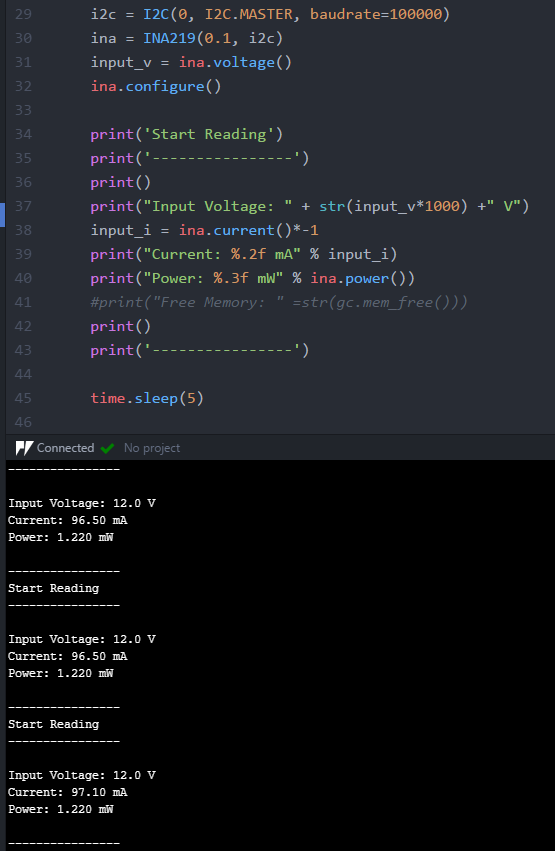
I managed to get this print I found a DC regulated power supply in the workshop.
-
@jimpower what do you see on a multimeter ?
-
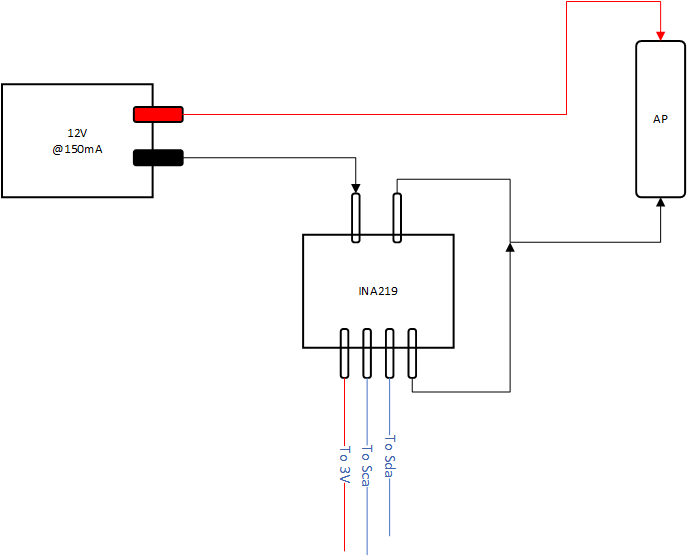
@timh I read the same within a 1mA. I have it attached in line with an Access point and connect devices to test the rise in current. I have the current limited to 150mA @ 12V.
-
@jimpower so either somethings very wrong or I don't understand what you are trying to do.
If you have 4-20ma current loop device you should only be seeing between 4-20ma (less than 4ma is used to indicate sensor fail).
So why are you seeing 150ma ?
-
@jimpower Does the device have different connections for the current loop output and power supply?
-
@timh I don't have the sensor deployed when it is connected it is showing 4mA which is to be expected but I dont have a tank to test depth with so I have connected the following cct.
-
@jimpower does the flow meter have a calibration/simulation mode. The ones we have do, so you can set them up to output a specific flow rate - and you will get the appropriate ma fed to you input.
-
@timh I don't have access to the flow meter only a submersible level transducer which doesn't have a calibration mode
-
@jimpower Oh, didn't realize you had changed devices.
So do you get a value equivalent to 4ma through the INA device (may need to be scaled) ? when not in the water ?

Hello! It looks like you're interested in this conversation, but you don't have an account yet.
Getting fed up of having to scroll through the same posts each visit? When you register for an account, you'll always come back to exactly where you were before, and choose to be notified of new replies (either via email, or push notification). You'll also be able to save bookmarks and upvote posts to show your appreciation to other community members.
With your input, this post could be even better 💗
Register Login