Welcome to the Pycom forum Forum
    • \[\[global:header.categories\]\]
    • \[\[global:header.recent\]\]
    • \[\[global:header.tags\]\]
    • \[\[global:header.popular\]\]
    • Login

    Explore Pybytes | Official Documentation | Report a Firmware Bug/Issue | GitHub

    Important update regarding LTE modem updates

    Scheduled Pinned Locked Moved Announcements & News
    lte
    123 Posts 26 Posters 44.7k Views 32 Watching
    Loading More Posts
    • Oldest to Newest
    • Newest to Oldest
    • Most Votes
    Reply
    • Reply as topic
    Log in to reply
    This topic has been deleted. Only users with topic management privileges can see it.
    • robert-hhR Offline
      robert-hh @tuftec
      last edited by

      @tuftec said in Important update regarding LTE modem updates:

      I do not see any transmissions in the band 8 uplink frequency area

      Same for me at Band 20. No RF send activity at all.AT least a cell is acquired in Band 20 (commands 'AT!="showphy"' and 'AT+CSQ')

      1 Reply Last reply Reply Quote 0
      • J Offline
        JoseDLopez
        last edited by

        Hello,

        I just updated to 37781 NB-IoT firmware my GPy. But i just realized that it will only works with Ericsson or Huawei Nodes.

        Here in Chile we only have available one NB-IoT working node and it is Nokia, should it work?

        Best regards,

        S 1 Reply Last reply Reply Quote 0
        • D Offline
          danielm @robert-hh
          last edited by

          @robert-hh
          This is the sequence which works for me (method is part of class):

          def test1(self):
          	self.lte = LTE()
          	self.lte.send_at_cmd('AT+CFUN=0')
          	self.lte.send_at_cmd('AT!="clearscanconfig"')
          	self.lte.send_at_cmd('AT!="addscanfreq band=20 dl-earfcn=6190"')
          	self.lte.send_at_cmd('AT!="zsp0:npc 1"')
          	self.lte.send_at_cmd('AT+CGDCONT=1,"IP","nbiot.telekom.sk"')
          	self.lte.send_at_cmd('AT+CFUN=1')
          
          	pycom.rgbled(0xff0000)
          	
          	while not self.lte.isattached():
          		print('Attaching…')
          		time.sleep(0.25)
          
          	pycom.rgbled(0x0000ff)
          
          	self.lte.connect()
          	while not self.lte.isconnected():
          		print('Connecting…')
          		time.sleep(0.25)
          
          	pycom.rgbled(0x008000)
          
          T 1 Reply Last reply Reply Quote 0
          • T Offline
            tuftec @danielm
            last edited by

            @danielm thanks for that.
            I gather you are not using the latest firmware revisions?
            The zsp0:npc 1 command does not seem to work anymore.

            I have tried something similar, but modified for my local carrier (Vodafone) and just can not get it to attach.
            Nothing seems to get transmitted in the band that I need to select (band 8).

            Peter.

            1 Reply Last reply Reply Quote 0
            • robert-hhR Offline
              robert-hh
              last edited by

              @danielm Thanks. But, as @tuftec said above, at least the zsp0::npc command does not exist in the new firmware. I could try with the old firmware, which is now available again.

              1 Reply Last reply Reply Quote 0
              • D Offline
                danielm
                last edited by

                Pycom FW release on my FiPy is 1.18.1.r1. I used built-in script to upgrade Sequans modem via UART to NB1 firmware version 37781.

                >>> node.lte.send_at_cmd("AT+CGMR")
                '\r\nUE6.0.0.0\r\n\r\nOK\r\n'
                

                Is there any command for more detailed version information?

                P robert-hhR 2 Replies Last reply Reply Quote 0
                • P Offline
                  peterv @danielm
                  last edited by

                  @danielm AT!="showver"

                  D 1 Reply Last reply Reply Quote 1
                  • robert-hhR Offline
                    robert-hh @danielm
                    last edited by robert-hh

                    @danielm
                    AT+CLAC
                    returns a list of all supported AT commands,
                    AT!="help"
                    returns a list of all Sequans specific commands. These are quite a few, like 400. Since the help list is longer than the buffer, you can get sections of it with:

                    AT!="help startIdx=nn qty=nn" e.g.
                    AT!="help startIdx=1 qty = 20" for the first 20 commands.
                    AT!="help help" shows how to use help

                    Interesting is the commands which returns the internal file tree, which is structured like a linux file tree. So maybe the device runs an embedded linux.

                    1 Reply Last reply Reply Quote 0
                    • D Offline
                      danielm @peterv
                      last edited by

                      @peterv @robert-hh
                      Thanks, will try that tomorrow and verify current Sequans modem firmware version.

                      Any ideas how to achieve reasonable power consumption without eDRX and PSM?
                      I was thinking to put ESP32 to light sleep for 5-10s after sending AT+CFUN=1 and then check if the modem is attached and connected.

                      1 Reply Last reply Reply Quote 0
                      • J Offline
                        Jiemde Pybytes Beta
                        last edited by

                        Just successfully connect to NB-IoT network Orange in Belgium with a Gpy in about 14 secondes!
                        Now can continue to develop the application! :))

                        T 1 Reply Last reply Reply Quote 1
                        • T Offline
                          tuftec @Jiemde
                          last edited by

                          @jiemde did you have to do anything special?
                          What band are you using? What is your connection command sequence?

                          P J 2 Replies Last reply Reply Quote 1
                          • P Offline
                            peterv @tuftec
                            last edited by

                            @tuftec I posted my command sequence for Orange Belgium in https://forum.pycom.io/topic/3476/orange-belgium-gpy/7

                            1 Reply Last reply Reply Quote 1
                            • D Offline
                              danielm
                              last edited by

                              @peterv @robert-hh

                              This is Sequans modem version info using "showver" command:

                              FIRMWARE VERSION
                              Bootloader0 : 5.1.1.0 [33080]
                              Bootloader1* : 5.1.1.0 [38638]
                              Bootloader2 : 5.1.1.0 [38638]
                              NV Info : 1.1,0,0
                              Software : 6.0.0.0 [37781] by robot-soft at 2018-07-05 20:21:02
                              UE : 6.0.0.0
                              COMPONENTS
                              ZSP0 : 1.0.99-319
                              ZSP1 : 1.0.99-302

                              Today I will test the conenctivity again to be sure. NB-IoT network coverage is not nation-wide yet (should be until end of 2018) so I will travel to different city to try it. In the meantime I installed my development FiPy board into custom PCB and housing.
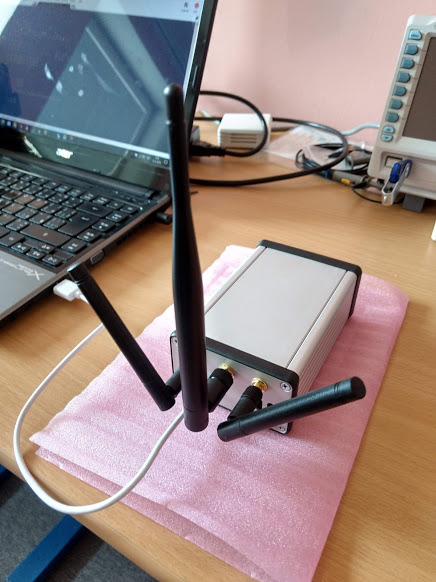
                              0_1536131520840_Gateway_3_antennas.jpg

                              1 Reply Last reply Reply Quote 1
                              • J Offline
                                Jiemde Pybytes Beta @tuftec
                                last edited by

                                @tuftec Here is the sequence I've used for connecting the Gpy to the Orange network in Belgium.```

                                from network import LTE
                                import pycom
                                import time
                                
                                pycom.heartbeat(False)
                                ​
                                lte = LTE()
                                lte.send_at_cmd('AT+CFUN=0')
                                # print("OK line 1")
                                lte.send_at_cmd('AT!="clearscanconfig"')
                                # print("OK line 2")
                                lte.send_at_cmd('AT!="addscanband band=20"')
                                # print("OK line 3")
                                lte.send_at_cmd('AT!="disablelog 1"')
                                # print("OK line 4")
                                lte.send_at_cmd('AT+CGDCONT=1,"IP","nbiot.iot"')
                                # print("OK line 5")
                                lte.send_at_cmd('AT+CFUN=1')
                                # print("OK line 6")
                                
                                pycom.rgbled(0xff0000)
                                	
                                while not lte.isattached():
                                	print('Attaching…')
                                	time.sleep(0.25)
                                
                                pycom.rgbled(0x0000ff)
                                
                                lte.connect()
                                
                                while not lte.isconnected():
                                	print('Connecting…')
                                	time.sleep(0.25)
                                
                                print("lte is connected")
                                
                                pycom.rgbled(0x008000)
                                
                                # Print line are just there to verify if the AT command are executed or not
                                1 Reply Last reply Reply Quote 0
                                • A Offline
                                  arneme @arneme
                                  last edited by

                                  @arneme I can confirm that we have managed to connect the FiPy to our guard band NB-IoT Huawei eNodeB based RAN (Telenor Norway). We do however see some strange signalling behaviour when the FiPy tries to connect to the network. It would help if the documentation could be updated (so that we might be able to get the FiPy to behave correct) or if we could get someone in Pycom or Sequans to discuss this with. We are officially launching a country wide NB-IoT (and Cat M1) network in a few weeks so it would be great if we could get this sorted out asap.

                                  X 1 Reply Last reply Reply Quote 1
                                  • X Offline
                                    Xykon administrators @arneme
                                    last edited by

                                    @arneme As a network operator please email bettina(at)pycom.io as we can provide special hardware & software to allow access to the DCP port.

                                    For everyone else, NB1 firmware 38729 is now available for download at https://software.pycom.io/downloads/sequans2.html with the same updater.elf file as all the other packages.

                                    Christian Ehlers

                                    robert-hhR A 2 Replies Last reply Reply Quote 1
                                    • robert-hhR Offline
                                      robert-hh @Xykon
                                      last edited by

                                      @xykon said in Important update regarding LTE modem updates:

                                      For everyone else, NB1 firmware 38729 is now available for download at https://software.pycom.io/downloads/sequans2.html with the same updater.elf file as all the other packages.

                                      @Xykon Do you know what has been changed? And did you succeed in testing this version?

                                      X 1 Reply Last reply Reply Quote 0
                                      • X Offline
                                        Xykon administrators @robert-hh
                                        last edited by

                                        @robert-hh All I've been told is that it contains various bug fixes compared to the previous version. I haven't yet had any success with this firmware... I keep getting LWM2M/ audit >| lwm2m: error while getting IP addresses and I'm getting the same message in any firmware and both with Vodafone Netherlands and Amarisoft's NB-IoT software. I've prepared trace logs that I've sent to both Vodafone and Sequans for analysis.
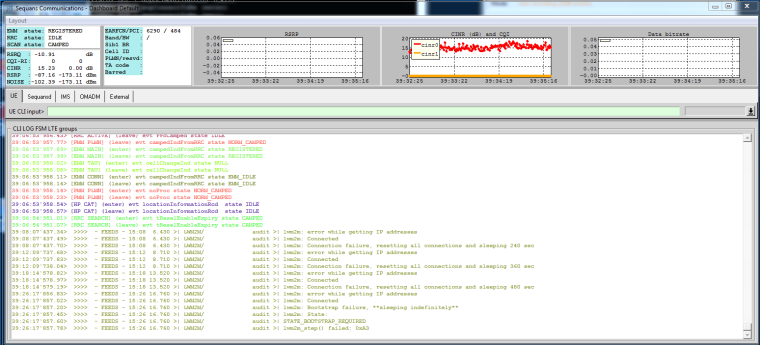
                                        0_1536154570382_2018-09-05_15-35-28.png

                                        Christian Ehlers

                                        robert-hhR T 2 Replies Last reply Reply Quote 0
                                        • robert-hhR Offline
                                          robert-hh @Xykon
                                          last edited by

                                          @xykon There is some difference in behavior to the previous version: it now shows RF activity. It still does not attach, but at least there is some communication.

                                          T 1 Reply Last reply Reply Quote 0
                                          • A Offline
                                            arneme @Xykon
                                            last edited by

                                            @xykon OK, I will try again to reach her :-)

                                            1 Reply Last reply Reply Quote 0

                                            Hello! It looks like you're interested in this conversation, but you don't have an account yet.

                                            Getting fed up of having to scroll through the same posts each visit? When you register for an account, you'll always come back to exactly where you were before, and choose to be notified of new replies (either via email, or push notification). You'll also be able to save bookmarks and upvote posts to show your appreciation to other community members.

                                            With your input, this post could be even better 💗

                                            Register Login
                                            • 1
                                            • 2
                                            • 3
                                            • 4
                                            • 5
                                            • 6
                                            • 7
                                            • 3 / 7
                                            • First post
                                              Last post

                                            Pycom on Twitter

                                            Pycom