Welcome to the Pycom forum Forum
    • \[\[global:header.categories\]\]
    • \[\[global:header.recent\]\]
    • \[\[global:header.tags\]\]
    • \[\[global:header.popular\]\]
    • Login

    Explore Pybytes | Official Documentation | Report a Firmware Bug/Issue | GitHub

    joining OTAA and then sending location data

    Scheduled Pinned Locked Moved LoPy
    lopy4
    24 Posts 3 Posters 3.5k Views 3 Watching
    Loading More Posts
    • Oldest to Newest
    • Newest to Oldest
    • Most Votes
    Reply
    • Reply as topic
    Log in to reply
    This topic has been deleted. Only users with topic management privileges can see it.
    • robert-hhR Offline
      robert-hh @abhishek2101
      last edited by

      @abhishek2101 About region IN865. Dou you use the standard firmware form Pycom or the IN865 package which I had assembled. Only in the latter case, IN865 is supported.

      A 1 Reply Last reply Reply Quote 0
      • A Offline
        abhishek2101 @robert-hh
        last edited by

        @robert-hh I am using the package you made.

        robert-hhR 1 Reply Last reply Reply Quote 0
        • robert-hhR Offline
          robert-hh @abhishek2101
          last edited by

          @abhishek2101 when using ftp, did you send the main.py to /flash/main.py on the device?
          Also, using the package I made, there is an simple files editor embedded, which you can call from the REPL prompt in a terminal window like Putty or Picocom or screen. And some file tools too.
          For the editor, enter:

          from pye import pye
          pye("main.py")
          

          Documentations is at https://github.com/robert-hh/Micropython-Editor
          For the file tools, enter:

          from upysh enter *
          

          then you have something like ls, cat, .. at the REPL prompt, and a man command for an overview of all supported commands.

          A 1 Reply Last reply Reply Quote 0
          • A Offline
            abhishek2101 @robert-hh
            last edited by

            @robert-hh I am using the upload feature of pymakr plugin in atom to upload the main.py file. After this when I ftp into the board I can see main.py inside the flash directory.

            robert-hhR 2 Replies Last reply Reply Quote 0
            • robert-hhR Offline
              robert-hh @abhishek2101
              last edited by

              @abhishek2101 There is always a main.py. The question is, whether it is the right one. You could try to give your file a different name, like otaa_test.py, and start it form the REPL prompt with:
              import otaa_test
              Thatis anyhow the preferred method - putting you own logic in separate files and start that from main.py with import xxxxx

              A 1 Reply Last reply Reply Quote 0
              • A Offline
                abhishek2101 @robert-hh
                last edited by

                @robert-hh i have put the following code in mylora.py and uploaded the same to the board using pymakr plugin for atom. When I upload I see a directory structure created (image attached) under flash directory. Now, if I want this code to run everytime the module is powered on what should I do ?

                from network import LoRa
                import socket
                import time
                import ubinascii
                ​
                # Initialise LoRa in LORAWAN mode.
                # Please pick the region that matches where you are using the device:
                # Asia = LoRa.AS923
                # Australia = LoRa.AU915
                # Europe = LoRa.EU868
                # United States = LoRa.US915
                lora = LoRa(mode=LoRa.LORAWAN, region=LoRa.IN865)
                ​
                # create an OTAA authentication parameters
                app_eui = ubinascii.unhexlify('xxxxxxxx')
                app_key = ubinascii.unhexlify('xxxxxxxxxx')
                ​
                # join a network using OTAA (Over the Air Activation)
                lora.join(activation=LoRa.OTAA, auth=(app_eui, app_key), timeout=0)
                ​
                # wait until the module has joined the network
                while not lora.has_joined():
                    time.sleep(2.5)
                    print('Not yet joined...')
                ​
                # create a LoRa socket
                s = socket.socket(socket.AF_LORA, socket.SOCK_RAW)
                ​
                # set the LoRaWAN data rate
                s.setsockopt(socket.SOL_LORA, socket.SO_DR, 5)
                ​
                # make the socket blocking
                # (waits for the data to be sent and for the 2 receive windows to expire)
                s.setblocking(True)
                ​
                # send some data
                s.send(bytes([0x01, 0x02, 0x03]))
                ​
                # make the socket non-blocking
                # (because if there's no data received it will block forever...)
                s.setblocking(False)
                ​
                # get any data received (if any...)
                data = s.recv(64)
                print(data)
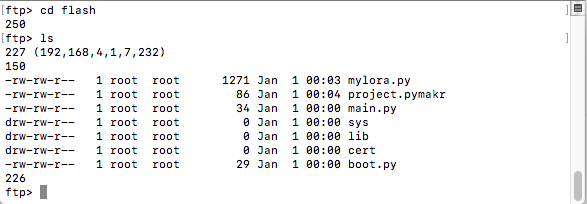
                

                0_1537957038455_Screenshot 2018-09-26 15.44.51.png

                robert-hhR 1 Reply Last reply Reply Quote 0
                • robert-hhR Offline
                  robert-hh @abhishek2101
                  last edited by

                  @abhishek2101 Add a statement:
                  import mylora
                  to main.py

                  A 1 Reply Last reply Reply Quote 0
                  • A Offline
                    abhishek2101 @robert-hh
                    last edited by

                    @robert-hh unfortunately, that is not working for me.

                    robert-hhR 1 Reply Last reply Reply Quote 0
                    • robert-hhR Offline
                      robert-hh @abhishek2101
                      last edited by

                      @abhishek2101 Does it work, if you call:
                      import mylora
                      from the REPL prompt?
                      if yes, and this statement is inside main.py, do not reset from pymakr, instead push the reset button on the Lopy4.
                      Pymakr may do a safe boot, which prevents boot.py and main.py from running.
                      Using my firmware package, you can check the content of main.py and boot.py from the REPL command line by:

                      from upysh import *
                      cat("main.py")
                      cat("boot.py")
                      
                      A 1 Reply Last reply Reply Quote 0
                      • robert-hhR Offline
                        robert-hh @abhishek2101
                        last edited by

                        @abhishek2101 You can also look into files using Chrome or the linux file manager, by connecting to:
                        ftp://<lopy_ip_address>
                        e.g.
                        ftp://192.168.4.1

                        1 Reply Last reply Reply Quote 0
                        • A Offline
                          abhishek2101 @robert-hh
                          last edited by

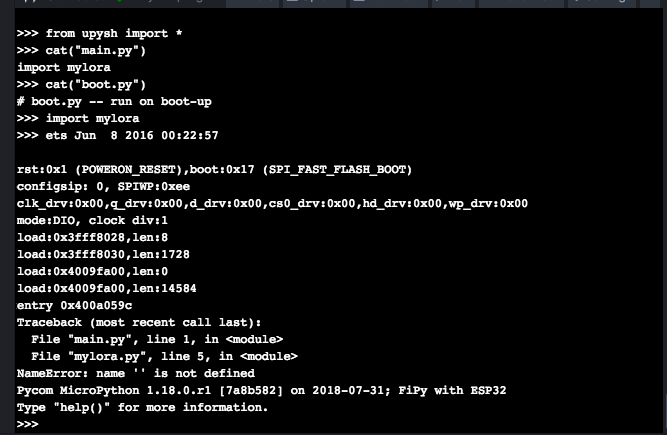
                          @robert-hh it does not work from REPL prompt also. I have also tried reseting from the button.
                          screenshot attached.
                          0_1537958985096_Screenshot 2018-09-26 16.18.08.png

                          robert-hhR 1 Reply Last reply Reply Quote 0
                          • robert-hhR Offline
                            robert-hh @abhishek2101
                            last edited by

                            @abhishek2101 What I see:
                            main.py starts and calls mylora.py, and that runs into an error at line 5. So check your script.

                            A 1 Reply Last reply Reply Quote 0
                            • A Offline
                              abhishek2101 @robert-hh
                              last edited by abhishek2101

                              @robert-hh here is the code, dont see any problem with line 5

                              the same code when i run (using pymakr plugin in atom) without uploading is able to run and join the TTN.

                              from network import LoRa
                              import socket
                              import time
                              import ubinascii
                              ​
                              # Initialise LoRa in LORAWAN mode.
                              # Please pick the region that matches where you are using the device:
                              # Asia = LoRa.AS923
                              # Australia = LoRa.AU915
                              # Europe = LoRa.EU868
                              # United States = LoRa.US915
                              lora = LoRa(mode=LoRa.LORAWAN, region=LoRa.IN865)
                              ​
                              # create an OTAA authentication parameters
                              app_eui = ubinascii.unhexlify('xxxxxxx')
                              app_key = ubinascii.unhexlify('xxxxxxx')
                              ​
                              # join a network using OTAA (Over the Air Activation)
                              lora.join(activation=LoRa.OTAA, auth=(app_eui, app_key), timeout=0)
                              ​
                              # wait until the module has joined the network
                              while not lora.has_joined():
                                  time.sleep(2.5)
                                  print('Not yet joined...')
                              ​
                              # create a LoRa socket
                              s = socket.socket(socket.AF_LORA, socket.SOCK_RAW)
                              ​
                              # set the LoRaWAN data rate
                              s.setsockopt(socket.SOL_LORA, socket.SO_DR, 5)
                              ​
                              # make the socket blocking
                              # (waits for the data to be sent and for the 2 receive windows to expire)
                              s.setblocking(True)
                              ​
                              # send some data
                              s.send(bytes([0x01, 0x02, 0x03]))
                              ​
                              # make the socket non-blocking
                              # (because if there's no data received it will block forever...)
                              s.setblocking(False)
                              ​
                              # get any data received (if any...)
                              data = s.recv(64)
                              print(data)```
                              robert-hhR 1 Reply Last reply Reply Quote 0
                              • robert-hhR Offline
                                robert-hh @abhishek2101
                                last edited by

                                @abhishek2101 There is a difference. When you run the code from pymakr, it is freshly uploaded. If you call it from main.py fro in the terminal window of pymakr, you run the local copy on the device.
                                What happens, if in the REPL prompt, you enter the command:
                                import mylora

                                A 1 Reply Last reply Reply Quote 0
                                • A Offline
                                  abhishek2101 @robert-hh
                                  last edited by

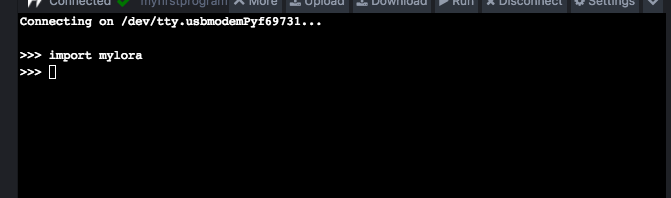
                                  @robert-hh nothing happens

                                  attached screenshot
                                  0_1537961419528_Screenshot 2018-09-26 16.59.56.png

                                  robert-hhR 1 Reply Last reply Reply Quote 0
                                  • robert-hhR Offline
                                    robert-hh @abhishek2101
                                    last edited by

                                    @abhishek2101 Since you have importedthat already in main.py, the second one is not executed. You have to remove that "import mylora" first from main.py

                                    A 1 Reply Last reply Reply Quote 0
                                    • A Offline
                                      abhishek2101 @robert-hh
                                      last edited by

                                      @robert-hh got it working !!
                                      since i was cutting and pasting the code, there were some truncation problems which were causing the errors.

                                      robert-hhR 1 Reply Last reply Reply Quote 0
                                      • robert-hhR Offline
                                        robert-hh @abhishek2101
                                        last edited by

                                        @abhishek2101 That's good. besides that, make yourself familiar with ftp (file transfer protocol), who's only purpose is to transfer files. That avoids any copying errros.

                                        1 Reply Last reply Reply Quote 0

                                        Hello! It looks like you're interested in this conversation, but you don't have an account yet.

                                        Getting fed up of having to scroll through the same posts each visit? When you register for an account, you'll always come back to exactly where you were before, and choose to be notified of new replies (either via email, or push notification). You'll also be able to save bookmarks and upvote posts to show your appreciation to other community members.

                                        With your input, this post could be even better 💗

                                        Register Login
                                        • 1
                                        • 2
                                        • 1 / 2
                                        • First post
                                          Last post

                                        Pycom on Twitter

                                        Pycom