Welcome to the Pycom forum Forum
    • \[\[global:header.categories\]\]
    • \[\[global:header.recent\]\]
    • \[\[global:header.tags\]\]
    • \[\[global:header.popular\]\]
    • Login

    Explore Pybytes | Official Documentation | Report a Firmware Bug/Issue | GitHub

    Frustrating Board - Cannot get started

    Scheduled Pinned Locked Moved WiPy 2&3
    wipy 3.0boot.pystartup
    8 Posts 2 Posters 1.0k Views 2 Watching
    Loading More Posts
    • Oldest to Newest
    • Newest to Oldest
    • Most Votes
    Reply
    • Reply as topic
    Log in to reply
    This topic has been deleted. Only users with topic management privileges can see it.
    • J Offline
      jimmie
      last edited by

      I would appreciate the community's help as I have never had that much trouble getting any micro to run.

      Several sites say use www.wipy.io to connect to the board. I then found out after poking around that it is www.pycom.io

      I have been able to upgrade the firmware. I have also been able to access the board using IP 192.168.4.1.

      I am unable to get the board to hook up to my Wifi as apparently boot.py has an error as reported by Pymakr. I have attached the file I am using and would appreciate any help.0_1539733658707_boot.py

      1 Reply Last reply Reply Quote 0
      • C Offline
        cmisztur
        last edited by

        Which CPU and board did you get?

        https://docs.pycom.io/

        J 2 Replies Last reply Reply Quote 0
        • J Offline
          jimmie @cmisztur
          last edited by

          @cmisztur Wipy 3.0 and Expansion Board 3.0.

          Was able to run the RGB example but cannot run the attached boot.py

          1 Reply Last reply Reply Quote 0
          • J Offline
            jimmie @cmisztur
            last edited by jimmie

            @cmisztur

            I was able to run the attached boot.py. However, when I uploaded to the board, I get an error:

            Connecting to a Pycom device...
            Traceback (most recent call last):
              File "boot.py", line 4, in <module>
            NameError: name '​' is not defined
            Pycom MicroPython 1.18.1.r1 [v1.8.6-849-b0520f1] on 2018-08-29; WiPy with ESP32
            Type "help()" for more information.
            >>>
            

            or

            >>> Running c:\Users\ttc\Desktop\boot.py
            
            >>>
            >>>
            ♦Traceback (most recent call last):
              File "<stdin>", line 13, in <module>
            OSError: the requested operation is not possible
            ♦>
            Pycom MicroPython 1.18.1.r1 [v1.8.6-849-b0520f1] on 2018-08-29; WiPy with ESP32
            Type "help()" for more information.
            >>>
            >>>
            
            C 1 Reply Last reply Reply Quote 0
            • C Offline
              cmisztur @jimmie
              last edited by

              @jimmie looks like you have some nonprintable characters in there.

              https://www.soscisurvey.de/tools/view-chars.php
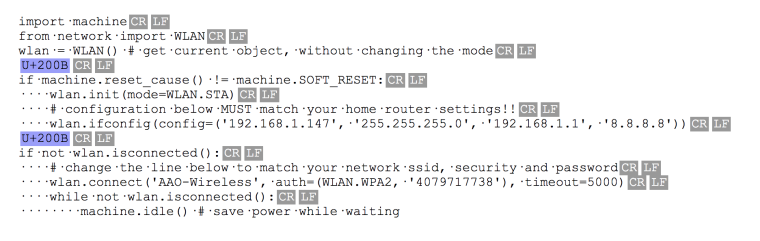
              0_1539740404211_05656812-12bc-4b80-b1ef-6a91a205e07d-image.png

              J 1 Reply Last reply Reply Quote 0
              • J Offline
                jimmie @cmisztur
                last edited by

                @cmisztur

                Thank you.

                Those are just spaces and carriage returns/line feeds ..

                1 Reply Last reply Reply Quote 0
                • J Offline
                  jimmie
                  last edited by

                  @cmisztur

                  THANK YOU VERY MUCH.

                  I have never seen this before as I always copy the code to notepad first to get rid of unprintable characters. Not sure what the U+200B is?!

                  It is working now after getting rid of that character..

                  C 1 Reply Last reply Reply Quote 0
                  • C Offline
                    cmisztur @jimmie
                    last edited by

                    @jimmie glad that copy and paste is your biggest problem :)

                    1 Reply Last reply Reply Quote 0

                    Hello! It looks like you're interested in this conversation, but you don't have an account yet.

                    Getting fed up of having to scroll through the same posts each visit? When you register for an account, you'll always come back to exactly where you were before, and choose to be notified of new replies (either via email, or push notification). You'll also be able to save bookmarks and upvote posts to show your appreciation to other community members.

                    With your input, this post could be even better 💗

                    Register Login
                    • 1 / 1
                    • First post
                      Last post

                    Pycom on Twitter

                    Pycom