New LTE Firmware releases v1.18.1.r4 (stable) & 1.19.0.b5 (development) & NB-IoT firmware 40343
-
@iwahdan
The test failed also without SSL:INFO 6619. HTTP POST successful: {"args":{},"data":{"time":"15432"},"files":{},"form":{},"headers":{"x-forwarded-proto":"https","host":"34.202.13.18","content-length":"17","accept":"application/json","content-type":"application/json","x-forwarded-port":"80"},"json":{"time":"15432"},"url":"https://34.202.13.18/post"} INFO 6620. HTTP POST successful: {"args":{},"data":{"time":"15435"},"files":{},"form":{},"headers":{"x-forwarded-proto":"https","host":"34.202.13.18","content-length":"17","accept":"application/json","content-type":"application/json","x-forwarded-port":"80"},"json":{"time":"15435"},"url":"https://34.202.13.18/post"} INFO 6621. HTTP POST successful: {"args":{},"data":{"time":"15437"},"files":{},"form":{},"headers":{"x-forwarded-proto":"https","host":"34.202.13.18","content-length":"17","accept":"application/json","content-type":"application/json","x-forwarded-port":"80"},"json":{"time":"15437"},"url":"https://34.202.13.18/post"} INFO 6622. HTTP POST successful: {"args":{},"data":{"time":"15439"},"files":{},"form":{},"headers":{"x-forwarded-proto":"https","host":"34.202.13.18","content-length":"17","accept":"application/json","content-type":"application/json","x-forwarded-port":"80"},"json":{"time":"15439"},"url":"https://34.202.13.18/post"} INFO 6623. HTTP POST successful: {"args":{},"data":{"time":"15441"},"files":{},"form":{},"headers":{"x-forwarded-proto":"https","host":"34.202.13.18","content-length":"17","accept":"application/json","content-type":"application/json","x-forwarded-port":"80"},"json":{"time":"15441"},"url":"https://34.202.13.18/post"} WARNING 6624. HTTP POST failed: -1 WARNING 6625. HTTP POST failed: -1 WARNING 6626. HTTP POST failed: -1 WARNING 6627. HTTP POST failed: -1 WARNING 6628. HTTP POST failed: -1 WARNING 6629. HTTP POST failed: -1 WARNING 6630. HTTP POST failed: -1 WARNING 6631. HTTP POST failed: -1 WARNING 6632. HTTP POST failed: -1 WARNING 6633. HTTP POST failed: -1 WARNING 6634. HTTP POST failed: 23 WARNING 6635. HTTP POST failed: 23 WARNING 6636. HTTP POST failed: 23 WARNING 6637. HTTP POST failed: 23 WARNING 6638. HTTP POST failed: 23 WARNING 6639. HTTP POST failed: 23 -
Second test without SSL failed as well, this time with "weird" exception:
INFO 9937. HTTP POST successful: {"args":{},"data":{"time":"22492"},"files":{},"form":{},"headers":{"x-forwarded-proto":"https","host":"34.202.13.18","content-length":"17","accept":"application/json","content-type":"application/json","x-forwarded-port":"80"},"json":{"time":"22492"},"url":"https://34.202.13.18/post"} INFO 9938. HTTP POST successful: {"args":{},"data":{"time":"22494"},"files":{},"form":{},"headers":{"x-forwarded-proto":"https","host":"34.202.13.18","content-length":"17","accept":"application/json","content-type":"application/json","x-forwarded-port":"80"},"json":{"time":"22494"},"url":"https://34.202.13.18/post"} INFO 9939. HTTP POST successful: {"args":{},"data":{"time":"22497"},"files":{},"form":{},"headers":{"x-forwarded-proto":"https","host":"34.202.13.18","content-length":"17","accept":"application/json","content-type":"application/json","x-forwarded-port":"80"},"json":{"time":"22497"},"url":"https://34.202.13.18/post"} WARNING 9940. HTTP POST failed: 'NoneType' object has no attribute 'split' WARNING 9941. HTTP POST failed: -1 WARNING 9942. HTTP POST failed: -1 WARNING 9943. HTTP POST failed: -1 WARNING 9944. HTTP POST failed: -1 WARNING 9945. HTTP POST failed: -1 WARNING 9946. HTTP POST failed: -1 WARNING 9947. HTTP POST failed: -1 WARNING 9948. HTTP POST failed: -1 WARNING 9949. HTTP POST failed: -1 WARNING 9950. HTTP POST failed: 23 WARNING 9951. HTTP POST failed: 23 WARNING 9952. HTTP POST failed: 23 WARNING 9953. HTTP POST failed: 23 WARNING 9954. HTTP POST failed: 23 WARNING 9955. HTTP POST failed: 23 -
I'm now trying just to get reliable network communication working using WIFI with v1.18.1.r4.
Sometimes it works and sometimes it doesn't.
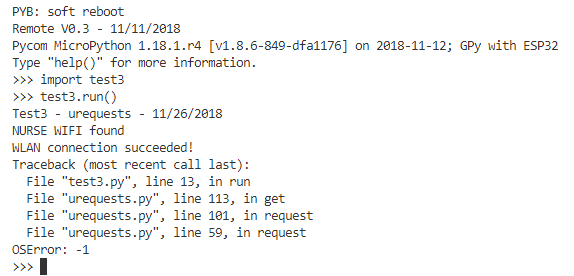
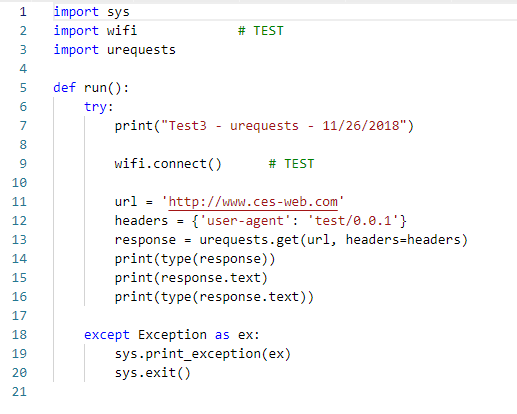
Below is a simple program to try to download a web page using a WIFI connection with the urequests.py module.
The socket connection command fails at least 50% of the time returning a OSError: -1 exception.
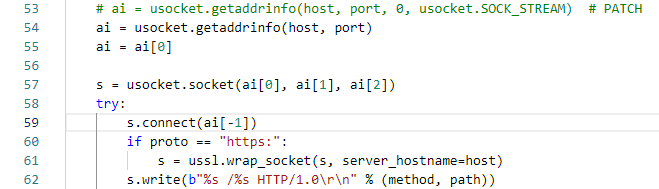
Part of urequests.py where crash occurs:
Simple test program:
-
Hi @danielm, when running your code I don't get the errors you have but however I do get another issue where the test is stuck at some point waiting for the POST response message - since blocking sockets is used - (it gets stuck after couple of hundred Posts, so I was not able to reach the point you had in your test (i.e in range of Thousands)), which i am currently investigating and might actually be a problem with our NB-IoT emulator.
Will keep you updated.
-
Hi @iwahdan, do you have possbility to connect to production NB-IoT network of MNO to find out if this problem disappears?
I think I have encountered this behavior in the past as well. The module was not completely hanged as it was possible to soft reset using Ctrl+F. I am suspecting that some operation with blocking socket will not timeout despite the fact that the timeout has been set.
-
Hi @danielm the error you are getting
HTTP POST failed: 'NoneType' object has no attribute 'split'is because the socket operationsocket.recv()has returned error code =EGAINwhich could be when the operation timesout if you are are setting a socket timeout > 0 , where this error is considered non blocking by thereadlinefunction in MicroPythonpy/stream.cwhere in that case aNoneobject is returned. maybe this should be handled in requests.pyon the other hand the problem of failing to create more sockets
HTTP POST failed: 23that happens at some point, is because lwip stack fails to allocate new sockets and this is because every time the exception'NoneType' object has no attribute 'split'is raised it is not caught by the exception handler in requests.pyexcept OSError: s.close() raiseAs it is an
AttributeErrornot anOSErrorexp, thus the socket is not closed and by turn the lwip stack does not free that socket as it considers conn still active since err code isEGAIN.
I know that in the normal case when the POST is successful you also don't close the socket afterwards but that is not a problem as the lwip will Reuse the oldest socket not closed yet [Note: that the Max active sockets is Configured to 10] .so the flow goes as follow socket # 54 gets allocated for first message then 55 for second and so on till #64 .. then lwip will allocate socket #54 again for creating new socket then #55 and so on.
However when a socket connection timeout if the socket is not closed the socket # will be reserved forever.so in your case if a socket operation timeout say every 1000 successful POST the esp32 will fail to allocate new sockets after 10000 POSTs (so it is a socket leak)
so to fix you problem you have to do the following modifications in requests.py:
Update exception handler to include all exceptions so that the socket is closed in any case:
    except :
        s.close()
        raise
maybe it is also a good idea to close the socket after successful POST as follows:
response = urequests.post(url, headers={ "Content-Type": "application/json", "Accept": "application/json"}, data='{"time": "%s"}' % (time.time()))
print("INFO", "%s. HTTP POST successful: %s" % (n, response.text))
response.close()
Thanks for your help.
-
Hi @iwahdan. Thank you for excelent analysis. I will perform recommended modifications and also long-term tests.
I believe that this issue is not related to issues you are describing in this post?
https://forum.pycom.io/topic/3985/new-lte-firmware-releases-v1-18-1-r4-stable-1-19-0-b5-development-nb-iot-firmware-40343/39 -
@danielm Thanks, No the problem I mentioned in that post is because the ssl handshake does not timeout, which I think is not what happens in your case.
-
@iwahdan
Is it possible to fix the ssl handshake not timing out?
What about socket.connect() timeout workaround implementation?Due to nature of network communication any socket operation may fail but it should never hang if timeout is set. Otherwise it will not be possible to develop reliable applications.
-
Hi @danielm, I am investigating the handshake problem, and for a the
socket.connecttimeout I think it is possible to have a workaround in the Micropython, but it would need proper design to ensure a robust implementation .I've already created an internal ticket for it.
-
@iwahdan
Great, please let me know if you need help with testing. -
@tlanier
The bug I was experiencing was caused by my inexperience using Python. I was allocating a new WLAN object every time I ran the code without destroying the old object.Here is a listing of my new wifi.py module that fixes my problem. I'm sorry if I've caused anyone to lose confidence in the GPy or spend time looking for bugs that did not exist.
from network import WLAN from util import log import utime wlan = None def connect(): global wlan if (wlan != None): if wlan.isconnected(): print('Already connected') return wlan = WLAN(mode=WLAN.STA) while True: # scan for WIFI access points nets = wlan.scan() print(nets) for net in nets: if (net.ssid == 'NURSEX'): print('NURSEX WIFI found') # wlan.connect(net.ssid, auth=(net.sec, 'password'), timeout=5000) wlan.connect(net.ssid, auth=(net.sec, 'password')) while not wlan.isconnected(): utime.sleep_ms(1000) print('WLAN connection succeeded!') return utime.sleep_ms(1000) def disconnect(): global wlan if (wlan != None): wlan.disconnect() wlan = None``` -
@tlanier No problem!, thanks for letting us know
-
@iwahdan
Are there any news regarding solution for known socket issues? -
@danielm what socket issues are you referring too?
-
@wghirakawa
The issue is that socket.connect() and SSL handshake will not timeout also in case the socket timeout is set and hang the application forever.
https://forum.pycom.io/topic/3985/new-lte-firmware-releases-v1-18-1-r4-stable-1-19-0-b5-development-nb-iot-firmware-40343/45
Hello! It looks like you're interested in this conversation, but you don't have an account yet.
Getting fed up of having to scroll through the same posts each visit? When you register for an account, you'll always come back to exactly where you were before, and choose to be notified of new replies (either via email, or push notification). You'll also be able to save bookmarks and upvote posts to show your appreciation to other community members.
With your input, this post could be even better 💗
Register Login