G01 power consumption
-
@danielm After deinit() Did you tried also the scenario to reset machine then go to deep sleep?
-
@colateral
I did not but I have an information that Pycom is already working on a fix. So let's wait for it and then I will repeat the tests with the same setup. -
@danielm Tried the same with my FiPy over USB.
a) first attached and connected,
and then ran the sequence:>>> lte.disconnect() >>> lte.dettach() >>> lte.deinit() >>> deepsleep(60*1000)The current went down to 11mA, which is just the power consumption of the USB/UART bridge.
I used a simple Chinese current tester for that purpose, resolution 1 mA, so I cannot tell whther the FiPy current consuption went down into the µA range.
And yes: SQNS firmware NB1-40343, FiPy firmware v1.20.0.rc0 -
@danielm , do you have the
pycom.lte_modem_en_on_bootflag set or not? -
@iwahdan
I did not change the default settings. Will check tomorrow, the board is in my office. -
@danielm Ok, the issue that we have detected is that since Low power mode is not currently enabled by default in NB-IoT sequans firmware, if
lte_modem_en_on_bootis not set , doing justmachine.deepsleepwithout initialising LTEimport machine machine.deepsleep()will not put the modem in Low power mode as we enable Low power mode in LTE initialization.
However it is strange that you get these DS currents when doing LTE initialization before going to Deepsleep.
I've tried your code with GPy and FiPy and I can always get Deepsleep current in order of uAmps in case of having LTE initialization before DS
The DS current consumption is high only when havinglte_modem_en_on_bootflag not set and going to Deepsleep without LTE init as I described above, which I will push a fix for it tomorrow.I will try to test also on G01 tomorrow, but I don't think it would be different.
-
@iwahdan
I checked state oflte_modem_en_on_bootand it returned True. I am sure that I did not set it to True. The module was unused, removed from the reel before soldering. Firmware upgrade sequence until now was factory version->1.20.0.rc0->1.18.1.r1->1.20.0.rc0. This is probably why I measured low DS current values in case I did not initialize LTE before going to DS.import machine import network lte=network.LTE() lte.deinit() machine.deepsleep()I again verified that this code results in DS current of 29 mA.
Then I set
lte_modem_en_on_bootto False and disconnected from power for several seconds.import machine machine.deepsleep()This code resulted in DS current of 76mA (checked twice) so there is some difference.
import machine import network lte=network.LTE() lte.deinit() machine.deepsleep()This code resulted in DS current of 29mA - 2 of 3 times, 1 hang on lte.init()
import machine
import network
lte=network.LTE()
lte.attach()
lte.deinit()
machine.deepsleep()
This code resulted in DS current of 29mA
import machine
import network
lte=network.LTE()
lte.attach()
lte.dettach()
lte.deinit()
machine.deepsleep()
This code resulted in DS current of 29mA
-
G01 power consumption test with v1.20.0.rc1.
Triggering deep sleep without LTE init results in 7uA deep sleep current albeit it takes some time.Running following sequence from REPL results in deep sleep current of 29mA - tested twice.
Based on power consumption it seems that attach process starts after first lte.isattached() command!Pycom MicroPython 1.20.0.rc1 [v1.9.4-bc4d7d0] on 2018-12-12; GPy with ESP32 Type "help()" for more information. >>> import machine >>> import network >>> lte=network.LTE() >>> lte.attach(band=20,apn="nbiot.telekom.sk") >>> lte.isattached() False >>> lte.isattached() False >>> lte.isattached() False >>> lte.isattached() False >>> lte.isattached() False >>> lte.isattached() False >>> lte.isattached() False >>> lte.isattached() False >>> lte.isattached() True >>> lte.connect() >>> lte.isconnected() True >>> lte.disconnect() >>> lte.dettach() >>> lte.deinit() >>> machine.deepsleep()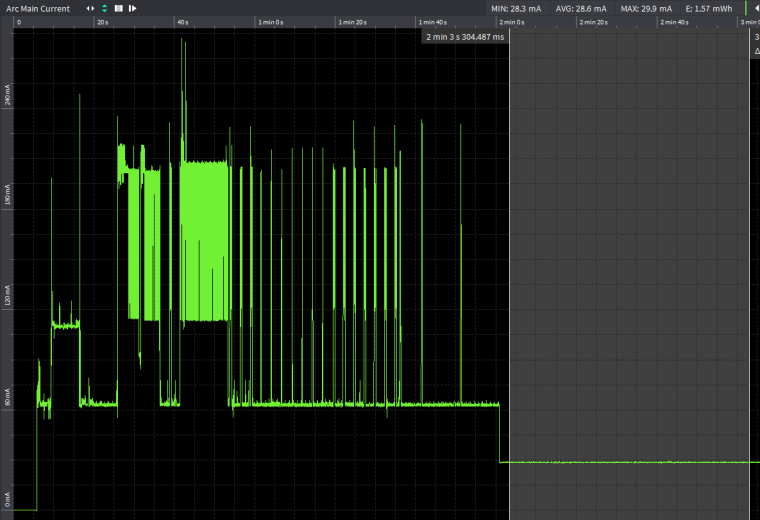
-
@danielm Using your command sequence with a FiPy, firmware v1.20.0.rc1, the current drops after a few seconds to 290µA, and then to 20µA after about a minute.
With lte.send_at_command('AT!="CBE::powerOff"') between lte.dettach() and lte.deinit() the current drops to 20 µA after a while too, but faster than a minute.
Without LTE init, the current drops to 20µA too. The difference to your test may be caused by the LoRa chip on the FiPy.
For the test, the FiPy was just connected to GND, Vin at 3.8V and an antenna, every other pin was left open. -
@robert-hh
Deep sleep current level around 20uA is expected if you take into account quiescent current of LM3281 voltage regulator. In my test I was powering G01 directly without any regulator. You managed to achieve lowest possible current value. Do you have possibility to test with G01 instead of FiPy? -
@danielm No. I just have development modules.
-
Dear Robert,
@robert-hh said in G01 power consumption:
Without LTE init, the current drops to 20µA too.
Are you saying that the LTE shutdown magic by invoking
lte.deinit()referenced many times in the forum will not be required at all? Our scenario is that we are currently not using the LTE modem of the FiPy and want to get power consumption as low as possible.We are humbly asking for your experience here, especially with the latest firmware releases.
Also, I just stumbled over
lte.send_at_cmd('AT!="powerOff"'), which also does not sound that bad ;]. Maybe this will shut down the modem in the quickest way possible without going through all procedures of the regularlte.deinit().Thanks already for taking the time to answer our question on this evergreen topic.
With kind regards,
Andreas.

Hello! It looks like you're interested in this conversation, but you don't have an account yet.
Getting fed up of having to scroll through the same posts each visit? When you register for an account, you'll always come back to exactly where you were before, and choose to be notified of new replies (either via email, or push notification). You'll also be able to save bookmarks and upvote posts to show your appreciation to other community members.
With your input, this post could be even better 💗
Register Login