PyTrack not working with Processing

-
Hello, I'm getting started with PyTrack and trying out the accelerometer example. I am able to output the accelerometer data in PyMakr in Atom, however Iget an error when I run the visualizer in Processing:
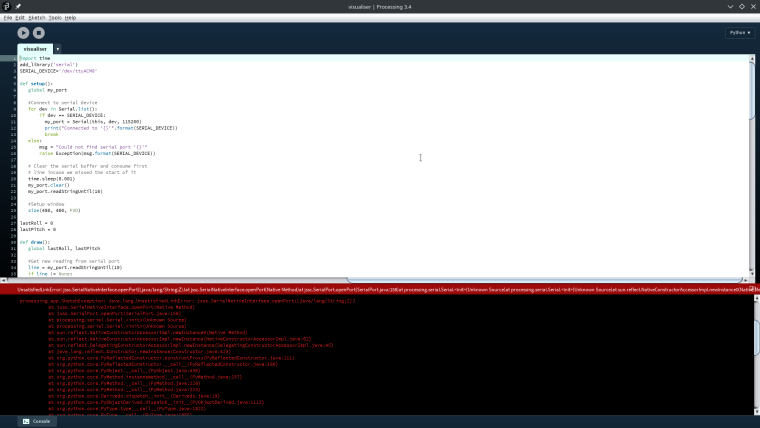
processing.app.SketchException: java.lang.UnsatisfiedLinkError: jssc.SerialNativeInterface.openPort(Ljava/lang/String;Z)J
	at jssc.SerialNativeInterface.openPort(Native Method)
	at jssc.SerialPort.openPort(SerialPort.java:158)
	at processing.serial.Serial.<init>(Unknown Source)
	at processing.serial.Serial.<init>(Unknown Source)
	at sun.reflect.NativeConstructorAccessorImpl.newInstance0(Native Method)
	at sun.reflect.NativeConstructorAccessorImpl.newInstance(NativeConstructorAccessorImpl.java:62)
	at sun.reflect.DelegatingConstructorAccessorImpl.newInstance(DelegatingConstructorAccessorImpl.java:45)
	at java.lang.reflect.Constructor.newInstance(Constructor.java:423)
	at org.python.core.PyReflectedConstructor.constructProxy(PyReflectedConstructor.java:211)
	at org.python.core.PyReflectedConstructor.__call__(PyReflectedConstructor.java:180)
	at org.python.core.PyObject.__call__(PyObject.java:438)
	at org.python.core.PyMethod.instancemethod___call__(PyMethod.java:237)
	at org.python.core.PyMethod.__call__(PyMethod.java:228)
	at org.python.core.PyMethod.__call__(PyMethod.java:223)
	at org.python.core.Deriveds.dispatch__init__(Deriveds.java:19)
	at org.python.core.PyObjectDerived.dispatch__init__(PyObjectDerived.java:1112)
	at org.python.core.PyType.type___call__(PyType.java:1822)
	at org.python.core.PyType.__call__(PyType.java:1805)
	at org.python.core.PyObject.__call__(PyObject.java:515)
	at org.python.core.PyObject.__call__(PyObject.java:519)
	at org.python.pycode._pyx11.setup$1(visualiser.pyde:22)
	at org.python.pycode._pyx11.call_function(visualiser.pyde)
	at org.python.core.PyTableCode.call(PyTableCode.java:171)
	at org.python.core.PyBaseCode.call(PyBaseCode.java:125)
	at org.python.core.PyFunction.__call__(PyFunction.java:403)
	at org.python.core.PyFunction.__call__(PyFunction.java:398)
	at jycessing.PAppletJythonDriver.setup(Unknown Source)
	at processing.core.PApplet.handleDraw(PApplet.java:2404)
	at processing.opengl.PSurfaceJOGL$DrawListener.display(PSurfaceJOGL.java:866)
	at jogamp.opengl.GLDrawableHelper.displayImpl(GLDrawableHelper.java:692)
	at jogamp.opengl.GLDrawableHelper.display(GLDrawableHelper.java:674)
	at jogamp.opengl.GLAutoDrawableBase$2.run(GLAutoDrawableBase.java:443)
	at jogamp.opengl.GLDrawableHelper.invokeGLImpl(GLDrawableHelper.java:1293)
	at jogamp.opengl.GLDrawableHelper.invokeGL(GLDrawableHelper.java:1147)
	at com.jogamp.newt.opengl.GLWindow.display(GLWindow.java:759)
	at com.jogamp.opengl.util.AWTAnimatorImpl.display(AWTAnimatorImpl.java:81)
	at com.jogamp.opengl.util.AnimatorBase.display(AnimatorBase.java:452)
	at com.jogamp.opengl.util.FPSAnimator$MainTask.run(FPSAnimator.java:178)
	at java.util.TimerThread.mainLoop(Timer.java:555)
	at java.util.TimerThread.run(Timer.java:505)

	at jycessing.mode.run.SketchRunner.convertPythonSketchError(SketchRunner.java:222)
	at jycessing.mode.run.SketchRunner.lambda$2(SketchRunner.java:119)
	at java.lang.Thread.run(Thread.java:748)```
I figured it had something to do with the jssc library and tried installing jssc. I extracted the files from jssc.jar and moved the files from jssc/lib/linux into ~/.jssc/linux but I still get the same error. I'm currently at a loss.
Also, I'm on Manjaro linux.
Any help would be appreciated!
-
I presume atom is closed/not connected when your trying to connect via Processing.
(Altho UnsatisfiedLinkError suggests its not just a case of the port being busy).Sadly I think this is more suited for Processing's support forums than It is here as the problem seems to lie outside of Pycoms control, That said Ill leave this thread open and perhaps someone might be able to help :)
-
@paul-thornton Ok thanks for the reply!
Hello! It looks like you're interested in this conversation, but you don't have an account yet.
Getting fed up of having to scroll through the same posts each visit? When you register for an account, you'll always come back to exactly where you were before, and choose to be notified of new replies (either via email, or push notification). You'll also be able to save bookmarks and upvote posts to show your appreciation to other community members.
With your input, this post could be even better 💗
Register Login