SMS Messages
-
Has anyone been able to receive SMS messages with the GPy?
-
I haven't tried yet, but also wondering about receiving SMS.
-
Below is what I've tried with no luck using a Hologram SIM. Am I just wasting my time or should this work?
Does the CAT-M1 network support SMS messaging?
- surely it does
Does GPy modem support SMS messaging?
- I would think so, but I have found no evidence that it does.
Does Hologram SIM support SMS messaging?
- Their dashboard has support for sending SMS messages.
Does MicroPython in GPy have SMS messaging routines?
- I have found none in my search.
Has anyone ever gotten SMS messaging to work with GPy?
- I have found no indication of anyone receiving a SMS message with a GPy.
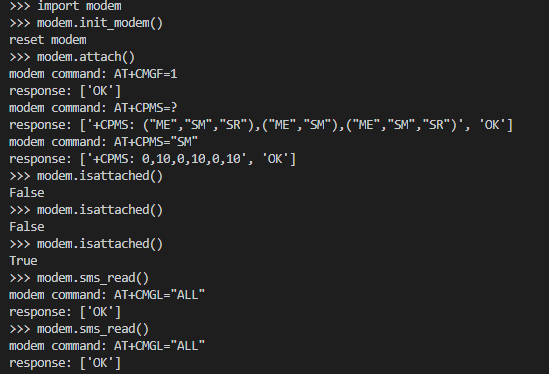
-
Ill put this to the team and see what I can find out.
-
@paul-thornton
Is there some AT command which enables/disables SMS messages? -
@tlanier SMS with the GPY is not something I have tried yet, but I added it to my list of of things to investigate further, a few months ago. I could see SMS being useful to low level system status updates for the project I am developing.
The 'Monarch Platform LR5.1.1.0 AT Commands Reference Manual' that I downloaded to help me understand the LTE configuration does have some references to SMS use in Chapter 6: SMS Proprietary Commands. This makes me think there is some capability in the GPY. As I said, I haven't tried to make it work yet, but you could take a look in that document? I will get to that sometime in the next couple of weeks, after I sort out more pressing code issues.
-
@stevo52 I went and spoke to the team. and your correct the modem does indeed support SMS. That said we do not have any form of API to read / send them exposed to python. but that the features should work via raw AT commands.
They suggested that perhaps https://pypi.org/project/sms might be a suitable target for modification.
-
@paul-thornton Hi Paul, yes, AT commands are used - as with the actual LTE setup, but are indeed workable (well, they work on the Telstra network here in OZ). I tried to post a couple of examples from the manual here, but I was advised that the content was considered 'spam'?.
So anyone wanting to try, should get the document I mentioned and refer to the relevant chapter. There isn't a huge range of commands, but it's just SMS anyway? I tried sending normal and multi-line sms, in both directions, at normal and high priority - all worked fine once I worked the exact syntax requirements out and 'built' the commands. But I have only dipped a toe in thus far, not really developed any serious code application.
-
@stevo52 Odd should not be considered spam. If you'd like them posted in the thread feel free to pm them to me and ill post them here on your behalf :)
-
It works!
The solution was to do: AT+CPMS="SM","SM","SM"
Before I was doing: AT+CPMS="SM" which does not work
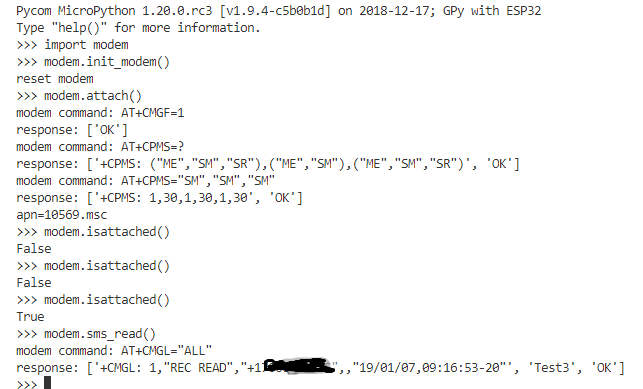 bolded text
 -
Finally!
import time, network
lte=network.LTE()

def _getlte():
  if not lte.isattached():
    print('lte attaching '); lte.attach()
    while 1:
      if lte.isattached(): print(' OK'); break
      print('. ', end=''); time.sleep(1)

_getlte()
print('configuring for sms', end=' '); ans=lte.send_at_cmd('AT+CMGF=1').split('\r\n'); print(ans, end=' ')
ans=lte.send_at_cmd('AT+CPMS="SM", "SM", "SM"').split('\r\n'); print(ans); print()
print('receiving an sms', end=' '); ans=lte.send_at_cmd('AT+CMGL="all"').split('\r\n'); print(ans); print()
print('sending an sms', end=' '); ans=lte.send_at_cmd('AT+SQNSMSSEND="61419123456", "This is the SMS content"').split('\r\n'); print(ans)
gives
configuring for sms ['', 'OK', ''] ['', '+CPMS: 6,30,6,30,6,30', '', 'OK', '']

receiving an sms ['', '+CMGL: 1,"REC READ","+61419123456",,"19/07/07,16:29:43+40"', 'C', 'Text to gpy test',  'OK', '']

sending an sms ['', '+SQNSMSSEND: ID,14', '', 'OK', '']
hope this saves someone some trial & error time.
Hello! It looks like you're interested in this conversation, but you don't have an account yet.
Getting fed up of having to scroll through the same posts each visit? When you register for an account, you'll always come back to exactly where you were before, and choose to be notified of new replies (either via email, or push notification). You'll also be able to save bookmarks and upvote posts to show your appreciation to other community members.
With your input, this post could be even better 💗
Register Login