New Pybytes firmware 1.18.1.r9 (Experimental LTE support)
-
Hello everyone,
I have now released a new Pybytes firmware version 1.18.1.r9
This fixes the issue reported here, however I noticed that data sent via LoRa currently doesn't seem to display correctly. I'll ask the Pybytes team to look into this tomorrow.
It is now possible to enable ssl with a single command (for WiFi and LTE connections):
pybytes.enable_ssl()After a reset, this will automatically create the pycom-ca.pem file if it does not already exist in /flash/cert.
Experimental LTE support (Please make sure your modem is updated to the latest CAT-M1 or NB-IoT firmware as Pybytes may not work with older versions):
To enable connectivity via LTE, you need to manually update the configuration to connect via LTE. If you have not already, first set up your device using WiFi and then use the following to connect via LTE:
The first step is to configure the LTE connection parameters. There are 5 parameters, depending on your connection:
carrier: If you use a carrier for which auto-configuration is available (ex: Verizon), you just need to set this
band: If you did not configure a carrier, it is highly suggested that you specify the band used by the network you are trying to reach. Scanning through all enabled bands can take a very long time.
cid: is a Connection ID. This is carrier specific, for Verizon use cid=3. Most other operators use cid=1 which is the default
apn: Some operators require that you specify an APN name.
reset: If set True this will reset the modem when disconnectingSome configuration examples:
Verizon:
pybytes.set_config('lte', { "carrier": "verizon", "cid": 3 })
CAT-M1 band 13:pybytes.set_config('lte', { "band": 13})
NB-IoT band 20:pybytes.set_config('lte', { "band": 20, "apn": "default.mnc001.mcc001.gprs", "reset": True})After setting the LTE parameters, you need to tell Pybytes to use the LTE connection. You can either use just the LTE connection:
pybytes.set_config('network_preferences', ["lte"])Or you can configure multiple network connections. For example, when using
pybytes.set_config('network_preferences', ["wifi", "lte"]), Pybytes will attempt to connect via WiFi first and fall back to LTE if the WiFi network is out of range.You can check your configuration with
pybytes.print_config()To activate the new configuration, restart your device.
Update:
I also added some debugging features to Pybytes that are especially useful when tryout out LTE.
To activate this please use the following:import pycom pycom.nvs_set('pybytes_debug', 1)You can set various debug levels from 0 (some warnings) to 6 (currently the highest being used).
-
@Xykon
Hi
nice update one question.
if i want to add a fipy in pybytes i can't add the LTE-m as network connection.as far i can read i have to do it manually, is this optoin to automate this coming to pybytes.
i'm also quite unfamiliar with json can you give an example json file?
-
0_1546860841813_stack_overflow coredump.py never mind,
got it working ;)
got the first stack overflow also
-
For anyone else having issues, I had better luck with the following:
"network_preferences": ["lte"], ""lte": {"carrier": "standard"}This works with Hologram in the US on Verizon.
It connects to MQTT and such:
Pybytes configuration read from /flash/pybytes_config.json
LTE init(carrier=standard)
LTE attach(band=None, apn=None)
LTE connect(cid=1)
LTE is_connected()
LTE connection established
Using MQTT over TLS
This is PybytesProtocol.start_MQTT(check_interval=0.5, networkType=0)
This is PybytesProtocol.__start_recv_mqtt()
Using 8192 bytes as stack size
Connected to MQTT mqtt.pybytes.pycom.io
This is PybytesProtocol.__check_mqtt_message()
Pybytes connected successfully (using the built-in pybytes library)
This is pack_info_message()
__pack_message: b'\x81\x05\x04\x90\x03\x8a\x04'
Sending message:[b'\x81\x05\x04\x90\x03\x8a\x04'] with topic:[None] and finalTopic: [xxxx-xxxx-xxxx-xxxx-xxxx]
Now starting user code in main.py
But, the terminal, flash browser, etc... on pybytes do NOT work over LTE, still. Is that expected? It says my device is offline. However, I can talk to the internet just fine from my device.
So I understand, this does not provide LTE support for Pybytes, on the web, just for auto-connecting to LTE? Or should it work?
-
@eric-waai Hi, we're going to add LTE support to Pybytes at the end of Q1, start Q2.
-
@jirkakrepl Does this mean REPL and firmware/OTA updates will work over cellular natively in pybytes then?
-
@protean Absolutely:)
-
@jirkakrepl Is this still happening?
-
Hi @protean
I haven't tested it thoughtfully myself yet. But it is now possible:
- Create LTE configuration in Pybytes https://pybytes.pycom.io/settings/lte-settings/add
- Create a device and use this LTE configuration
- Use firmware updater to add this device to Pybytes https://docs.pycom.io/pybytes/connect/quick/
If your LTE configuration is correct, your device with a Simcard should connect to Pybytes using LTE.
Then Terminal and Flash OTA update should work too.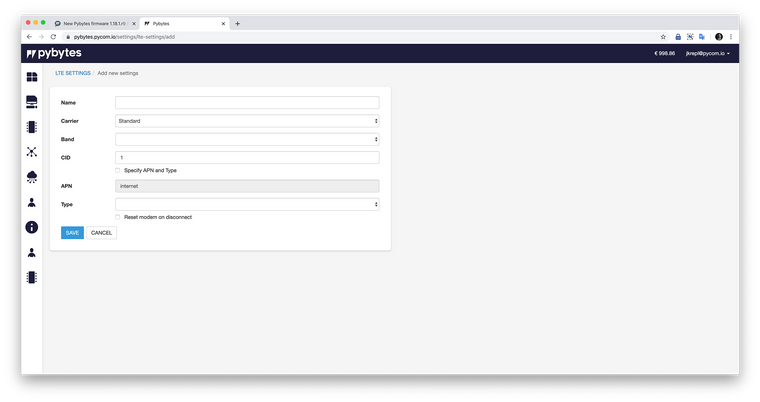
-
@jirkakrepl said in New Pybytes firmware 1.18.1.r9 (Experimental LTE support):
If your LTE configuration is correct, your device with a Simcard should connect to Pybytes using LTE.
Then Terminal and Flash OTA update should work too.Awesome, I'll try it out soon, thanks! LTE OTA was only thing holding us back from a production release.
Hello! It looks like you're interested in this conversation, but you don't have an account yet.
Getting fed up of having to scroll through the same posts each visit? When you register for an account, you'll always come back to exactly where you were before, and choose to be notified of new replies (either via email, or push notification). You'll also be able to save bookmarks and upvote posts to show your appreciation to other community members.
With your input, this post could be even better 💗
Register Login