[solved] No data on dash board since update
-
I updated the firmware to 1.18.2.r0 and everything works fine but no data is displayed in the dashboard widgets. The Data page shows that all my signals are being received, just no graphs on the Dashboard. The Configuration page says my activation token has expired. Is that the cause?
-Jason
-
Hi Jason, we're going to take a look at this. Can you "live updates" when you receive your signals on Data page?
Can you go to the Dashboard page, reload the browser, open your web browser console and send us a screenshot, please?
Expired activation token is standard behavior. This token is used only when a device is being added to Pybytes by firmware updater. Activation token expires after one hour.
-
@jirkakrepl I beg your pardon:
But i have similar issue: the data seems to be recived as is shown in the table, but the graphs is not displayed i send the screenshoot.
 image url)
Thank you
-
Hi @nervencid, thank you for letting us know.
From the main table, it seems to me that data you receive from signal might be in the array.
How does yoursend_signalfunction look on your device? Are you sure you're sending float dataType from Python code, please? -
@jirkakrepl Hello and thank you for your answer there is my code:
# Import what is necessary to create a thread import _thread from time import sleep # Increment index used to scan each point from vector sensors_data def inc(index, vector): if index < len(vector)-1: return index+1 else: return 0 # Define your thread's behaviour, here it's a loop sending sensors data every 10 seconds def send_env_data(): idx = 0 sensors_data = [0, -0.2, -0.5, -0.7, -0.8, -0.9, -0.9, -0.9, -0.8, -0.6, -0.4, -0.2, 0, 0.3, 0.5, 0.7, 0.8, 0.9, 0.9, 0.9, 0.8, 0.6, 0.4, 0.1] while (pybytes): pybytes.send_virtual_pin_value(False, 1, sensors_data[idx]) idx = inc(idx, sensors_data) sleep(10) # Start your thread _thread.start_new_thread(send_env_data, ()) -
Hi, @nervencid
thank you for your code and reporting this issue. Please change your function
send_virtual_pin_valuetosendSignal. Documentation is also now updated: https://docs.pycom.io/pybytes/dashboard.htmlhere's the whole code:
# Import what is necessary to create a thread
import _thread
from time import sleep

# Increment index used to scan each point from vector sensors_data
def inc(index, vector):
    if index < len(vector)-1:
        return index+1
    else:
        return 0

# Define your thread's behaviour, here it's a loop sending sensors data every 10 seconds
def send_env_data():
    idx = 0
    sensors_data = [0, -0.2, -0.5, -0.7, -0.8, -0.9, -0.9, -0.9, -0.8, -0.6, -0.4, -0.2, 0, 0.3, 0.5, 0.7, 0.8, 0.9, 0.9, 0.9, 0.8, 0.6, 0.4, 0.1]

    while (pybytes):
        pybytes.send_signal(1, sensors_data[idx])
        idx = inc(idx, sensors_data)
        sleep(10)

# Start your thread
_thread.start_new_thread(send_env_data, ())
We broke
send_virtual_pin_valuefunction (we're going to fix it). It sends values, but they are inside one elementarraylike[-0.8].I created this screenshot to illustrate that. We're going to fix
send_virtual_pin_valuefunction. For now, usesend_signal, please.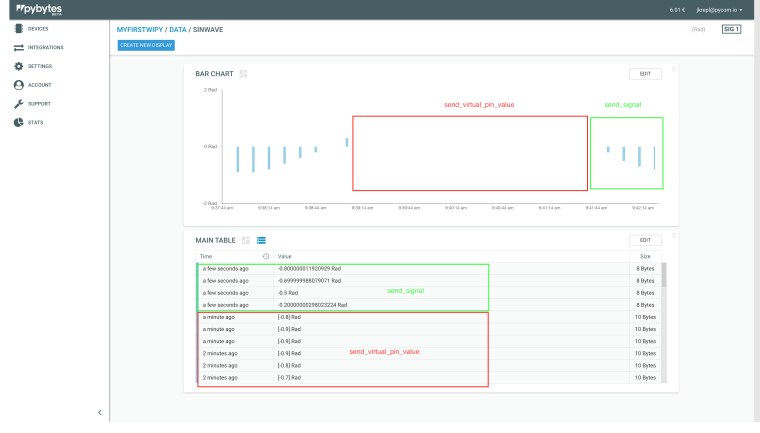
-
@jirkakrepl Hello again:
I rewritted the code and works fine thank you:
But you must specify that into:
pybytes.send_signal(1, sensors_data[idx])where the "1" is for "Signal" parameter on pybytes and no the name
This the code that i used (the comments are in Spanish)
#ANTES DE TODO VERIFICAR QUE EL DISPOSITIVO ESTE AGREGADO A PYBYTES #Importamos las librerias necesarias para crear un hilo import _thread from time import sleep #Definimos una funcion que va recorriendo el vector continuamente def inc(index, vector): if index < len(vector)-1: return index+1 else: return 0 # Define your thread's behaviour, here it's a loop sending sensors data every 10 seconds def send_env_data(): #Indice inicial idx = 0 #Datos sinteticos a enviar sensors_data = [0, -0.2, -0.5, -0.7, -0.8, -0.9, -0.9, -0.9, -0.8, -0.6, -0.4, -0.2, 0, 0.3, 0.5, 0.7, 0.8, 0.9, 0.9, 0.9, 0.8, 0.6, 0.4, 0.1] #Mientras estemos conectados a pybytes enviamos los datos while (pybytes): ''' ENVIAMOS DATOS: El numero '1' corresponde a la etiqueta 'Signal' (y no 'Name') en la plataforma PYBYTES cuando es creada dicha 'Signal' verificar que coincida antes de enviar los datos ''' pybytes.send_signal(1, sensors_data[idx]) #Incrementamos o reiniciamos el indice para recorrer el arreglo idx = inc(idx, sensors_data) sleep(10) # Iniciamos un nuevo hilo _thread.start_new_thread(send_env_data, ()) -
@jirkakrepl Thanks for the response. I updated my code with the new command and it works fine.
Hello! It looks like you're interested in this conversation, but you don't have an account yet.
Getting fed up of having to scroll through the same posts each visit? When you register for an account, you'll always come back to exactly where you were before, and choose to be notified of new replies (either via email, or push notification). You'll also be able to save bookmarks and upvote posts to show your appreciation to other community members.
With your input, this post could be even better 💗
Register Login