VS Code COM port setting ignored
-
Hi,
I have been using VSCode and Pymakr and it is generally working OK. I am using a USB to serial adapter, as it happens on COM10. I wanted to start debugging some serial port functions so plugged in a second USB serial adapter which came up as COM3. Pymakr now insists that it has found a Pycom module on this COM port and ignores the setting in pymakr.conf and pymakr.json and tries to connect on COM3. It seems that it is simply using the lowest number COM port, whatever the settings. I have tried with auto_connect set True and False, it doesn't help.I have actually managed to get things working by swapping over so that the Pycom module is indeed on COM3 but I can see this becoming a nuisance.
How can I fix the COM port used for the connection?
Thanks
-
Could you post both your global pymakr conf and the per project one if you have one so I can take a look. It should use what you've given it. Not just decide on one itself.
-
Hi, I should have included these first time:
pymakr.conf:
{
    "address": "COM10 (FTDI)",
    "username": "micro",
    "password": "python",
    "sync_folder": "",
    "open_on_start": true,
    "safe_boot_on_upload": true,
    "py_ignore": [],
    "fast_upload": false,
    "ctrl_c_on_connect" : true
}
pymakr.json (from All commands->Pymakr>Global settings):
{
	"address": "COM10 (FTDI)",
	"username": "micro",
	"password": "python",
	"sync_folder": "",
	"open_on_start": true,
	"safe_boot_on_upload": false,
	"py_ignore": [],
	"fast_upload": false,
	"sync_file_types": "py,txt,log,json,xml,html,js,css,mpy",
	"ctrl_c_on_connect": false,
	"sync_all_file_types": false,
	"auto_connect": true
}
Thanks
-
Hello.
Please remove the (FTDI) parts and try again.
It only needs "COM10" :)Should work after that.
Paul
-
Hi,
I've changed both settings as suggested but it still insists on going to COM3.
Patrick
-
@changeddaily I had similar issue with Atom, there is option that was checked to always select first COM port from list. It sound to me that VS Code is doing the same thing.
-
@changeddaily said in VS Code COM port setting ignored:
Hi,
I've changed both settings as suggested but it still insists on going to COM3.
Patrickhmm ... I'm not really sure about how it works on Windows ... as on Mac / Linux we provide the full path to our "/dev/...."
here is a copy of my files:
pymakr.json [Global Settings]
{
	"address": "/dev/cu.usbmodem",
	"username": "micro",
	"password": "python",
	"sync_folder": "",
	"open_on_start": true,
	"statusbar_buttons": [
		"console",
		"run",
		"upload",
		"download",
		"status",
		"disconnect",
		"listserial",
		"projectsettings",
		"settings",
		"getversion",
		"getssid"
	],
	"sync_file_types": "py,txt,log,json,xml",
	"ctrl_c_on_connect": false,
	"safe_boot_on_upload": false,
	"sync_all_file_types": false,
	"auto_connect": false,
	"py_ignore": [],
	"fast_upload": false
}
pymakr.conf [Project Settings]
{ "address": "/dev/cu.usbmodemPy3434341", "username": "micro", "password": "python", "sync_folder": "", "open_on_start": true, "statusbar_buttons": [ "status", "listserial", "settings", "projectsettings", "getversion", "getssid", "console", "run", "upload", "download", "connect", "disconnect" ], "sync_file_types": "py,txt,log,json,xml", "ctrl_c_on_connect": false } -
@changeddaily You have auto_connect set to true in the global settings, which is why it connects to COM3. If autoconnect finds 2 potential pycom devices it just picks the first one in the list it gets back from the serial library.
-
@ralph Yes, I can confirm that changing to just "COM10" and setting auto connect to false fixes the issue. Perhaps some changes to the default settings or further explanation in the documentation would be helpful.
Thanks to all for suggestions.
-
@changeddaily Good to hear. Yes I agree, our documentation could definitely use an update.
-
I also could not connect to my board and solved the problem as follows:
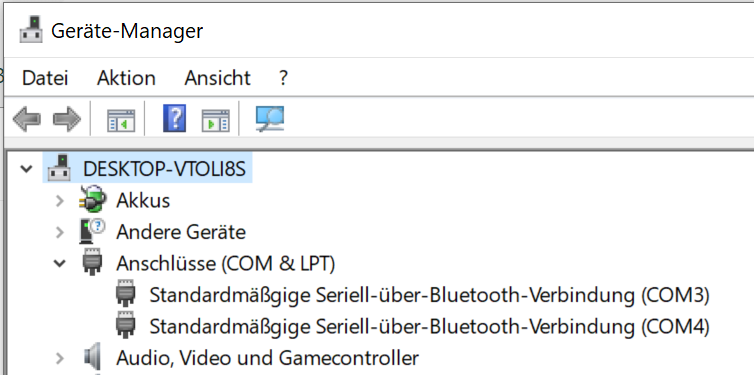
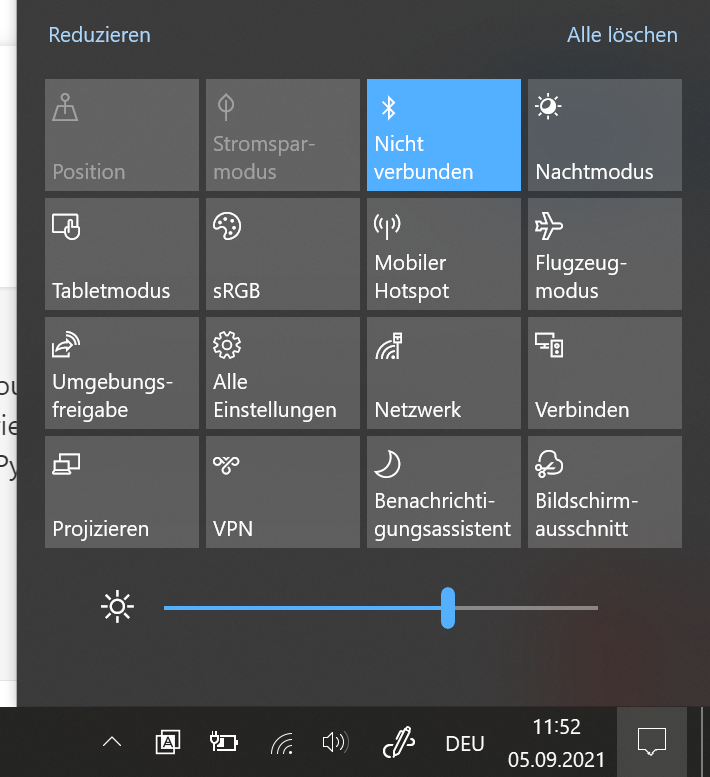
If your PC has Bluetooth, have you ever tried to turn off Bluetooth? On my PC, Bluetooth uses COM3. Pymark always tried to connect to COM3. After I turned off Bluetooth, I was able to connect to my Pycom board without any problems.
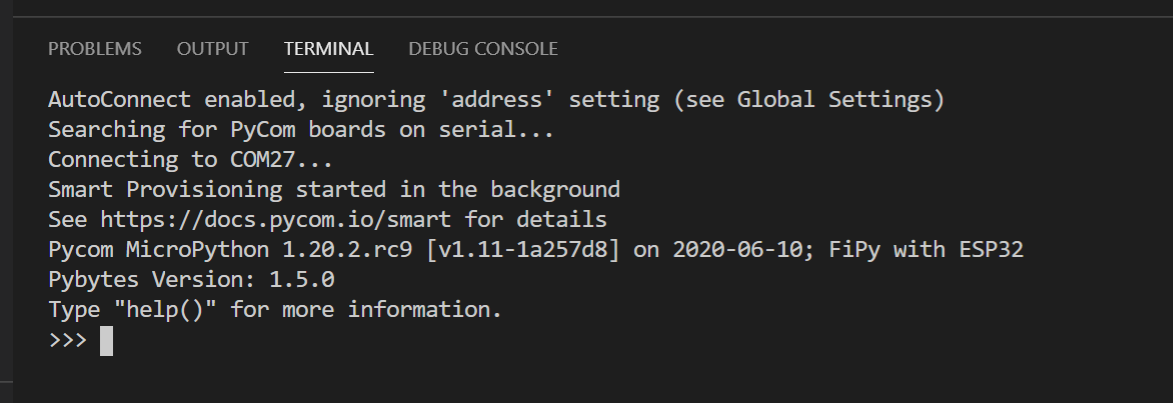
Once a connection to the board has been established, the board can also reconnect successfully with Bluetooth turned on.
I hope this information helps. (:
In my case COM3 is used by Bluetooth and Pymark tries to connect to COM3.
In this menu you can disable Bluetooth
Connection to the board has been established successfully:
Hello! It looks like you're interested in this conversation, but you don't have an account yet.
Getting fed up of having to scroll through the same posts each visit? When you register for an account, you'll always come back to exactly where you were before, and choose to be notified of new replies (either via email, or push notification). You'll also be able to save bookmarks and upvote posts to show your appreciation to other community members.
With your input, this post could be even better 💗
Register Login