Pymesh updates
-
@catalin Thanks for the quick response!
I have started to work with the binaries you had uploaded, and all of sudden I get this exception over and over again:Guru Meditation Error: Core 0 panic'ed (LoadProhibited). Exception was unhandled.
Core 0 register dump:
PC : 0x400930de PS : 0x00060033 A0 : 0x80092689 A1 : 0x3ffbb3a0
A2 : 0x3ffbb3f0 A3 : 0x3ffbb3c0 A4 : 0x00000020 A5 : 0x3ffc413c
A6 : 0x00000002 A7 : 0x3ffbb800 A8 : 0x00000000 A9 : 0x3ffb4d38
A10 : 0x3ffbb414 A11 : 0x3ffc4144 A12 : 0x3ffb4d38 A13 : 0x3ffb4d30
A14 : 0x00000001 A15 : 0x3ffbb6f0 SAR : 0x0000000a EXCCAUSE: 0x0000001c
EXCVADDR: 0x0000000c LBEG : 0x4009873c LEND : 0x40098747 LCOUNT : 0x00000000Backtrace: 0x400930de:0x3ffbb3a0 0x40092686:0x3ffbb3c0 0x40093fb5:0x3ffbb3f0 0x40094302:0x3ffbb5c0 0x40093c1a:0x3ffbb600 0x40093e6e:0x3ffbb620 0x4008394a:0x3ffbb640 0x40090eb5:0x3ffbb700 0x40092c14:0x3ffbb720 0x40092bca:0x00000000
Any idea what might be the problem?
-
hi @eranroll
(Sorry, I have not saved the .elf, to debug the previous error)
Please try to re-load this v1.20.1.r1 release, also try also
Erasing Flash file systemandForce update LoRa regionlike:
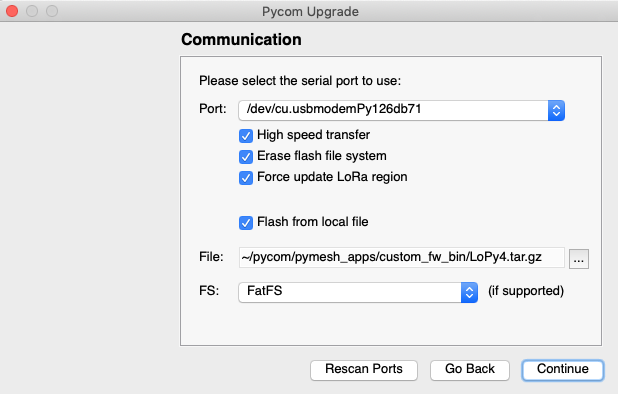
Next, just try this simple code:
from network import LoRa
lora = LoRa(mode=LoRa.LORA, region=LoRa.EU868, frequency = 863000000, bandwidth=LoRa.BW_500KHZ, sf=7)
mesh = lora.Mesh()
Next, you could try only this main.py: https://github.com/pycom/pymesh_apps/blob/master/pymesh_micropy_scripts/main.py
Catalin,
Have you checked out our docs for the answer? (Now with an easy search function) https://docs.pycom.io
Check out our newly revamped device management platform, Pybytes! https://pybytes.pycom.io/ -
@catalin said in Pymesh updates:
from network import LoRa
lora = LoRa(mode=LoRa.LORA, region=LoRa.EU868, frequency = 863000000, bandwidth=LoRa.BW_500KHZ, sf=7)
mesh = lora.Mesh()Sorry been busy for some days. Today I did flash it with the https://github.com/pycom/pymesh_apps/blob/master/custom_fw_bin/LoPy4.tar.gz
Then used the code above and still the following :
Rebooting...
ets Jun  8 2016 00:22:57

rst:0xc (SW_CPU_RESET),boot:0x13 (SPI_FAST_FLASH_BOOT)
configsip: 0, SPIWP:0xee
clk_drv:0x00,q_drv:0x00,d_drv:0x00,cs0_drv:0x00,hd_drv:0x00,wp_drv:0x00
mode:DIO, clock div:1
load:0x3fff8020,len:8
load:0x3fff8028,len:2164
load:0x4009fa00,len:19944
entry 0x400a05e8
Guru Meditation Error: Core  0 panic'ed (LoadProhibited). Exception was unhandled.
Core 0 register dump:
PC      : 0x40090fa8  PS      : 0x00060033  A0      : 0x40092c33  A1      : 0x3ffbb700
A2      : 0x3ffc42bc  A3      : 0x7fffffff  A4      : 0x00050023  A5      : 0xc8bc0000
A6      : 0x3ffdd8c8  A7      : 0x00000000  A8      : 0x3ffc412c  A9      : 0x00003ffd
A10     : 0x00000001  A11     : 0x3ffb4d38  A12     : 0x00000000  A13     : 0x00000005
A14     : 0x3ffc4030  A15     : 0x3ffc4134  SAR     : 0x00000014  EXCCAUSE: 0x0000001c
EXCVADDR: 0x00004009  LBEG    : 0x00000000  LEND    : 0x00000000  LCOUNT  : 0x00000000

Backtrace: 0x40090fa8:0x3ffbb700 0x40092c30:0x3ffbb720 0x40092be6:0x00000000
rolling fast... :)
Going to try the other main now...
-
@catalin I followed the instructions given to @eranroll and me... and erased the flash file system and did update LoRa-region when flashing the new firmware that you linked
This is what I got when I tried this one:
https://github.com/pycom/pymesh_apps/blob/master/pymesh_micropy_scripts/main.pyFinal error reading /flash/pymesh_config.json file! Exception: [Errno 2] ENOENT Can't find /flash/pymesh_config.json , or can't be parsed as json; Set default settings and reset Default settings: {'debug': 5, 'Pymesh': {'key': '112233'}, 'autostart': True, 'LoRa': {'sf': 7, 'region': 5, 'freq': 863000000, 'bandwidth': 2}, 'ble_api': True, 'ble_name_prefix': 'PyGo '} Set MAC in config file as 8121069065130701253 MAC ok 8121069065130701253 Default settings: {'ble_api': True, 'autostart': True, 'ble_name_prefix': 'PyGo ', 'debug': 5, 'LoRa': {'sf': 7, 'region': 5, 'freq': 863000000, 'bandwidth': 2}, 'MAC': 8121069065130701253, 'Pymesh': {'key': '112233'}} write_config force restart ets Jun 8 2016 00:22:57 rst:0x5 (DEEPSLEEP_RESET),boot:0x13 (SPI_FAST_FLASH_BOOT) configsip: 0, SPIWP:0xee clk_drv:0x00,q_drv:0x00,d_drv:0x00,cs0_drv:0x00,hd_drv:0x00,wp_drv:0x00 mode:DIO, clock div:1 load:0x3fff8020,len:8 load:0x3fff8028,len:2164 load:0x4009fa00,len:19944 entry 0x400a05e8 MAC ok 8121069065130701253 Settings: {'ble_api': True, 'MAC': 8121069065130701253, 'autostart': True, 'debug': 5, 'LoRa': {'sf': 7, 'region': 5, 'freq': 863000000, 'bandwidth': 2}, 'ble_name_prefix': 'PyGo ', 'Pymesh': {'key': '112233'}} Guru Meditation Error: Core 0 panic'ed (LoadProhibited). Exception was unhandled. Core 0 register dump: PC : 0x40090fa8 PS : 0x00060033 A0 : 0x40092c33 A1 : 0x3ffd6730 A2 : 0x3ffc42bc A3 : 0x7fffffff A4 : 0x00050023 A5 : 0xc8bc0000 A6 : 0x3ffdd8c8 A7 : 0x00000000 A8 : 0x3ffc412c A9 : 0x00003ffd A10 : 0x00000001 A11 : 0x3ffb4d38 A12 : 0x00000000 A13 : 0x00000005 A14 : 0x3ffc4030 A15 : 0x3ffc4134 SAR : 0x00000012 EXCCAUSE: 0x0000001c EXCVADDR: 0x00004009 LBEG : 0x40098758 LEND : 0x40098763 LCOUNT : 0xffffffff Backtrace: 0x40090fa8:0x3ffd6730 0x40092c30:0x3ffd6750 0x40092be6:0x000000fe Guru Meditation Error: Core 0 panic'ed (LoadProhibited). Exception was unhandled. Core 0 register dump: PC : 0x400930fa PS : 0x00060033 A0 : 0x800926a5 A1 : 0x3ffd63d0 A2 : 0x3ffd6420 A3 : 0x3ffd63f0 A4 : 0x00000020 A5 : 0x3ffc412c A6 : 0x00000002 A7 : 0x3ffd68d0 A8 : 0x00003ffd A9 : 0x3ffdf7f4 A10 : 0x3ffd6438 A11 : 0x3ffc4134 A12 : 0x3ffdf7f4 A13 : 0x3ffe3130 A14 : 0x00000001 A15 : 0x3ffd6720 SAR : 0x0000000a EXCCAUSE: 0x0000001c EXCVADDR: 0x00004009 LBEG : 0x40098758 LEND : 0x40098763 LCOUNT : 0x00000000 Backtrace: 0x400930fa:0x3ffd63d0 0x400926a2:0x3ffd63f0 0x40093fd1:0x3ffd6420 0x4009431e:0x3ffd65f0 0x40093c36:0x3ffd6630 0x40093e8a:0x3ffd6650 0x4008395e:0x3ffd6670 0x40090fa5:0x3ffd6730 0x40092c30:0x3ffd6750 0x40092be6:0x000000fe Re-entered core dump! Exception happened during core dump! Rebooting... -
Thanks to @Danne I was able to debug the problem.
Apparently, there's a more general problem, so before using this Pymesh firmware, you should first erase all your board (Fipy or Lopy4) using the cli version of the
Firmware Update Tool, so please navigate where this app was installed (search forpycom-fwtool-cliexecutable) and execute:pycom-fwtool-cli -p <PORT> erase_allNext, flash the Pymesh binary can be flashed using the normal
Firmware Update Tool.Also, fixed a small bug in main.py.
Catalin,
Have you checked out our docs for the answer? (Now with an easy search function) https://docs.pycom.io
Check out our newly revamped device management platform, Pybytes! https://pybytes.pycom.io/ -
@catalin That erase_all thing resolved my problems. Flash'ing your custom LoPy4-firmware now works, and your updated pymesh_micropy_scripts/main.py example starts out of the box :-)
-
@catalin Thanks a lot!
This allows my project to continue, and I look forward to check out the app!
-
@catalin: I'm using the https://github.com/pycom/pymesh_apps/blob/master/custom_fw_bin/LoPy4.tar.gz on two devices (LoPy4 and FiPy) , but these both devices can not find a neighbor!
Another 4 LoPy modules with firmware LoPy-1.20.0.rc7.tar.gz work perfectly in parallel. -
@CAPKE
Hi, it discover indirectly neighbor too? Thank you -
Hi all,
The Pymesh docs were updated: https://docs.pycom.io/pymesh/ explaining the frozen library API, BLE RPC, the CLI and the Border Router example.
It should work with the firmware from https://github.com/pycom/pymesh_apps/tree/master/custom_fw_bin@CAPKE So, you're having the corresponding firmware Fipy and Lopy from here, so the 2 devices should create a Mesh network. Probably they're not compatible with the older Mesh created by LoPy-1.20.0.rc7.tar.gz because the
masterkeyis different. Initially I've used some default masterkey, now it can be set here and the default one is specified here in docs.
Anyway, you could find the masterkey with command:# as test, the masterkey can be printed >>> print("masterkey:", pymesh.cli("masterkey")) masterkey: 11223300000000000000000000000000Catalin,
Have you checked out our docs for the answer? (Now with an easy search function) https://docs.pycom.io
Check out our newly revamped device management platform, Pybytes! https://pybytes.pycom.io/ -
@catalin Thanks for updating the documentation!
One question: Do you consider lib/pymesh.py to be an api or an application? To my understanding, it spawn's an interactive CLI shell, right? so should it really be a part of /lib ?
-
@kodarn good question, so it seems to be both, which is not clear design, right? Just to mention, there are also threads started for BLE-RPC part.
One idea would be, in the configuration file to have a parameter to enable/disable CLI (also for the other application features).Or how would you like to use pymesh library? What would you modify?
-
@catalin Perhaps I am misunderstanding things since I was thinking of PyMesh being the Mesh Network. But PyMesh is not that. Instead, PyMesh seems to be more of a wrapper to the Mesh Network enabling BLE/Configuration/CLI stuff?
So if I'm interested in building applications with the Pycom Mesh Network API, and not interested in the Bluetooth & CLI stuff, I should use the mesh_interface.py api?
-
@kodarn Yes, you can use directly
mesh_interface.py, but make sure you initialise it as inpymesh.py.
The idea was that thepymesh.pyis the API level, but you can just use it as it fits your needs. -
As mentioned earlier, the official release process is in this topic.
-
@catalin I updated my LoPy4 and FiPy with the firmware LoPy4.tar.gz and FiPy.tar.gz.
On both devices, I successfully tested the example https://docs.pycom.io/pymesh/simple-example/.But if I try out the following code:
import ubinascii
from network import LoRa

lora = LoRa(mode=LoRa.LORAWAN, region=LoRa.EU868)
masterkey = ubinascii.unhexlify("112233")
pymesh = lora.Pymesh(key=masterkey)
See https://docs.pycom.io/firmwareapi/pycom/network/lora/pymesh/#class-network-lora-pymesh-key-masterkey
I get the error message:
Traceback (most recent call last):
  File "main.py", line 19, in <module>
AttributeError: 'LoRa' object has no attribute 'Pymesh'
Pycom MicroPython 1.20.1.r1 [v1.11-7c63158e0] on 2019-10-22; FiPy with ESP32
I'm currently not sure when to use which PyMesh-lib?
-
Thanks @CAPKE for spotting that documentation problem. The subclass name is
Mesh(), notPymesh()😕.
I've made a wrong replace-all in docs. -
hi all,
Few updates:
- the
LoRa.Mesh()class documentation issue, was fixed here, so there's no class namePymesh - the repository pymesh_apps was deleted as the information was redundant:
- releases are released thru licensing process
- scripts and mobile app are https://github.com/pycom/pycom-libraries/tree/master/pymesh
- the
-
@catalin Hi Catalin,
I found a other issue at the https://docs.pycom.io/firmwareapi/pycom/network/lora/pymesh/#class-network-lora-pymesh-key-masterkey example:
The constructor
class network.LoRa(id=0, …)without the paramsbandwidthandsfwill not work correctly (no neighbors will be found).Please change to:
lora = LoRa(mode=LoRa.LORA, region=LoRa.EU868, frequency = 863000000, bandwidth=LoRa.BW_125KHZ, sf=7) -
ok @CAPKE, thanks a lot!
mode=LoRa.LORAWANis a mistake, it should have beenmode=LoRa.LORA.A pre-requisite of the Pymesh is that all the nodes (that want to be part of the same mesh network) should be initialised on the same LoRa settings (band, frequency, spreading factor, bandwidth) and master key.




Hello! It looks like you're interested in this conversation, but you don't have an account yet.
Getting fed up of having to scroll through the same posts each visit? When you register for an account, you'll always come back to exactly where you were before, and choose to be notified of new replies (either via email, or push notification). You'll also be able to save bookmarks and upvote posts to show your appreciation to other community members.
With your input, this post could be even better 💗
Register Login