LoPy4 locking on sending and receiving data
-
Hi,
In my project I need an a downlink communication to my LoPy4. I set blocking to True and enable downlink and send a one bit message with the socket 's' in the following way:
# init Sigfox for RCZ1 (Europe)
sigfox = Sigfox(mode=Sigfox.SIGFOX, rcz=Sigfox.RCZ1)

# create a Sigfox socket
s = socket.socket(socket.AF_SIGFOX, socket.SOCK_RAW)

# make the socket blocking
s.setblocking(True)

# configure it as DOWNLINK specified by 'True'
s.setsockopt(socket.SOL_SIGFOX, socket.SO_RX, True)

# send 1-bit message
s.send("")
Thus far I have followed all the examples and tutorials I can find online, this results in the simple code above. However, if I run the code I get an "OSError: [Errno 100] ENETDOWN" error. I solved this by catching it and continueing on to a receive statement.
Sadly the follwing code does not work either:
# send 1-bit message
try:
    s.send("")
except OSError:
    # handle possible things
    pass

s.recv(64)
While the code now moves past the sending of data, it locks on the receiving. It does not receive anything, while the backend shows proper handeling of te callback.
Could someone help in pointing out what I am missing or am missunderstanding.
Thanks in advance!
edit: added the Sigfox object initialisation after the comment of @Eric73
-
It seem you are missing one init in your code (init sigfox stack), i show you the (simplified) code i use
from network import Sigfox import socket UplinkFrame='' Sfx=Sigfox(mode=Sigfox.SIGFOX, rcz=Sigfox.RCZ1) SfxSoc = socket.socket(socket.AF_SIGFOX, socket.SOCK_RAW) SfxSoc.setblocking(True) SfxSoc.setsockopt(socket.SOL_SIGFOX, socket.SO_RX, True) ret=SfxSoc.send(bytes(UplinkFrame)) Resp=SfxSoc.recv(32) print ("Sigfox RX:"+str(Resp)) -
@Eric73 Hi! Thank you so much for your comment! Sadly, I missed out on this in my description, but not in my code... I indeed initialise the Sigfox object before creating the socket. Do you happen to have any other idea? Does it lock for you as well?
I am thinking that it might be my signal strength not being able to create a downlink message. However, I am grasping at straws.
-
@Track Hi Track, When you login to your sigfox backend did you see your uplink frame ? (it's the first step to have a downlink that the uplink is receive)
How have you defined your "bidir" downlink in sigfox backend, as custom http callback ? aws service ? fixed data?...?
What the backend (message tab- LQI) said about your link quality ? (good average low?)
When you click on the arrow down in callback colomn what it indicate (for me " Status : [ACKED] Data (Hexa) : 000b36a45c000000" a red down arrow indicate a fail to send the downlink -
Hi @Eric73, thanks for the effort I have included all relevant information taken from my Sigfox account

The HTTP Post which I receive on my own server and respond with the following JsonResponse (taken from django.http):
{
    {trackerID}: {
        "downlinkData": "1234567890123456"
    }
}
The status of the callback seems fine to me, except for the aforementioned signal strength:
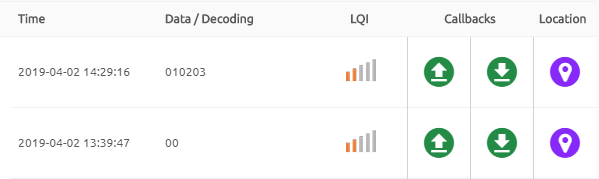
Where the status of the downlink looks like the following:
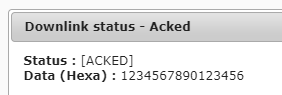
As stated in my original message I would not know anything except for link quality. However, I still find it really strange that my LoPy4 lock when it tries to send data and need the
try-catch:structure.Maybe you have even more helpful insight or spot the error in my ways here. Thanks again for the help!
-
@Eric73 Hi, I just received the uplink twice successfully on the LoPy! I am now thinking that it might have worked yesterday as well, but before I had inserted a print statement my four messages a day were already used.
However, this does introduce the new problem of locking out the LoPy if it does not receive a message. I suspect it has trouble sending the message over the low-quality connection. After that, it throws the Network Error. This belief is fortified by the successful output printing what has been sent:
    print("send 1-bit message to the Sigfox cloud") # prints succesfully in both cases
    try:
        print(s.send("")) # prints '0' only when the downlink works
    except OSError:
        pass

    print("wait to receive a message") # prints successfully in both cases, get stuck on this line if downlink does not work.
    data = s.recv(64)

    print(data) # prints "b'\x124Vx\x90\x124V'" (the correct payload as send by my server) if the downlink works. Otherwise this code is not reached at all.
So the output if the downlink works is:
send 1-bit message to the Sigfox cloud
0
wait to receive a message
b'\x124Vx\x90\x124V'While the output if the downlink does not work is:
send 1-bit message to the Sigfox cloud
wait to receive a messageIf I do not receive a downlink I just want to continue on in the program (deep sleep and push information 5 hours later again). If I do receive a downlink I want the LoPy to do some extra work.
I am curious to find out what you think.
-
@Track So, sigfox send message procedure cannot fail if hardware work (it's a loop of sending bit in dpbsk) BUT after sending it if you have set downlink to 1 (with SfxSoc.setsockopt(socket.SOL_SIGFOX, socket.SO_RX, True) ) cpu wait 20 sec and then wait 25 sec on RX FSK 600bds for a downlink message.
All this work is done on one ESP32 core and the other run your application.
If there's no downlink receive you get ENETDOWN exception and when you do the s.recv(64) you go in infinite loop as the socket as been set in blocking (by s.setblocking(True) ) and no data will be never available.
Change your code toRxDone=False try: s.send("") s.recv(64) RxDone=True except OSError: # handle possible things pass if(RxDone==True): DoYourStuffHere else: Sleep6Hoursmay solve your trouble
-
@Eric73, thank you very much. Everything is functioning properly now!
Hello! It looks like you're interested in this conversation, but you don't have an account yet.
Getting fed up of having to scroll through the same posts each visit? When you register for an account, you'll always come back to exactly where you were before, and choose to be notified of new replies (either via email, or push notification). You'll also be able to save bookmarks and upvote posts to show your appreciation to other community members.
With your input, this post could be even better 💗
Register Login