Wifi and Lora Mesh on Lopy4
-
Hello,
I have 6 Lopy4s to build a LoRa mesh.
I used this code :
https://github.com/pycom/pycom-libraries/blob/master/lib/lora_mesh/loramesh.pyIt's the code of the simple pymesh. It works very well, my lopy4s are able to connect to the mesh and send pings and messages to each other.
Now, I would like to implement a WLAN socket. I want my smartphone to send data using wifi to the lopy, and I need the module to receive this wifi data and send it to the LoRa mesh.
I also need to take the received data from the LoRa mesh and send it to the smartphone via Wifi.
I tried to actualise the variable "msg" (the message) when the wifi socket receives data but it doesn't work. The ping is sent but nothing else is done.
Here is my code :
"main.py"
Ifrom network import LoRa
from network import WLAN
import socket
import time
import utime
import ubinascii
import pycom
import machine
import network
import _thread

from loramesh import Loramesh

pycom.wifi_on_boot(False)
pycom.heartbeat(False)


print('===============  setup as Wifi access point  ==============')
wlan = network.WLAN()

print('===============  Wifi initialisation  =====================')
wlan.init(mode=WLAN.AP,ssid='lopy1',auth=(WLAN.WPA2,'lopy1key'),channel=8,antenna=WLAN.INT_ANT)
print('===============  initialisation completed  ================')

wlan.ifconfig(config=('192.168.4.1','255.255.255.0','0.0.0.0','8.8.8.8'))
print(wlan.ifconfig())
wifi_port = 9999
wifi_ip = wlan.ifconfig()[0]
print(wifi_ip)
soc=socket.socket(socket.AF_INET, socket.SOCK_DGRAM)
soc.setsockopt(socket.SOL_SOCKET,socket.SO_REUSEADDR,1)
soc.bind((wifi_ip,wifi_port))
print('waiting....')


print("===============  LoRA init  ===============================")
lora = LoRa(mode=LoRa.LORA, region=LoRa.EU868, bandwidth=LoRa.BW_125KHZ, sf=7)
MAC = str(ubinascii.hexlify(lora.mac()))[2:-1]
print("LoRa MAC: %s"%MAC)

mesh = Loramesh(lora)

# waiting until it connected to Mesh network
while True:
    mesh.led_state()
    print("%d: State %s, single %s"%(time.time(), mesh.cli('state'), mesh.cli('singleton')))
    time.sleep(2)
    if not mesh.is_connected():
        continue

    print('Neighbors found: %s'%mesh.neighbors())
    break

# create UDP socket
s = socket.socket(socket.AF_LORA, socket.SOCK_RAW)
myport = 1234
s.bind(myport)

# handler responisble for receiving packets on UDP Pymesh socket
def receive_pack():
    # listen for incomming packets
    while True:
        rcv_data, rcv_addr = s.recvfrom(128)
        if len(rcv_data) == 0:
            break
        rcv_ip = rcv_addr[0]
        rcv_port = rcv_addr[1]
        print('Incomming %d bytes from %s (port %d)'%(len(rcv_data), rcv_ip, rcv_port))
        print(rcv_data)
        # could send some ACK pack:
        if rcv_data.startswith("Hello"):
            try:
                s.sendto('ACK ' + MAC + ' ' + str(rcv_data)[2:-1], (rcv_ip, rcv_port))
            except Exception:
                print("ACK failed")
                pass
        mesh.blink(7, .3)

pack_num = 1
msg = "Hello World! from fipy2, pack: "
ip = mesh.ip()


mesh.mesh.rx_cb(receive_pack)

# infinite main loop
while True:
    mesh.led_state()
    print("%d: State %s, single %s, IP %s"%(time.time(), mesh.cli('state'), mesh.cli('singleton'), mesh.ip()))

    # check if topology changes, maybe RLOC IPv6 changed
    new_ip = mesh.ip()
    if ip != new_ip:
        print("IP changed from: %s to %s"%(ip, new_ip))
        ip = new_ip

    # update neighbors list
    neigbors = mesh.neighbors_ip()
    print("%d neighbors, IPv6 list: %s"%(len(neigbors), neigbors))

    # send PING and UDP packets to all neighbors
    for neighbor in neigbors:
        if mesh.ping(neighbor) > 0:
            print('Ping OK from neighbor %s'%neighbor)
            mesh.blink(10, .1)
        else:
            print('Ping not received from neighbor %s'%neighbor)

        time.sleep(10)

        pack_num = pack_num + 1
        try:
            s_data, s_addr = soc.recvfrom(128)
            if len(s_data) != 0:
                s_ip = s_addr[0]
                s_port = s_addr[1]
                print('Incomming %d bytes from %s (port %d)'%(len(s_data), s_ip, s_port))
                print(s_data)
                msg = s_data
            s.sendto(msg + str(pack_num), (neighbor, myport))
            print('Sent message to %s'%(neighbor))
        except Exception:
            pass
        time.sleep(20 + machine.rng()%20)

    # random sleep time
    time.sleep(30 + machine.rng()%30)
Can you please tell me what I am doing wrong please ? I've been on it for 2 weeks now and I really struggle with it.
Thank you very much and have a nice day,
CamGro
-
@CamGro can you share the logs printed by your code?
Which node do you want to send the UDP packets to? As it stands, it seems your code will sent any received packet to whichever neighbour it is currently looping through, I'm not sure that's what you intended to do.
Also, you probably want to set the UDP socket to non-blocking.
-
Hello and thank you very much for your answer !
For now, I just wanted to send the message coming from the wifi socket to all the neighbors in the mesh. Each neighbor has a smartphone so every neighbor's smartphone should read what is sent in the mesh.
But for now I am just testing it on two modules : one fipy (fipy2) and one lopy (lopy3).
Here are the results I got on the console. I was sending data on the wifi socket but the modules did not seem to realize it.
for fipy2 :
for lopy 3 :

http://zupimages.net/viewer.php?id=19/17/kwrv.png

http://zupimages.net/viewer.php?id=19/17/mymx.png
So the default message is sent using the LoRa mesh and received on the other end, because a ACK is sent back.
However, the message is not actualized with the wifi data.
Thank you and have a nice day,
CamGro
-
@CamGro The links you provided load (along with your tiny images) a whole truckload of junk. Why not paste the images here directly?
-
@Martinnn I tried to use the picture option but it didn't work obviously. Sorry for that.
Here are the pictures :
fipy 2
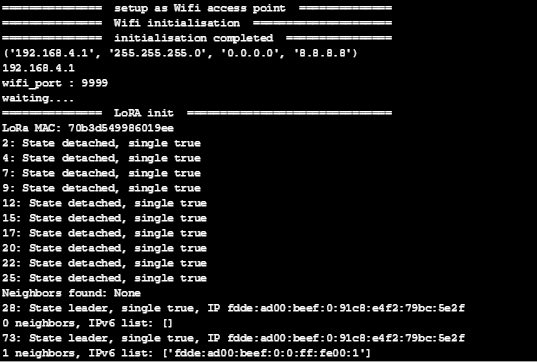
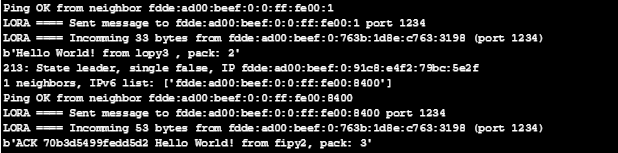
And lopy3 :
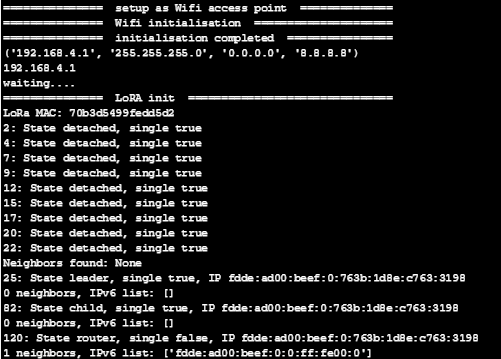

-
@CamGro It's always better to copy-paste as text rather than screenshots. That makes it searchable and allows copy-paste, it's much better.
You should make sure you incoming packet log is different for UDP and LoRa, it would make reading the logs easier.
Have you tried doing a test with just the UDP socket to test that part? Are you sure whatever you use to send the UDP packet actually works and sends to the correct IP and port?
-
@jcaron said in Wifi and Lora Mesh on Lopy4:
It's always better to copy-paste as text rather than screenshots.
When you press CTRL-C in the REPL it will stop the all the running code...
-
@rfinkers there are plenty of other ways to copy-paste. Right click, menu...
-
@jcaron Right click in the REPL is not working...?
-
@rfinkers Haven't used Atom in a while, and never used on PC (on macOS Copy is Command-C which is different from Ctrl-C, hence no issue in that respect), so I can't really say. But in the worst case you should be able to use the Edit menu?
Hello! It looks like you're interested in this conversation, but you don't have an account yet.
Getting fed up of having to scroll through the same posts each visit? When you register for an account, you'll always come back to exactly where you were before, and choose to be notified of new replies (either via email, or push notification). You'll also be able to save bookmarks and upvote posts to show your appreciation to other community members.
With your input, this post could be even better 💗
Register Login