LoPy4 problem to Run and Upload
-
Hi !
First of all, I'm a beginner on Pycom's tech.
I buy a LoPy4 and a Expansion Board v3.0 recently and today I tried to make my first program on it.
I installed ATOM (v1.36.1) and Pymark (v1.4.13)
Pluged my Pycom board

And I update the Pycom board software as it written on the tutorial (v1.18.2.r3)
Then I tried a program (still on the tutorial)
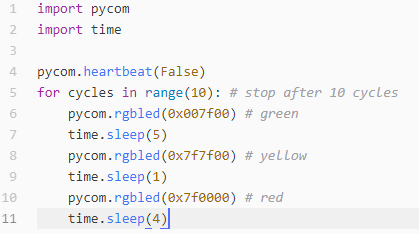
BUT nothing changed when I click on RUN and when I tried to upload, I get this message :Upload failed: timeout. Please reboot your device manually.
The LoPy LED doesn't blink in any colorI don't know what the problem could be. The LoPy4 is connected and all is well powered (Proof : expansion board ==> USB led in green | RGB_LED fixed in red)
Thanks for your help !
Ben
Hello! It looks like you're interested in this conversation, but you don't have an account yet.
Getting fed up of having to scroll through the same posts each visit? When you register for an account, you'll always come back to exactly where you were before, and choose to be notified of new replies (either via email, or push notification). You'll also be able to save bookmarks and upvote posts to show your appreciation to other community members.
With your input, this post could be even better 💗
Register Login