TEROS 12 and SDI-12
-
@tttadam The Teros device only sends a UART message once after power on. Since according to the Teros data sheet the high level is 3.6V, you do not need the level shifter. In fact, the level shifter you use may make things worse.
After the first message, the Teros device changes the polarity. That will be seen by the UART as start bit, and so it will constantly try to receive bytes. WIth the given set-up, you only can receive one message after power up of the Teros devuice, and then you must discard every else until the next power cycle of the Teros device. -
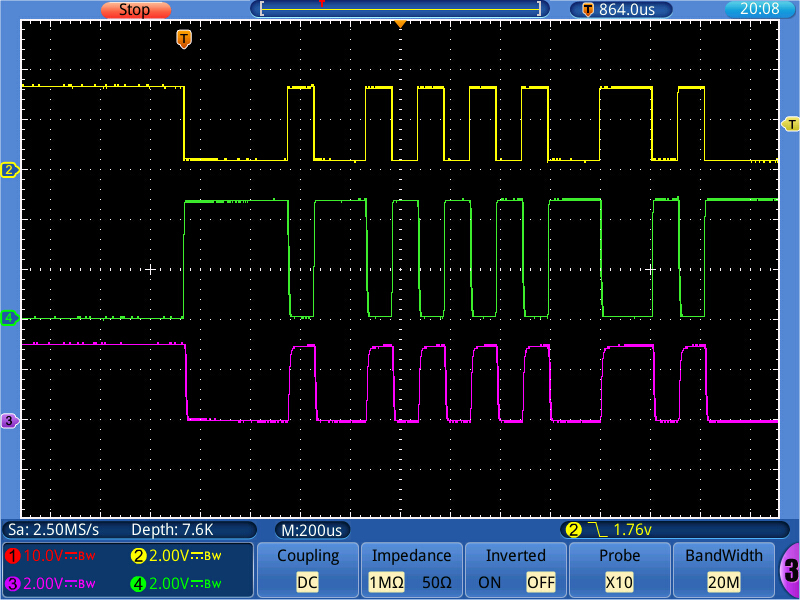
@robert-hh I made a breadboard set-up with the optocouplers according to the schematics below. Since I do not have a SDI-12 device, I can only rate it by the intrinsic loop-back (what is sent, will also be received). The picture below shows the timing: yellow is Tx, green is the SDI-12 bus line, pink is RX. The optocoupler used is a 4N27 device. The voltage at the SDI-12 line is 5V. But due to the isolation, that does not matter much. Only the resistor values may have to be adapted.
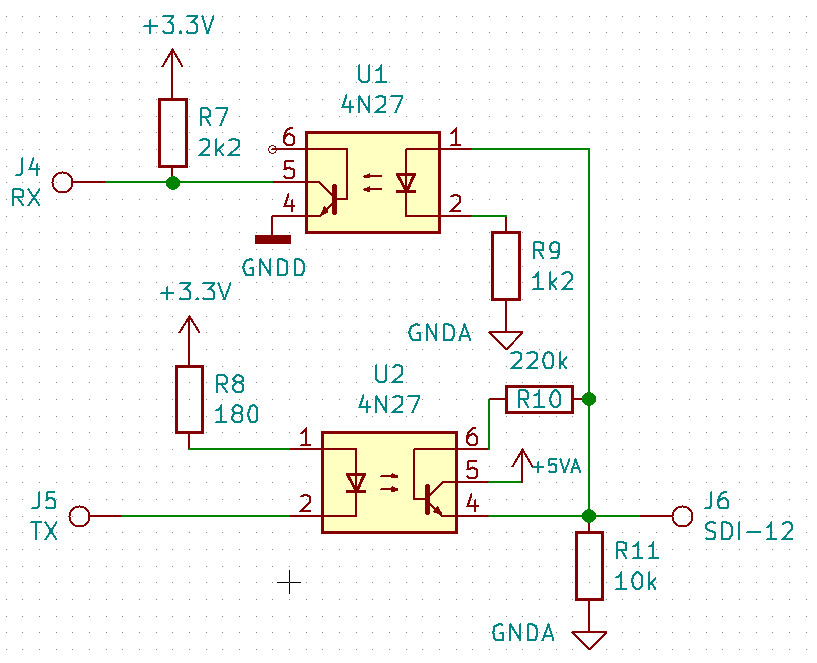
For that set-up, I changed the resistor values a little bit. The 4N27 has a relatively low current transfer ratio, which required a lower value of R8. A 4N25 might work better. The new schematics is below. R10 improves the switch off timing, R11 the off level.
-
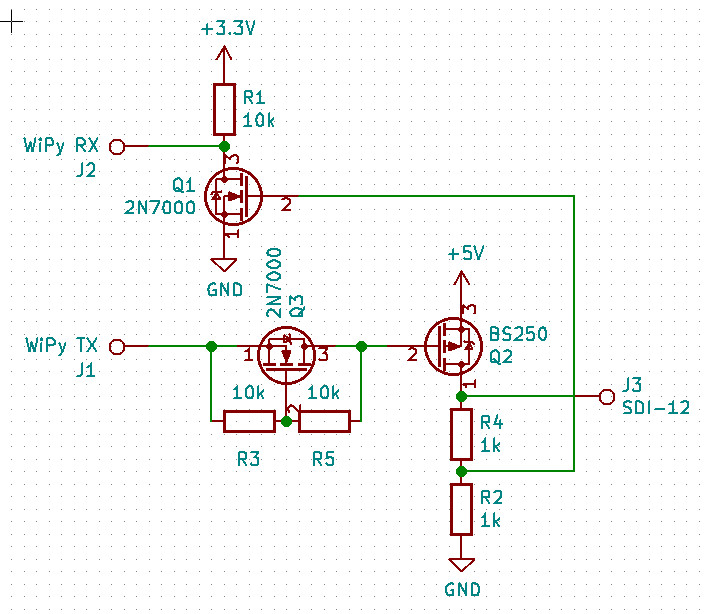
@tttadam Now the set-up with the transistor circuit. I added Q3 as level shifter to the output branch. The circuit is now:
Timing diagram with colors as before (yellow: Tx, green SDI12 bus, pink Rx:
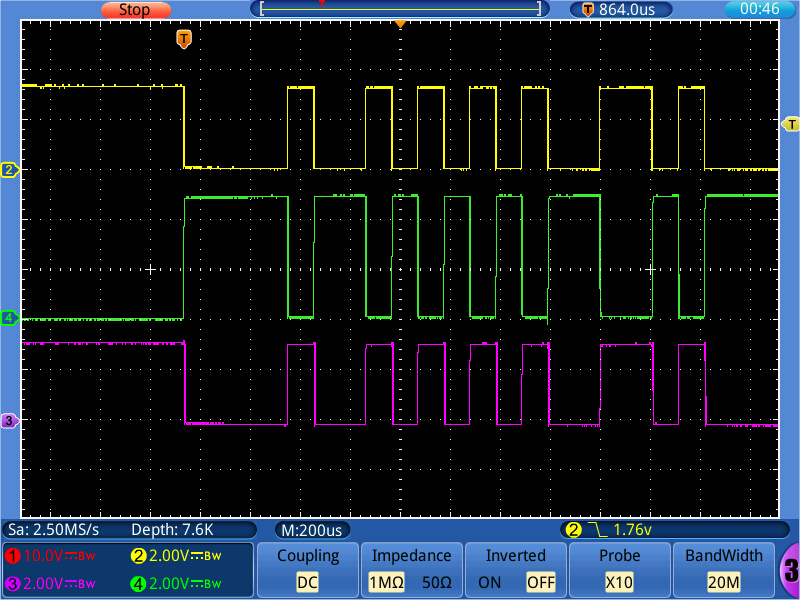
Transitions are much faster.
-
@robert-hh I see. Okay, I tried out without anything but the values I receive are still don't make too much sense to me
>>> print(uart.readall()) b'\x80\x00\x00\x80\x00\x00\x80\x80\x00\x00\x00\x00\x80\x00\x00\x80\x00\x00\x80\x00\x00\x00\x00\x00\x00\x00\x80\x00\x00\x80\x00\x00\x00\x00\x00\x00\x00\x80\x80\x00\x80\x00\x80\x80\x00\x80\x80\x80\x80\x80\x80\x80\x80\x00\x00\x80\x00' >>> print(uart.readall()) b'\x80\x00\x00\x80\x00\x00\x80\x80\x00\x00\x80\x00\x80\x00\x00\x00\x80\x00\x80\x00\x00\x00\x00\x00\x00\x00\x00\x80\x00\x00\x80\x00\x00\x00\x00\x00\x00\x00\x80\x80\x00\x80\x00\x80\x80\x00\x80\x80\x00\x00\x80\x80\x00\x00\x80\x00' -
@tttadam Okay, the issue was that baudrate was not correct :)
I have the values now, but I didn't cracked them :)>>> cou = UART(1, baudrate=1200, pins=('P5','P6')) >>> print(cou.readall()) b'\t1726.6 28.0 1\rgJX\r\n' -
You should look at the manual page 10:
<TAB><calibratedCountsVWC> <temperature> <electricalConductivity><CR><sensorType><Checksum><CRC> -
@tttadam Is that the message after Boot?
According to the data sheet linked below, this message consists of:
<TAB><calibratedCountsVWC> <temperature> <electricalConductivity><CR><sensorType><Checksum><CRC>
And so I assign:
\t <Tab>
1726.6 Calibrated counts
28.0 Temperature
1 Electrical Conductivity (that value seems strange)
\r <CR>
g Sensor Type Teros 12
J = 0x4a Checksum
X = 0x58 CRC -
I guess the sensor is not in the soil/water or the soil is dry.
-
@robert-hh Yes the sensor was on my desk. Thats why the values seems to be strange.
This is how a I use the sensor. I turn it on get the values, then turn it off.
This is how I can get the values from it cause only get values when I turn it on.
But why do I need to reinit the UART every time? If I dont do that, only turn p_tou on then off, there is nothing on UART.
Thanksprint("<---------------TEROS-12 Soil Sensor---------------->") p_tou = Pin('P11', mode=Pin.OUT) #pin for turn it on and off the sensor tou = UART(2, baudrate=1200, pins=('P3','P4')) #tricky /ugly workaround time.sleep(0.5) p_tou(1) time.sleep(0.5) trread = tou.readall() strarray = trread.decode("utf-8")[1:].replace("\r\n","").replace("\r"," ").split(" ") checksum = ord(list(strarray[3])[1]) crc = ord(list(strarray[3])[2]) Cb = strarray[0] soultemp = strarray[1] ec = strarray[2] print(trread) print(strarray) print(checksum) print(crc) p_tou(0) -
@tttadam I think it because there may be values in the read buffer, which are discarded when you init the device. You could try to call tou.read() to flush the buffer instead of re-initing the UART. if that does not work, it's no big harm. Reestablising the UART does not harm.

Hello! It looks like you're interested in this conversation, but you don't have an account yet.
Getting fed up of having to scroll through the same posts each visit? When you register for an account, you'll always come back to exactly where you were before, and choose to be notified of new replies (either via email, or push notification). You'll also be able to save bookmarks and upvote posts to show your appreciation to other community members.
With your input, this post could be even better 💗
Register Login