LoPy4 Incorrectly Labeled as LoPy1
-
LoPy 4
Firmware: 1.18.2.r7We have several LoPy4 devices that are incorrectly labeled as LoPy1 as the Device Type when running the Pycom Update tool.
LoRa on these incorrectly marked LoPy4 devices does not work.
How can I reset/clear/format/? these incorrectly marked LoPy devices?
This shows one device labeled as a LoPy1, but, it is a LoPy4:
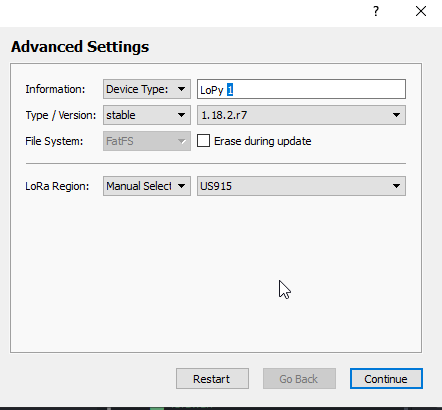
The Information field is read only and I cannot edit it.
Here is another LoPy4 correctly shown as a LoPy4:
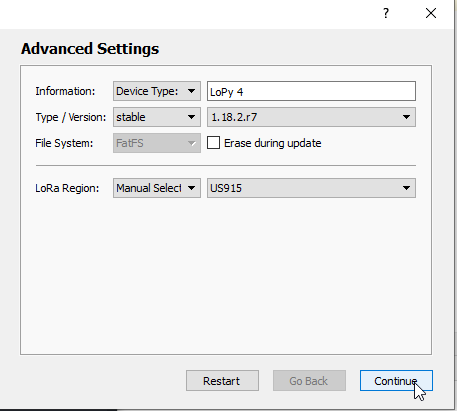
All devices are clearly marked as LoPy4:
The ones marked as LoPy1 as the Device Type seem to communicate together, but, not with the ones correctly marked as LoPy4.
-
@caseyrodgers. just to add to the info for Pycom: does the following also return LoPy (and not LoPy4)?
uos.uname()[0] -
@caseyrodgers You can force-load the right version, by downloading the LOPY4 firmware from the pycom web site at https://software.pycom.io/downloads/LoPy4.html and loading from a file. If the IDE version of the downloader refuses that package, try the CLI version (see https://docs.pycom.io/advance/downgrade.html).
-
@caseyrodgers just to check whether it’s an issue of mislabelled LoPy 1s or mis-I-don’t-know-what LoPy 4s, how many antenna connectors do they have?
-
@jcaron I posted an image ...
-
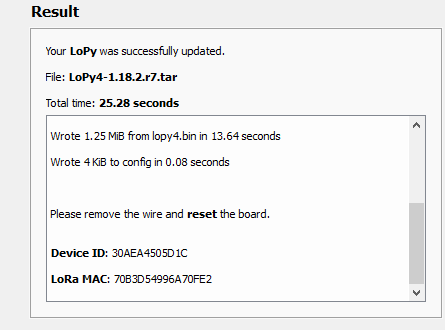
No change. I still do not get a chance to set the Device Type. And the outcome is the same:
 .
.Thanks for the help Robert. Just a note: we have been in development with the LoPy for about two years.
This is a real problem. We have 4 LoPy4s that cannot be used with our existing network. We have reported this before and have not had any luck.
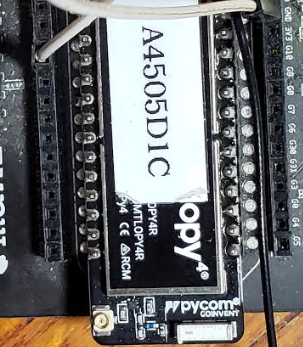
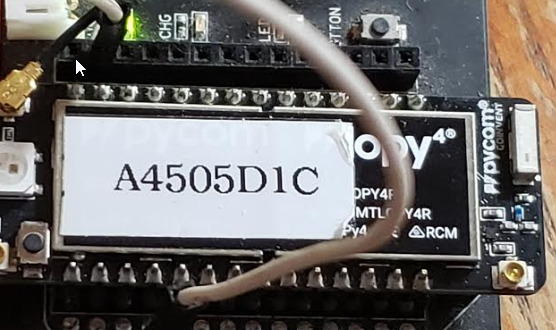
Just to make sure I'm not seeing things, this is the actual board as it's being updated... Is this not a LoPy4?:
-
@philwilkinson
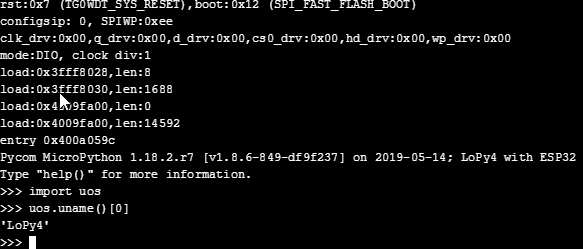
Here is the boot right after update:
-
@caseyrodgers The image you posted initially only showed part of the module, which is not very different between the LoPy 1 and 4 (always only one antenna connector on that end).
The new picture you posted shows the other end, which indeed has 2 antennas connectors like a LoPy 4 (a LoPy 1 only has one connector on that end).
So it's definitely a LoPy 4.
The logs shown after the update correctly indicate a LoPy 4 now, don't they?
As for your communication issue, could you provide more details? Are you using raw LoRa or LoRaWAN? As devices or gateways? On what channels/frequencies? Can you provide the relevant source code and logs?
-
The image you posted initially only showed part of the module,
The logo clearly says LoPy4, is that enough to know it is a LoPy4?
As for your communication issue, could you provide more details?
My problem was the issue showing on the Firmware update. This has nothing to do with any code (happens on a clean os.mkfs('/flash')) Clearly stated and shown with images. I really did not want to make the issue any more convoluted.
Thank you for your help!
-
by downloading the LOPY4 firmware from the pycom web site at
https://software.pycom.io/downloads/LoPy4.html and loading from a file.This actually solved the problem ... well at least LoRa for these devices is now working.
I requested my partner in Australia to try manually downloading and installing and it worked for his 3 devices too. (we have about 50 LoPy4s (no LoPy1s))
Note the Device Type shown on the LoPy firmware's Advanced Settings update tool still shows LoPy1 (on all 4 devices)
Why this worked I'm not sure, but I am 100% appreciative..
Thank you!
-
@caseyrodgers Pycom may have a database of device numbers & types. That one may have wrong entries. You can send a mail to Pycom with the WiFi Mac address, explaining the trouble, such that they can fix the database. You can get the mac with:
import machine,binascii
binascii.hexlify(machine.unique_id())


Hello! It looks like you're interested in this conversation, but you don't have an account yet.
Getting fed up of having to scroll through the same posts each visit? When you register for an account, you'll always come back to exactly where you were before, and choose to be notified of new replies (either via email, or push notification). You'll also be able to save bookmarks and upvote posts to show your appreciation to other community members.
With your input, this post could be even better 💗
Register Login