'LoRa' object has no attribute 'Mesh'
-
Hello! I'm trying to create a LoRa Mesh or PyMesh network. I'm using LoPy4 and FiPy with expansion board 3.1v. After a few problems, I was able to create a PyMesh network using Pybytes. I have a project on Pybytes with WiFi and LoRa added as networks.
The devices have the same firmware version (1.20.2.rc11). They connet to Pybytes and they get a role (the rgbled change its color). However, I checked the monitoring tab and they don't find neighbours.
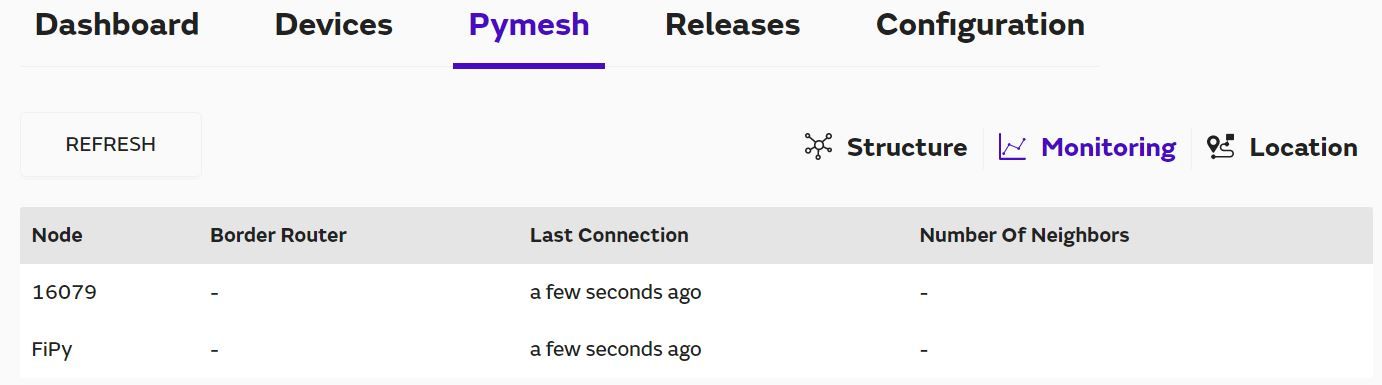
Moreover, I set the FiPy as Border Router, but something happened because in the image above it isn't appear as I defined previously.
I'm running tests right now, the FiPy is the leader of the network (MAGENTA) and the LoPy4 is a router (GREEN). Do I need another LoPy/FiPy to find neighbours between them?
I read the tutorials in the Pycom website, but I'm getting a bit confused because what I found here (https://docs.pycom.io/pymesh/licence/) works, but couldn't find neighbours in the network, and what I also found on the website (https://docs.pycom.io/firmwareapi/pycom/network/lora/pymesh/) doesn't work. It throws an error:
Guru Meditation Error: Core  1 panic'ed (LoadProhibited). Exception was unhandled.
Core 1 register dump:
PC      : 0x400ff85a  PS      : 0x00060030  A0      : 0x800ff890  A1      : 0x3ffdd450
A2      : 0x00000000  A3      : 0x00000000  A4      : 0x3f433b18  A5      : 0x3ffdd5b8
A6      : 0x0000002a  A7      : 0x0000098a  A8      : 0x3f40fc38  A9      : 0x3ffdd430
A10     : 0x00000000  A11     : 0x00060023  A12     : 0x00060020  A13     : 0x00000000
A14     : 0x0000000a  A15     : 0x3ffdd5e0  SAR     : 0x0000001e  EXCCAUSE: 0x0000001c
EXCVADDR: 0x00000000  LBEG    : 0x4009527c  LEND    : 0x40095287  LCOUNT  : 0xffffffff

ELF file SHA256: 0000000000000000000000000000000000000000000000000000000000000000

Backtrace: 0x400ff85a:0x3ffdd450 0x400ff88d:0x3ffdd470 0x40108334:0x3ffdd490 0x40101e71:0x3ffdd4c0 0x400fe299:0x3ffdd4e0 0x4010a251:0x3ffdd500 0x40101f84:0x3ffdd5a0 0x400fe299:0x3ffdd600 0x400fe2c6:0x3ffdd620 0x400e1679:0x3ffdd640 0x400e1908:0x3ffdd6e0 0x400e01bd:0x3ffdd720
The code above had some core dump info but it was a bunch of letters without much sense and I decided not to put it here.
So I would appreciate if someone can give me some hints about whats happening or what to do now.
Hello! It looks like you're interested in this conversation, but you don't have an account yet.
Getting fed up of having to scroll through the same posts each visit? When you register for an account, you'll always come back to exactly where you were before, and choose to be notified of new replies (either via email, or push notification). You'll also be able to save bookmarks and upvote posts to show your appreciation to other community members.
With your input, this post could be even better 💗
Register Login