'LoRa' object has no attribute 'Mesh'
-
Hi, nowadays you can get the pymesh firmware through Pybytes: https://docs.pycom.io/pybytes/pymeshintegration/
-
Hello, I have the same error, I tried whit the FW version 1.20.2.rc7, rc10, r4, can you help me please?, maybe I need another FW.
thanks in advance.
-
Hi @jclo13,
Sorry to hear about your experience.
I’ve just flashed a new Lopy4 with the latest v1.20.2.r4, registered to Pybytes, did all the steps from https://docs.pycom.io/pybytes/pymeshintegration/provisioning/; the device updated Pymesh firmware v.1. 20.2.rc11.
Bellow is the log. After update, you can obtain the pymesh object using:
pymesh = pybytes.__pymesh.__pymeshAs explained here: https://docs.pycom.io/pymesh/simple-example/
Firmware: 1.20.2.r4 Pybytes: 1.6.1 Initialized watchdog for WiFi and LTE connection with timeout 1260000 ms WiFi connection established Connected to MQTT mqtt.pybytes.pycom.io Pybytes connected successfully (using the built-in pybytes library) Configuration successfully converted to pybytes_config.json Pycom MicroPython 1.20.2.r4 [v1.11-ffb0e1c] on 2021-01-12; LoPy4 with ESP32 Pybytes Version: 1.6.1 Type "help()" for more information. >>> >>> Pymesh configuration written to /flash/pymesh_config.json Requesting: manifest.json?current_ver=1.20.2.r4&sysname=LoPy4&token=f10b536c-d264-458f-a5cf-d6676ec8fba8&ota_slot=0x210000&wmac=30AEA4ECAB28&fwtype=pymesh¤t_fwtype=pybytes to software.pycom.io:443 with SSL? True Wrapping socket Sending request Requesting: downloads/appimg/firmware_LoPy4_1.20.2.rc11-pymesh.bin to software.pycom.io:443 with SSL? True Wrapping socket Sending request Full Update Image detected. Restart the device to load the new firmware. ets Jun 8 2016 00:22:57 rst:0x7 (TG0WDT_SYS_RESET),boot:0x16 (SPI_FAST_FLASH_BOOT) configsip: 0, SPIWP:0xee clk_drv:0x00,q_drv:0x00,d_drv:0x00,cs0_drv:0x00,hd_drv:0x00,wp_drv:0x00 mode:DIO, clock div:1 load:0x3fff8020,len:8 load:0x3fff8028,len:2128 load:0x4009fa00,len:19760 entry 0x400a05bc WMAC: 30AEA4ECAB28 Firmware: 1.20.2.rc11 Pybytes: 1.5.2 Initialized watchdog for WiFi and LTE connection with timeout 1260000 ms WiFi connection established Connected to MQTT mqtt.pybytes.pycom.io Pybytes connected successfully (using the built-in pybytes library) Set MAC in config file as 8121069065078588544 MAC ok8121069065078588544 Settings:{'Pymesh': {'key': 'f1a1d8f7-2f9b8274-3d17e71f-3add897c'}, 'debug': 5, 'ble_api': False, 'ble_name_prefix': 'Device-30AEA4ECAB28', 'br_prio': 0, 'MAC': 8121069065078588544, 'LoRa': {'sf': 7, 'freq': 868000000, 'region': 5, 'bandwidth': 0}, 'br_ena': False, 'autostart': True} ============ MESH THREAD >>>>>>>>>>> 15: MAC 0x70b3d549946c4480(8121069065078588544), State Detached, Single True ['fdde:ad00:beef:0:0:0:0:4480', 'fdde:ad00:beef:0:8c3c:4c8d:4cc:b5d5', 'fe80:0:0:0:72b3:d549:946c:4480'] >>>>>>>>>>> DONE MESH THREAD ============ 49 Pybytes configuration read from /flash/pybytes_config.json Pycom MicroPython 1.20.2.rc11 [v1.11-f4d850b] on 2020-07-08; LoPy4 with ESP32 Pybytes Version: 1.5.2 Pymesh Version: 1.0.1 Type "help()" for more information. >>> os.uname() (sysname='LoPy4', nodename='LoPy4', release='1.20.2.rc11', version='v1.11-f4d850b on 2020-07-08', machine='LoPy4 with ESP32', lorawan='1.0.2', sigfox='1.0.1', pybytes='1.5.2', pymesh='1.0.1') >>> ============ MESH THREAD >>>>>>>>>>> 25: MAC 0x70b3d549946c4480(8121069065078588544), State Detached, Single True ['fdde:ad00:beef:0:0:0:0:4480', 'fdde:ad00:beef:0:8c3c:4c8d:4cc:b5d5', 'fe80:0:0:0:72b3:d549:946c:4480'] >>>>>>>>>>> DONE MESH THREAD ============ 49 ============ MESH THREAD >>>>>>>>>>> 35: MAC 0x70b3d549946c4480(8121069065078588544), State Detached, Single True ['fdde:ad00:beef:0:0:0:0:4480', 'fdde:ad00:beef:0:8c3c:4c8d:4cc:b5d5', 'fe80:0:0:0:72b3:d549:946c:4480'] >>>>>>>>>>> DONE MESH THREAD ============ 51 >>> pymesh = pybytes.__pymesh.__pymesh >>> ============ MESH THREAD >>>>>>>>>>> 55: MAC 0x70b3d549946c4480(8121069065078588544), State Leader, Single True ['fdde:ad00:beef:0:0:ff:fe00:fc00', 'fdde:ad00:beef:0:0:ff:fe00:3c00', 'fdde:ad00:beef:0:0:0:0:4480', 'fdde:ad00:beef:0:8c3c:4c8d:4cc:b5d5', 'fe80:0:0:0:72b3:d549:946c:4480'] Leader: mac 0x70b3d549946c4480, rloc 0x3c00, net: 0x7b92bd9d Neighbors Table: None >>>>>>>>>>> DONE MESH THREAD ============ 111 pymesh.debug_level(0) >>> pymesh.status_str() "Role 4, Single True, IPv6: ['fdde:ad00:beef:0:0:ff:fe00:fc00', 'fdde:ad00:beef:0:0:ff:fe00:3c00', 'fdde:ad00:beef:0:0:0:0:4480', 'fdde:ad00:beef:0:8c3c:4c8d:4cc:b5d5', 'fe80:0:0:0:72b3:d549:946c:4480']" >>> -
@catalin Thank you very much for the prompt reply, I was trying to use the code found on Github (https://github.com/pycom/pycom-libraries/tree/master/pymesh/pymesh_frozen) and I was getting that error, it will be possible to use this code ?.
Thanks in advance.
-
@catalin I'm a bit confused, the micropython API that is in the DOCs (https://docs.pycom.io/firmwareapi/pycom/network/lora/pymesh/) works with Pymesh from Pybytes? or how it should use the micropython API?.
thanks in advance.
-
@jclo13 As I've tried to explained here https://docs.pycom.io/pymesh/simple-example/ if Pybytes is stopped then you can use directly the Pymesh Library API (like:
pymesh = Pymesh(pymesh_config, new_message_cb))Stopping Pybytes can be done using (and enabling it can be done by using parameter
pycom.pybytes_on_boot(True)):import pycom pycom.pybytes_on_boot(False) machine.reset()If Pybtyes is stopped then Pymesh is not automatically started, but Pybytes Library scripts are included as frozen.
- You can re-upload Pymesh Library scripts (with custom modifications), and this ones will be executed, they are preferred instead of the frozen ones
- OR, You can use directly Pybytes low-level micropython API: https://docs.pycom.io/firmwareapi/pycom/network/lora/pymesh/
Thanks and let me know if anything else is not clear.
-
@catalin thanks for your response, I am having problems whit the Pymesh Firmware, exactly whit the following code:
loraSaved = pycom.nvs_get('loraSaved')I have the follogin error:
ValueError: No matching object for the provided keyCan you help me, please?
thanks in advance.
-
Hi,
I don't think that has to do with the Pymesh firmware, but rather a missing key in the NVS. You can use a try-except block to catch the error, or use any of the following:pycom.nvs_set('loraSaved', value)to set the key, or
pycom.nvs_get('loraSaved', value)Which will return
valueif the key is not set. -
@Gijs Wasn't there a few months ago a breaking change in
nvs_getwhich switched from returningNoneto generating aValueErrorexception when the key does not already exists? -
I did a quick search for what you mention, and could only find this, from about a year ago: https://forum.pycom.io/topic/6132/pycom-nvs_get-returns-an-exception. Indeed there was a time where it returned 'None' as per the docs, but it has been like this for (at least) a year, so it should also be implemented in the Pymesh :)
You're correct when mentioning we should keep track of the API per firmware version.
-
@catalin said in 'LoRa' object has no attribute 'Mesh':
import pycom
pycom.pybytes_on_boot(False)
machine.reset()Dear Catalin, many thanks for your support. I still have issues with pmesh on my pycom Fipy.
Here what I did:
a. git clone https://github.com/pycom/pycom-libraries.git
b. in Atom Add a new project from pycom-libraries/pymes/pymesh_frozen
c. execute the code you suggestimport machine
import pycom
pycom.pybytes_on_boot(False)
machine.reset()d. Upload the project to the device
result: I got the error:
Traceback (most recent call last):
  File "main.py", line 35, in <module>
  File "/flash/lib/pymesh.py", line 57, in __init__
  File "/flash/lib/mesh_interface.py", line 56, in __init__
  File "/flash/lib/mesh_internal.py", line 123, in __init__
  File "/flash/lib/loramesh.py", line 73, in __init__
  File "/flash/lib/loramesh.py", line 122, in _lora_init
AttributeError: 'LoRa' object has no attribute 'Mesh'
Pycom MicroPython 1.20.3.b3 [v1.11-92f2b22e] on 2021-04-19; FiPy with ESP32
in line 122 does not exist lora.Mesh()
Wrong firmware version? Which is the right one?
Here my current version:Pycom MicroPython 1.20.3.b3 [v1.11-92f2b22e] on 2021-04-19; FiPy with ESP32Thanks!
F. -
Hi,
As I mentioned in a post above, nowadays you need to get the pymesh firmware through Pybytes. There is a guide here: https://docs.pycom.io/pybytes/pymeshintegration/. The pycom-libraries version of pymesh frozen is a reference to the pymesh code, but the firmware includes some additional closed-source components. If you use the firmware, you do not need to load the pymesh-frozen library seperately. -
@Gijs
Hi, thanks for your quick answer. I understood that is possible to use Pybytes, but I would like to understand if the code in github can be still used with some older firmware version or not.BR,
F- -
To be honest, I don't know. Perhaps the special submodule can be found in versions 1.20.0.rc8 through rc10 as my colleague Catalin described 2 years ago, but I would not recommend using that firmware in a production environment.
-
This post is deleted! -
As I mentioned before, the pymesh firmware uses closed-source libraries that unfortunately we cannot publish. When you update to the Pymesh firmware through Pybytes, you accept the license agreement, which is why we cannot publish the source or binary for this firmware. Sorry for the inconvenience.
-
Hello! I'm trying to create a LoRa Mesh or PyMesh network. I'm using LoPy4 and FiPy with expansion board 3.1v. After a few problems, I was able to create a PyMesh network using Pybytes. I have a project on Pybytes with WiFi and LoRa added as networks.
The devices have the same firmware version (1.20.2.rc11). They connet to Pybytes and they get a role (the rgbled change its color). However, I checked the monitoring tab and they don't find neighbours.
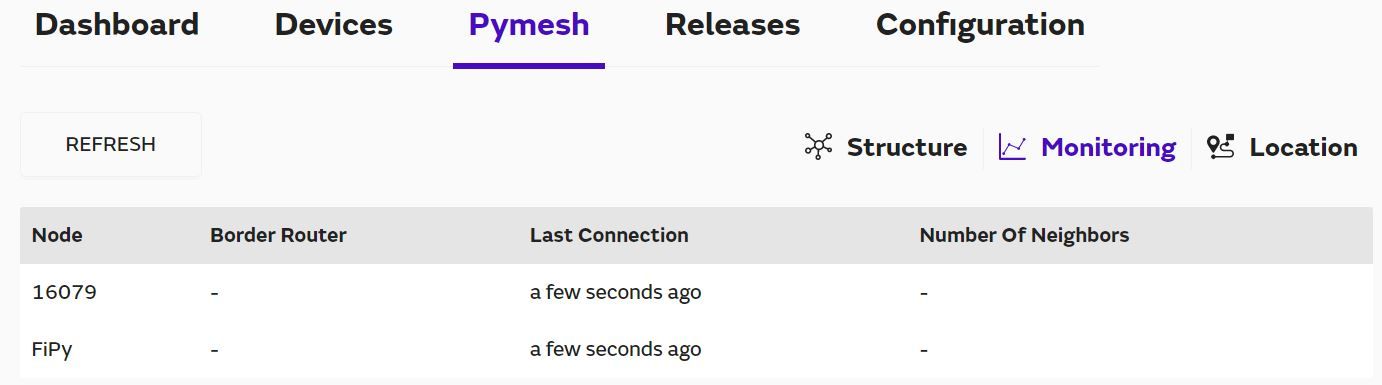
Moreover, I set the FiPy as Border Router, but something happened because in the image above it isn't appear as I defined previously.
I'm running tests right now, the FiPy is the leader of the network (MAGENTA) and the LoPy4 is a router (GREEN). Do I need another LoPy/FiPy to find neighbours between them?
I read the tutorials in the Pycom website, but I'm getting a bit confused because what I found here (https://docs.pycom.io/pymesh/licence/) works, but couldn't find neighbours in the network, and what I also found on the website (https://docs.pycom.io/firmwareapi/pycom/network/lora/pymesh/) doesn't work. It throws an error:
Guru Meditation Error: Core  1 panic'ed (LoadProhibited). Exception was unhandled.
Core 1 register dump:
PC      : 0x400ff85a  PS      : 0x00060030  A0      : 0x800ff890  A1      : 0x3ffdd450
A2      : 0x00000000  A3      : 0x00000000  A4      : 0x3f433b18  A5      : 0x3ffdd5b8
A6      : 0x0000002a  A7      : 0x0000098a  A8      : 0x3f40fc38  A9      : 0x3ffdd430
A10     : 0x00000000  A11     : 0x00060023  A12     : 0x00060020  A13     : 0x00000000
A14     : 0x0000000a  A15     : 0x3ffdd5e0  SAR     : 0x0000001e  EXCCAUSE: 0x0000001c
EXCVADDR: 0x00000000  LBEG    : 0x4009527c  LEND    : 0x40095287  LCOUNT  : 0xffffffff

ELF file SHA256: 0000000000000000000000000000000000000000000000000000000000000000

Backtrace: 0x400ff85a:0x3ffdd450 0x400ff88d:0x3ffdd470 0x40108334:0x3ffdd490 0x40101e71:0x3ffdd4c0 0x400fe299:0x3ffdd4e0 0x4010a251:0x3ffdd500 0x40101f84:0x3ffdd5a0 0x400fe299:0x3ffdd600 0x400fe2c6:0x3ffdd620 0x400e1679:0x3ffdd640 0x400e1908:0x3ffdd6e0 0x400e01bd:0x3ffdd720
The code above had some core dump info but it was a bunch of letters without much sense and I decided not to put it here.
So I would appreciate if someone can give me some hints about whats happening or what to do now.

Hello! It looks like you're interested in this conversation, but you don't have an account yet.
Getting fed up of having to scroll through the same posts each visit? When you register for an account, you'll always come back to exactly where you were before, and choose to be notified of new replies (either via email, or push notification). You'll also be able to save bookmarks and upvote posts to show your appreciation to other community members.
With your input, this post could be even better 💗
Register Login