Driver Software for Pysense
-
I am trying to update the firmware for Pysense so that I can update the firmware for my Lopy4 later. I use Window 8.1, 64 bit.
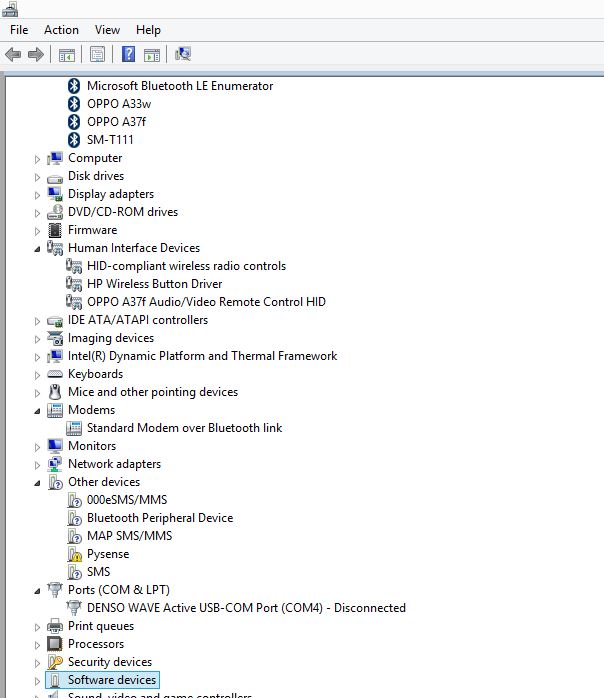
When I connect the Pysense to my laptop using the USB 2.0 cable, I can see Pysense appearing under the "Other devices" in the Device Manager but I am not able to see the device under the Ports (COM & LPT)........screenshot attached below.
As per the Pycom documentation instruction, The Pysense device should appear under the Port (COM & LPT)). I referred the link in Pycom site http://docs.pycom.io/gettingstarted/installation/drivers/ but could not obtain the driver file instead some wired .inf file appears.
If anyone especially those who have used Windows to update the driver would help me to advise please,
Thank you
-
-
@rskoniec Don't know what is the problem. I checked my Window auto-update and it is enabled already. Still, it shows the same and does not appear under Port (COM&LPT).
-
@phusy012 After you've enabled Windows Auto Update did you try remove the device from Device Manager and replug the board?
Hello! It looks like you're interested in this conversation, but you don't have an account yet.
Getting fed up of having to scroll through the same posts each visit? When you register for an account, you'll always come back to exactly where you were before, and choose to be notified of new replies (either via email, or push notification). You'll also be able to save bookmarks and upvote posts to show your appreciation to other community members.
With your input, this post could be even better 💗
Register Login