New Firmware Updater version 1.16.0
-
A new firmware updater version 1.16.0 is now available. The update is currently optional but will be made mandatory in the next few days to make full use of some server side changes.
GUI:
-
Support for downgrading (in Advanced Settings)
-
Support for choosing the file system type (in Communication or Advanced Settings)
-
Improved Results screen on success
-
The firmware updater should now remember the last file flashed (if it still exists)
-
When using an Expansion Board 3 or Shield (Pyscan etc.), the firmware updater will now make 3 attempts to flash the board before throwing an error. This should mitigate some USB issues.
-
Improved error messages when the serial connection failed
CORE:
-
Fixes a bug that would cause the firmware updater to get stuck at a lower baudrate than requested
-
Fixes a bug that would prevent the file system from getting erased on modules with 8MB flash
-
Support for version 2.1 of the script2 file. Version 2.0 support (which was never officially released) has been disabled due to missing otadata partition definition.
Server improvements:
If a device has had its LoRa MAC erased before it was flashed for the first time, a new address is now assigned to the device. We will also upload production data from our most recent production runs to the server over the next few days so that new devices are recognised automatically.
Choosing the File System:
The new development firmware (1.19.0.b3 and newer) supports both FatFS and LittleFS for the internal flash file system and the new firmware updater has support for this.
When flashing in online mode, you can choose the file system based on what is available in the firmware:
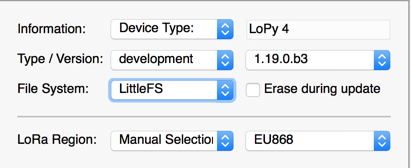
Advanced Settings is always enabled when flashing a development firmware!
When flashing from a local file, the option to choose the file system is in the Communication screen:
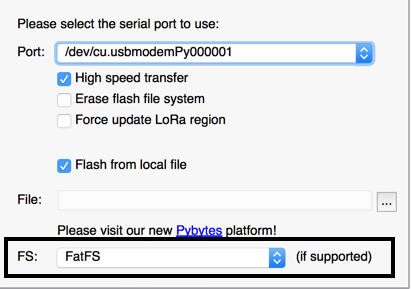
CLI:
- Improved progress output when using flash, copy and erase_fs commands
Please note that CLI commands copy and ota currently do not work correctly with development firmware 1.19/1.20 due to changes made in the partition table. The copy command should not be used with partitions factory, ota_0 and otadata in this case.
As usual please let me know if you encounter any issues.
-
-
The download link in the firmware updater appears to give a 404 page can't be found response.
Do you have an alternative download link?
Thanks
Andrew
-
@thinginnovations said in New Firmware Updater version 1.16.0:
The download link in the firmware updater appears to give a 404 page can't be found response.
Sorry about that... this is a bug in the old stable firmware updater when creating the download link. I have deployed an update on the software server to take this into account so the link should work now. Please let me know if this isn't the case.
-
Works now. Thanks for the quick fix
Cheers
Andrew
-
In the download page :
https://software.pycom.io/downloads/linux-1.16.0.html
the version "Generic Linux with GLIBC 2.18 (and higher)" has wrong links, giving "404 Not Found". -
This post is deleted!

Hello! It looks like you're interested in this conversation, but you don't have an account yet.
Getting fed up of having to scroll through the same posts each visit? When you register for an account, you'll always come back to exactly where you were before, and choose to be notified of new replies (either via email, or push notification). You'll also be able to save bookmarks and upvote posts to show your appreciation to other community members.
With your input, this post could be even better 💗
Register Login