OTA or not OTA that is the question...
-
@robert-hh Thx a lot.
-
@Innocenzo I just gave ftplib a try.
- the uncompressed python script does not load
- the cross-compiled python file loads and works well
- a minified python script loads too and works well.
Since the minified version is not really readable too and requires an PC pre-process step, the compiled version is preferred. You could also compile the minified version, which gives the smallest footprint (about 11k). (get minify with pip install minify)
I would still try to use my own little loader, since that gives you full control. The only disadvantage is, that you have to implement both client & server. -
I'm trying OTA over FTP, is this still non-functional? I'm able to upload only about 1/4 of appimg.bin and it dies.
This is what I see on the console when it dies. Here, I am going from 1.4.0.b1 to 1.6.0.b1 on a WiPy 2.0.
Also could someone please upvote me as well? Grin
Guru Meditation Error of type IllegalInstruction occurred on core 0. Exception was unhandled. Register dump: PC : 0x40188c04 PS : 0x00050930 A0 : 0x80096671 A1 : 0x3fff2730 A2 : 0x3ffced9c A3 : 0x3ffc1dec A4 : 0x40188603 A5 : 0x00000000 A6 : 0x00000000 A7 : 0x0000012e A8 : 0x80188600 A9 : 0x3fff2710 A10 : 0x3ffc1dec A11 : 0x00060923 A12 : 0x00060920 A13 : 0x00000002 A14 : 0x00000fdb A15 : 0x00060023 SAR : 0x0000001a EXCCAUSE: 0x00000000 EXCVADDR: 0x00000000 LBEG : 0x4000c2e0 LEND : 0x4000c2f6 LCOUNT : 0x00000000 Backtrace: 0x40188c04:0x3fff2730 0x40096671:0x3fff2750 0x4009824e:0x3fff2770 0x40099fa2:0x3fff2790 Rebooting... -
@BetterAuto In order to uplod the full appimg.bin you must bulid the environment and edit the bootloader. (Actually the size for the appimg is fixed to 1MB). After that you can upload the entire file appimg.bin using FTP. Anyway, I do some tests and after the upload of the appimg.bin file in the sys folder nothing change. In other words OTA doesn't work also if you upload the full image on sys folder.
-
Ok but you see the file won't even upload. I'm able to upload only about 1/4 of appimg.bin and it dies. But since you said it's not ready I'll wait.
-
@BetterAuto
You have to be running an image with the modified boot loader flashed via the normal serial process before you try OTA, otherwise the code will overwrite itself during the FTP and cause a crash. -
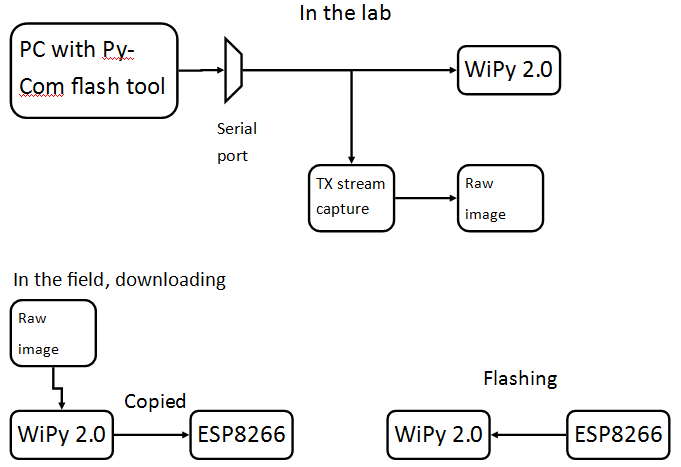
Could an image be downloaded to the WiPy and copied to an 8266? Then the helper chip could reset the WiPy, hold pin 23, feed the update, and reset it again.
If you capture the bytes from a serial port of a successful flash you could then replay that exact sequence from the helper board and no need to program much logic into it. Simply reset, pin 23, stream the prerecorded flash session, reset.
-
@BetterAuto Besides the fact,that this might only shift the problem to the ESP8266, you could also try to port the relevant portion of esptool.py to the ESP8266. But you maybe not done until OTA is working again with WiPy and it's cousins.
-
@robert-hh That's why I discussed capturing the bytes from a serial port of a successful flash. By replaying the exact sequence from the helper board there's no need to program much logic into it. No need to port esptool.py. Simply reset, pin 23, stream the prerecorded flash session, reset.
-
@BetterAuto If you look at the flash communication, it's not as simply as just dumping a stream of data to the xxPy. Flashing consists of two parts, the stub loader and the actual image, and then the data is transferred in blocks of 16 kByte each, with a (simple) protocol.
Esptool.py by itself is most likely too big to be ported to an ESP8266, but it could be split in an preparation phase running on the PC, which creates the binary data stream to be sent to the ESP32, which is then transferred to the ESP3266, and a smaller loader, which just takes this prepared image and sends it over to the ESP32. The first part might already be implemented in esptool.py, there is an option called write_image, for the second the protocol can be extracted from esptool.py. That seems doable.
Besides that, you have to organize on how the image is retrieved by the ESP8266. That device has to be managed too, like switching it on only when needed, etc.
But still, I do not think it's worth the effort, since OTA updates are still on Pycom's to-do-list. -
@robert-hh said in OTA or not OTA that is the question...:
If you look at the flash communication, it's not as simply as just dumping a stream of data to the xxPy. Flashing consists of two parts, the stub loader and the actual image, and then the data is transferred in blocks of 16 kByte each, with a (simple) protocol.
Understood, but if that entire session of two parts is captured raw the sending device should not need much if any logic. If you capture the raw stream coming from the TX pin (maybe via an intermediary device) it should work fine. Thus the helper chip should not need to understand what it is sending, it should be able to just send exactly the same stream of bytes that the original, with esptool.py, had sent.
Besides that, you have to organize on how the image is retrieved by the ESP8266. That device has to be managed too, like switching it on only when needed, etc.
The device has an enable pin which must be held high to operate. You would have to put a small amount of logic to tell it when to start and what file to send but that should be all.
I do not think it's worth the effort, since OTA updates are still on Pycom's to-do-list.
It depends if their timeline is three weeks, three months, or three years. I'm making a product for market right now and can't wait three years.
Do you know their timeline?
-
@BetterAuto
At the Eindhoven hackaton yesterday Daniel said they were still waiting for the bootloader section - which can't be updated via OTA - to stabilise before enabling over the air upgrades, he expected it to be possible in 3-4 weeks. -
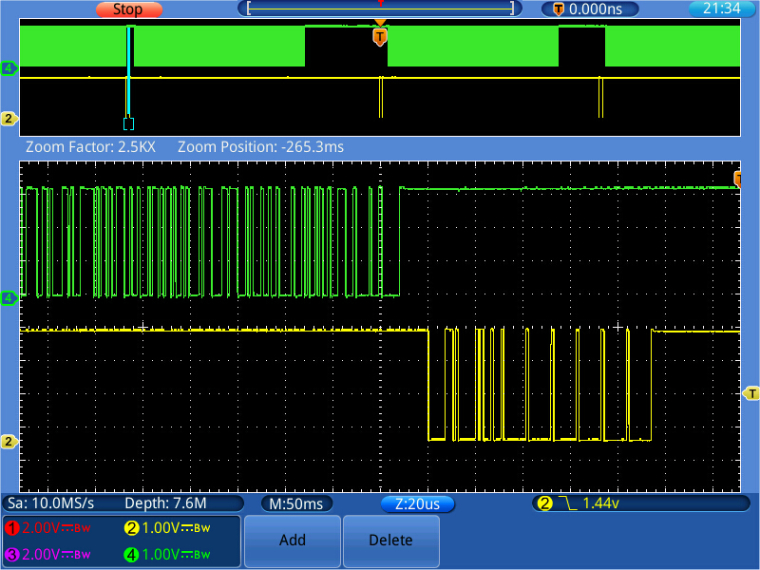
@BetterAuto @jmarcelino I understand your concept. B.T.W. since the EPS8266 has WiFI too, you can download the image directly to it, using a TCP/IP connection. Otherwise, any micro with sufficient flash would do, but then you have to implement a second transfer link between WiPy and ESP8266. But what I said, flashing the WiPy needs to run a protocol, of sending blocks, waiting for responses, etc. I do not know the protocol. I may also implement succeed/fail flags, which have to be handled by the loader accordingly. That's why I suggested to take that part out of esptool.py. Below is a picture of a small loading section. Green is the data sent to the LoPy at TX, yellow the response at RX! The response consists of an 8 Byte and a 4 Byte message. The zoomed window shows the 8 byte message (speed 921600 Baud).
P.S.: Daniel is known to be optimistic about the timelines. If he says 3-4 weeks, there's a good chance that we have it at the end of the year.
-
@robert-hh
Understood :) My feeling, because of the Pybites platform, the FiPy etc is we'll have it within 3 months. -
My kids used to like to watch Dora the Explorer. On that show the cartoon character turns to the audience and asks questions and pretends to respond. Even though the show is prerecorded, the illusion of ask/response is sufficient to satisfy many toddlers.
What does that have to do with OTA?
The prerecorded flash session need not be actually interactive. Two identical devices would respond in two identical ways even if one of them is only listening to a prerecorded message. I still think my method could work.
But if the timeline is somewhere between three weeks and year's end then I'll wait.
-
@BetterAuto The protocol is a9 variable in timing and it b) may vary in response, if it allows for a "transmission failed, please repeat las message" response. For a) a worst case timin could be used, but b) cannot be prerecorded.
-
I see, thanks. That's the kind of information I was looking for. Since we're so close to a solution I'll wait. I'm producing a product for sale and if a few of the first models cannot OTA it'll have to suffice.
I'm building OTA for the scripts in at least, which is where I think most potential vulnerabilities would lie anyway.
The solution for OTA for the scripts is I am downloading any updated scripts as something.py.new and will then reset the device. I will have code in boot.py to look for *.new, if found it will delete any existing something.py and move something.py.new to something.py. Then proceed with the rest of the bootup.
One could even extend this to back up existing files and provide a fallback option via GPIO but I've decided not to proceed with that.
-
The stranger thing is that if I upload my
appimg.binusing FileZilla FTP , the procedure complete without problems. But if I use a code like this:import socket import uos import machine from network import WLAN import utime import gc from machine import SD wlan = WLAN(mode=WLAN.STA) wlan.connect('TP-LINK_2.4GHz_E113DF', auth=(WLAN.WPA2,"***********")) while not wlan.isconnected(): machine.idle() #sd = SD() #uos.mount(sd, '/sd') print("Mem_alloc: {}".format(gc.mem_alloc())) print("Mem_free: {}".format(gc.mem_free())) uos.chdir("sys") s = socket.socket(socket.AF_INET,socket.SOCK_STREAM, socket.IPPROTO_TCP) addr = socket.getaddrinfo("**************", 80)[0][-1] print(addr) s.connect(addr) print("connected") s.write(b"GET /*************/appimg.bin\r\n") s.write(b"\r\n") #f = open("/sd/appimg.bin","wb") f = open("appimg.bin","w") while 1: req = s.recv(8192) if not req or req == b"\r\n" or req == b'': break f.write(req) gc.collect() f.close() print("DONE")or like this:
import socket
import gc
import uos
import machine
from network import WLAN
import utime
import sys

wlan = WLAN(mode=WLAN.STA)
wlan.connect('TP-LINK_2.4GHz_E113DF', auth=(WLAN.WPA2,"******"))
while not wlan.isconnected():
    machine.idle()

def getPort(req):
    req = req.split('(')
    print(req)
    req = req[1].split(')')
    print(req)
    req = req[0].split(',')
    port = (int(req[4]) << 8) + int(req[5])
    return port

uos.chdir("sys")
s = socket.socket(socket.AF_INET,socket.SOCK_STREAM)
s.connect(socket.getaddrinfo("*********", 21)[0][-1])
s.sendall(b'USER *******\r\n')
req = str(s.recv(8192))
print(req)
s.sendall(b'PASS *********\r\n"')
req = str(s.recv(8192))
print(req)
s.sendall(b'PASV\r\n')
req = str(s.recv(8192))
print(req)
s.sendall(b'TYPE I\r\n')
req = str(s.recv(8192),'utf-8')
print(req)
port = getPort(req)
p = socket.socket(socket.AF_INET,socket.SOCK_STREAM)
p.connect(socket.getaddrinfo("************", port)[0][-1])
print("Connected!")
f = open("appimg.bin",'wb')
s.sendall(b'RETR appimg.bin\r\n')
req = str(s.recv(8192))
print(req)
print("Start transfer")

while 1:
    req = p.recv(8192)
    if not req or req == b'':
        break
    try:
        f.write(req)
    except:
        print("NO!")
    gc.collect()
    utime.sleep(0.1)
f.close()
print("DONE")
I have an exception on the
f.write(req)and I can transfer only 497.664 bytes of theappimg.bin. -
@Innocenzo As far as I understand the ftp.c and ftpupdater.c code, the file appimg.bin, when received by ftp, is not written to the file system, but treated separately and written to a dedicated buffer. That's why it does not show up in the file system. Ftp looks out for that special file name "/flash/sys/appimg.bin".
The file system size is 508 k and is way to small to hold the image file. -
@robert-hh But @Innocenzo said that the procedure completes without problems when he uploads using FileZilla FTP.
@Innocenzo perhaps do a capture of the data being passed during the working upload to see what may need to be added to your filesystem code.
Working back to my thoughts on a small daughter device, perhaps an ESP8266 can FTP the code over. I had ignored that method since I couldn't get it to work with FileZilla myself.

Hello! It looks like you're interested in this conversation, but you don't have an account yet.
Getting fed up of having to scroll through the same posts each visit? When you register for an account, you'll always come back to exactly where you were before, and choose to be notified of new replies (either via email, or push notification). You'll also be able to save bookmarks and upvote posts to show your appreciation to other community members.
With your input, this post could be even better 💗
Register Login