Cannot update firmware on W01
-
We manufactured some custom boards using the W01 (used for the Wipy2) and are having trouble updating the pycom firmware from what it came with (1.7) to the latest 1.18.
Using the Pycom Firmware Update tool we see this:
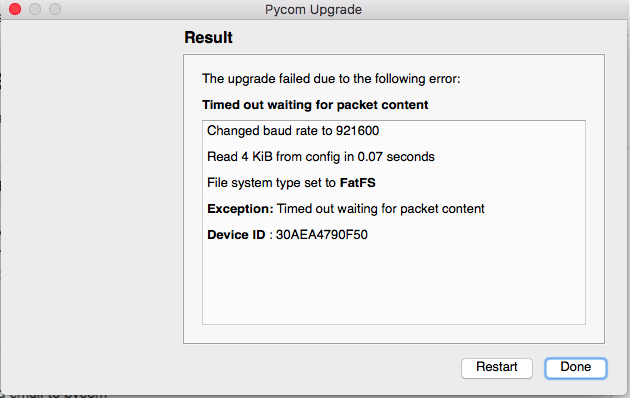
We also tried using the esptool.py from espressif based on the readme in the https://github.com/pycom/pycom-micropython-sigfox and found that esptool.py could not read the flash_id of the ext flash inside the W01. It read the chip_id just fine.
So, we imagine something happened to the ext flash connected to the esp32 chip in the W01. All 5 of our boards have this issue. We've made boards (using W01) like this before that work just fine.
The only difference we can see between these boards and ones that worked in the past with W01 is that we are supplying the W01 with about 3.42V instead of 3.3V.
Could this cause an issue with the W01?
Note: we do pull the P2 pin low and then reset as per pycom instructions to enter firmware upgrade mode. This usually works for us just fine with our older boards.
-
@jbthompson did you pull P2 (GPIO0) low and apply reset to enable firmware update mode?
-
@robert-hh yes, we did that. Normally, this works for us on our other boards that use W01. We usually have no trouble updating the pycom firmware.
It seems it all comes down to the esp32 not being able to communicate with the ext flash chip. But we are not sure why. It could be a pcb assembly / manufacturing issue... -
Well, issue seems to be resolved!
It looks like our new design had P8 pulled HIGH. According to this pycom ticket: https://github.com/pycom/pycom-documentation/issues/96 this will cause the firmware upgrade to have issues....
We removed the pullup from P8 (we are using it for another purpose).. and now are able to talk to the ext flash and update the firmware.
Maybe this should be more clear in the pycom documentation?

Hello! It looks like you're interested in this conversation, but you don't have an account yet.
Getting fed up of having to scroll through the same posts each visit? When you register for an account, you'll always come back to exactly where you were before, and choose to be notified of new replies (either via email, or push notification). You'll also be able to save bookmarks and upvote posts to show your appreciation to other community members.
With your input, this post could be even better 💗
Register Login