FiPy v1.2 Problems
-
@securigy It is not an issue of the FiPy, the problem is the new 1.20.1r1 firmware, which includes pybytes. That disables the AP, and also changes the behaviour of the REPL prompt; soft-reset by Ctrl-D is not working any more. See also the (lengthy) discussion here:
https://forum.pycom.io/topic/5348/gpy-full-flash-erase/28
And in the thread around that. You find there also a link to a place, where @andreas hosts some images without pybytes, which I have built yesterday: https://packages.hiveeyes.org/hiveeyes/foss/pycom/robert-hh/
You can disable the autostart of pybytes (see the first link above), but that does not change the soft-reset block. For copying files, you can also use pyboard.py from this place: https://github.com/micropython/micropython/blob/master/tools/pyboard.py. AFAIK, that still works with the pybytes repo. -
@robert-hh Ok, first of all it is a good piece of news - it proves that I am not insane...
Then I have a bunch of questions:-
If the 1.20.1.r1 image screws up automatic AP on boot up and access to REPL over serial, why Pycom is shipping it without providing a word of caution? I wasted enormous amount of time dealing with this...
-
If 1.20.1.r1 is the problem - will this problem go away if I flash 1.20.1 instead?
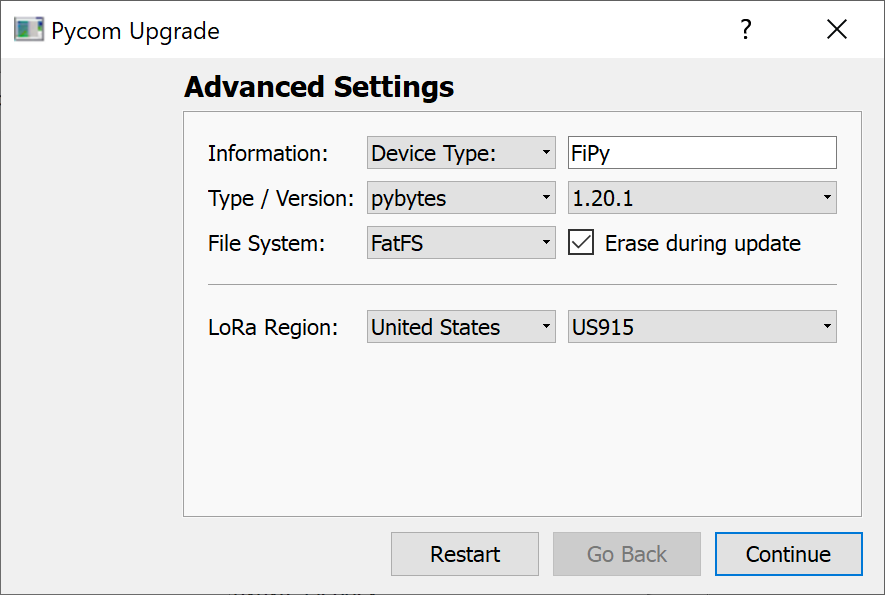 image url)
Actually, this is the 1st step I am going to take.... -
If I do #2 above - will I lose any functionality or introduce old problems to FiPy (at this point what's important to me is to be able to access REPL over serial and be able to establish AP by default on boot up).
-
I also downloaded the image you built from the 2nd link in your message. When I unzipped it I got this:
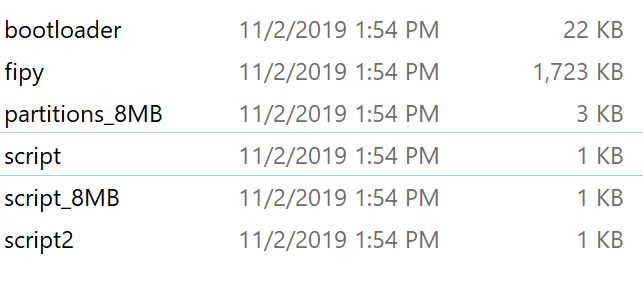
Now, I am not a firmware guy - so what do I do with these files? How do I flash them to FiPy? Is there any tool I can use on Windows 10 in order to do so? Any procedures/manuals? What are these script files? What are they written with?
EDIT: I flashed 1.20.1 and it fixed the problem of accessing REPL over serial. However, the attempt to upload project files is failing as it was on FiPy 1.0:
Connecting to COM15...

>>>
Uploading project (main folder)...
Not safe booting, disabled in settings

Uploading to /flash...
Reading file status
Failed to read project status, uploading all files
Creating dir lib
[1/6] Writing file boot.py (2kb)
Failed to write file, trying again...
Failed to write file, trying again...
timeout
[2/6] Writing file lib/L76GNSS.py (3kb)
Failed to write file, trying again...
Failed to write file, trying again...
timeout
[3/6] Writing file lib/LIS2HH12.py (6kb)
Failed to write file, trying again...
Failed to write file, trying again...
timeout
[4/6] Writing file lib/pycoproc.py (10kb)
Failed to write file, trying again...
Failed to write file, trying again...
Upload failed.: timeout Please reboot your device manually.
So I am not out of the woods yet...
-
-
Dear @securigy,
you would just use the "Flash from local file" option with that firmware images bundled as tarballs like depicted in
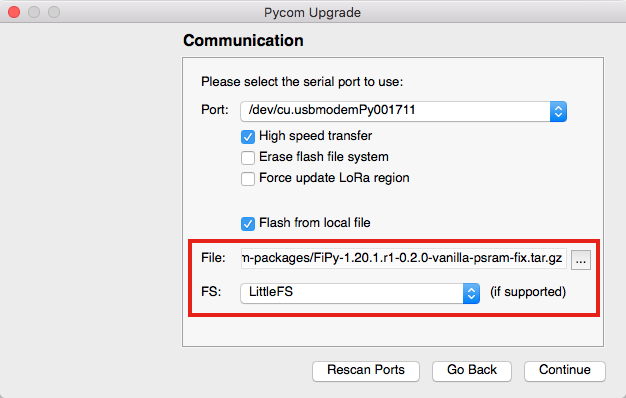
With kind regards,
Andreas. -
@andreas oh, silly me! Thank you. Will try right away.
What do I need to chose: FatFS or LittleFS? -
@securigy You will definitively want to use LittleFS. The FatFS will most likely give you file corruption issues in one way or another [1].
Please be aware that you will loose the content of your filesystem on the FiPy device.
Please also be aware that you should completely erase your device before, otherwise you might get strange errors from the WiFi subsystem [2].
On Windows, the required invocations on the command line are
pycom-fwtool-cli.exe --verbose --port COM11 erase_all
pycom-fwtool-cli.exe --verbose --port COM11 flash --tar FiPy-1.20.1.r1-0.2.0-vanilla-psram-fix.tar.gz
Please adjust the argument to the
--portparameter according to your environment.[1] https://community.hiveeyes.org/t/fipy-verliert-programm-nach-power-off-durch-leeren-lipo-file-system-corruption-through-brownout-conditions/2057
[2] https://community.hiveeyes.org/t/installing-the-recent-pycom-firmware-1-20-1-r1-requires-erasing-the-flash-memory-completely/2688 -
@andreas So I flashed the image I got from Robert's second link.
With this one I still do not see fipy-wlan in the list of available networks.
...and I also lost access to REPL through serial:AutoConnect enabled, ignoring 'address' setting (see Global Settings) Searching for PyCom boards on serial... Connecting to COM15...Any suggestions?
-
Dear @securigy,
sorry, I can't tell anything about the default AP mode. Just wanted to help out with flashing the firmware images. However, @robert-hh seems to know more about the details of the features still available with this firmware.
Sorry for the experience with all that from your perspective. It's really a moving target as it is all over the place with software and systems these days.
Keep up the spirit!
With kind regards,
Andreas. -
@andreas @robert-hh
Thank you Robert for building Andreas' versions.
It works now:- First I did
pycom-fwtool-cli.exe --verbose --port COM15 erase_all- Then followed with the flashing of Robert's build (I could not find your build, Andreas) with LittleFS
and now I can see fipy-wlan-XXXX in available networks list and I can also access REPL over serial and I could Upload the files to FiPy without errors!
You have no idea how grateful I am to you guys.
Very excited - finally I can start coding my contraptions! -
@securigy Good to hear this process worked well for you. Good luck with your next steps!
-
Dear @securigy,
if you feel lucky, you might want to try our custom build just released on [1]. More background about this is available through [2].
With kind regards,
Andreas.[1] https://packages.hiveeyes.org/hiveeyes/foss/pycom/vanilla/FiPy-1.20.1.r1-0.6.0-vanilla-dragonfly.tar.gz
[2] https://community.hiveeyes.org/t/investigating-random-core-panics-on-pycom-esp32-devices/2480 -
@securigy I am happy to help. But that should not be our task. Pycom should stop building firmware versions which break existing behavior - and that without announcement or documentation.


Hello! It looks like you're interested in this conversation, but you don't have an account yet.
Getting fed up of having to scroll through the same posts each visit? When you register for an account, you'll always come back to exactly where you were before, and choose to be notified of new replies (either via email, or push notification). You'll also be able to save bookmarks and upvote posts to show your appreciation to other community members.
With your input, this post could be even better 💗
Register Login