Experiences with DHT21/AM2301
-
Hi everyone! I have a temperature monitoring project that previously used a DHT11 sensor to read temperature and humidity data, but for improved accuracy, I have moved to the DHT21, which is also called AM2301. I thought I bought a DHT22, but apparently I didn't.
A Google search says that this sensor should work like a DHT22, but I have tried these two libraries for DHT sensors with the DHT22 setting, and I could not read any data successfully.
Any experiences with this sensor together with Pycom devices or any recommendations on how I can get it to work and report data?
Datasheet for my sensor (uses a 1-wire interface): http://www.haoyuelectronics.com/Attachment/AM2301/AM2301.pdf
Link to my sensor (Swedish retailer): https://www.kjell.com/se/produkter/el-verktyg/arduino/tillbehor/luxorparts-temperatur-och-luftfuktighetssensor-for-arduino-p90471
(back of sensor reads:ASAIR AM2301 POWER 3.3-5.2V DC HUMI 0...99.9% RH TEMP -40...80 C PRECISION: +/-3%RH +/-0.5C OUTPUT: DIGITAL (1 WIRE) SERIE NO: 18053E87A)
-
@techykermit Do you have a pull-up resistor between Data and Vcc? The recommended value is 4.7 kOhm.
-
@robert-hh Nope, I could not get it to work with @Jurassic-Pork's library. It does not seem to read data from the AM2301 sensor. I attached a 10k resistor.
Also, by the way, I got a DHT22, but it requires 3.5 volts and is not enough for the Pycom. How have other people gotten this to work?
-
@techykermit I have a DHT22, or to be precise, AM2302, working with 3.3V. The datasheet says 3.3-5.5V. If that one does work too, then there is a different problem. Which Pin did you use for the connection, and does that match the script?
-
@robert-hh Unfortunately, DHT22 makes my Pycom stop responding to USB commands (when I connect it properly) and it also turns off the LED indicator light on the expansion board. I used Pin 3 (P3), but have also tried with P6. This makes me think it is the DHT22 requiring too much power. Google's suggested answer for "DHT22 specs" from this website: https://components101.com/sensors/dht22-pinout-specs-datasheet says 3.5 volts, but Adafruit does not say that so I trust them because that was where I bought it.
My AM2301 does not seem to do anything to the power of the board, but on P3 with a 10k resistor between VCC and data, it does not read any data in my case.
-
@techykermit I do not fully understand P3 is the 5th pin counting from the edge. P3 seems to be used by the expansion board. You should try using pins like P9, P10, or P11, which are definitely not used for anything else.
-
@robert-hh Hi! I am very sorry that I have not responded sooner.
We have not prioritized getting the DHT22 to work as we can test with DHT11 while we are developing. Production is getting closer though.
And no, the pin does not matter at all. Let me show you:
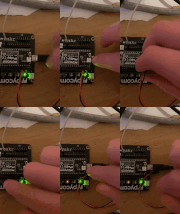
Bigger image here.Note how the "LED" light isn't on when the DHT22 is plugged in, and that the WiPy does not get enough power to work (it does not show up in my computer or show the heartbeat (as an indication that it is on)).
After power to the DHT22 is disconnected, the device works just fine.
I bought my sensor from Adafruit and I have the resistor that came together with the sensor between data and power.
Any ideas?
-
@techykermit Did you try just that single DHT22 unit? It may be broken.
From you video it is a litle bit hard to tell, but it seems as if the black wire is going to 3.3v, and the red one to P23. -
@robert-hh They are connected correctly, I double-checked.
I also tried with another DHT22. It was no different, the same thing happened.
I suspect that it can be something with the DHT22 drawing too much power from the Pycom. -
@techykermit So you connected DHT22 GND to WiPy GND and DHT22 Data to a WiPy GPIO an DHT22 Vcc to GPIO 3.3V.
That should stop the WiPy in any way from running. -
@robert-hh That way of connecting things to the Pycom works flawlessly with DHT11. What do you suggest doing otherwise? Powering the DHT22 separately?
-
Update: I powered the DHT22 separately and connected it to P10. I removed the RTS jumper.
Still no success. -
@techykermit Does it still stop the WiPy? or does it simply not work? If it stops the WiPy while properly connected to Vcc and GND, then the DHT devices are faulty. Their current consumption should be less than 1 mA.
-
@robert-hh It does not stop the WiPy from working, but the PyCom can not read any data from it.
-
@techykermit I reproduced your setup (see the attached figure) and I am able to get readings from both DHT22 and DHT11 sensors using as an example
P8for VCC andP10as DATA pins (and a pull-up resistor for the DATA pin).For reading the values I used https://github.com/JurassicPork/DHT_PyCom/tree/pulses_get (notice that I used the
pulses_getbranch not themaster).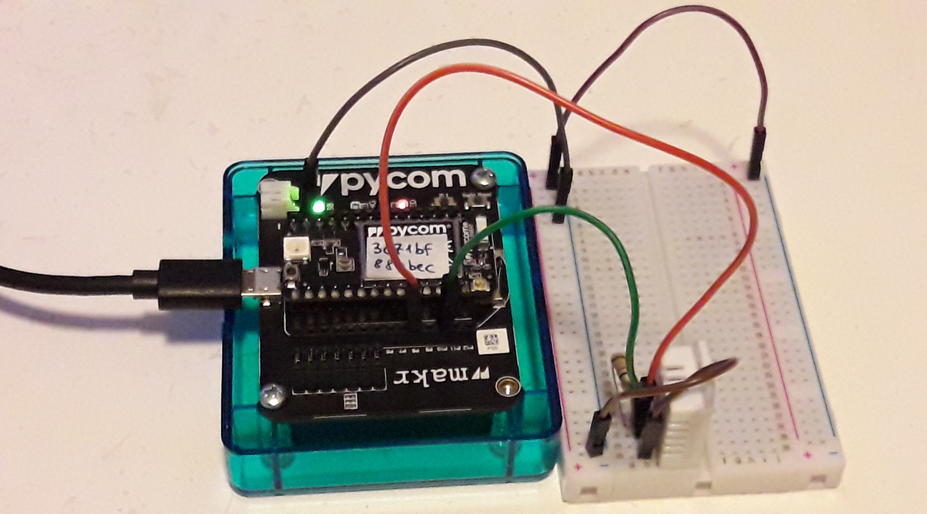
-
I am struggling to get past error free compiling in an effort to learn Arduino. I have Googled for solutions for untold hours and it is my conclusionthat most of these errors I experience are related to "libraries" for devices. At this point in my learning I cannot yet write Sketches, but I attempt to understand and rework Sketches that I find, but most just fail. I have worked through trying to understand the error messages without much success. My current IDE is 1.6.13 and I am wondering if uninstalling my entire current Arduino platform and libraries and re-installing the latest 1.8.1 IDE would be a step towards eliminating these compiling errors? Is there a best repository for error free device libraries. https://speedtest.vet/ https://vidmate.bid/ https://123-movies.red/
-
@arso Besides that this forum is about Pycom and Python, I can leave a few words about ESP32 and Arduino. It works, both with Version 1.6.13 and 1.8.10. In order to use the ESP32, you have to follow the intructions here: https://github.com/espressif/arduino-esp32/blob/master/docs/arduino-ide/boards_manager.md to
- Change the preferences to include the ESP32 modules
- Select the ESP package in the board manager (tools->board menu) and let it install the package. It is BIG.
- Select an appropriate board and settings in the tools menu
If you have done a lot of configuration attempts, it may be better to erase Arduino form you system and start over again. Especially the Arduino folder with it's settinsg should be newly created (...\Documents\Arduino on windows, ~.arduino15 on linux), at this contains the ESP32 package.


Hello! It looks like you're interested in this conversation, but you don't have an account yet.
Getting fed up of having to scroll through the same posts each visit? When you register for an account, you'll always come back to exactly where you were before, and choose to be notified of new replies (either via email, or push notification). You'll also be able to save bookmarks and upvote posts to show your appreciation to other community members.
With your input, this post could be even better 💗
Register Login