Gateway doesn't send LoRa Wan packets after deep sleep
-
Hi everybody,
I'm using The Things Indoor gateway to transfer data to my application in TTN. It works well when used in a loop, I can send every packets that I want, the counter increments well and everything. But, when I use deep sleep on my Lopy4 it seems like my gateway doesn't see the packets even if it did transfer the first. I have read almost every topic about deep sleep when using LoRa Wan but none of the solutions is working for me. I am using lora.nvram_save() and restore functions.
Here is my code for you to have a look :
#***********************************************************************
#*****
#*****			INITIALISATION
#*****
#***********************************************************************

#-----------------------------------------------------------------------
#     			IMPORTS / INCLUDE
#-----------------------------------------------------------------------

import pycom
import time
from network import LoRa
import socket
import machine
from machine import Pin
import binascii

import dht

#-----------------------------------------------------------------------
#     			DEFINITION DES CONSTANTES
#-----------------------------------------------------------------------

#-----------------------------------------------------------------------
#     			FONCTIONS COMMUNES QUI SERONT APPELEES
#-----------------------------------------------------------------------
pycom.wifi_on_boot(False) #pour eviter crash
#***********************************************************************
#*****
#*****			CONFIGURATION
#*****
#***********************************************************************
pycom.heartbeat(False)
#-----------------------------------------------------------------------
#     			INSTANCIATIONS
#-----------------------------------------------------------------------

th  = dht.DTH(Pin('P22', mode=Pin.OPEN_DRAIN),1)
# initialize LoRa in LORAWAN mode.
# Please pick the region that matches where you are using the device:
# Asia = LoRa.AS923
# Australia = LoRa.AU915
# Europe = LoRa.EU868
# United States = LoRa.US915
#SF=[7;12] répartir les SF entre les capteurs
LORA_NODE_DR = 4

if machine.reset_cause() == machine.DEEPSLEEP_RESET:

    lora = LoRa(mode=LoRa.LORAWAN, region=LoRa.EU868,sf=8,bandwidth=LoRa.BW_125KHZ)
    lora.nvram_restore()
    while not lora.has_joined():
        time.sleep(4)
        print("Trying to reconnect after deep sleep")
    print("join not first time")
    s = socket.socket(socket.AF_LORA, socket.SOCK_RAW)
    s.setsockopt(socket.SOL_LORA, socket.SO_DR, LORA_NODE_DR)
    s.setblocking(False)
    #s.bind(2)

else:
    lora = LoRa(mode=LoRa.LORAWAN, region=LoRa.EU868,sf=8,bandwidth=LoRa.BW_125KHZ)
    app_eui = binascii.unhexlify('XXXXXXXXXXXXXXXXX') #unique pour l'application
    app_key = binascii.unhexlify('XXXXXXXXXX') #a changer pour chaque capteur
    lora.join(activation=LoRa.OTAA, auth=(app_eui, app_key), timeout=0) # join a network using OTAA (Over the Air Activation)
    while not lora.has_joined():    # wait until the module has joined the network
        time.sleep(4)
        print("not joined yet first time")

    s = socket.socket(socket.AF_LORA, socket.SOCK_RAW)
    s.setsockopt(socket.SOL_LORA, socket.SO_DR, LORA_NODE_DR)
    s.setblocking(False)

# set the 3 default channels to the same frequency (must be before sending the OTAA join request)
lora.add_channel(0, frequency=868100000, dr_min=0, dr_max=5)
lora.add_channel(1, frequency=868100000, dr_min=0, dr_max=5)
lora.add_channel(2, frequency=868100000, dr_min=0, dr_max=5)
# remove all the non-default channels
for i in range(3, 16):
    lora.remove_channel(i)


#***********************************************************************
#*****
#*****			BOUCLE PRINCIPALE
#*****
#***********************************************************************

def run():

    #result = th.read()
    #s.send(str(result.temperature))
    s.send("Yo")
    pycom.rgbled(0xff00) #led verte après envoi de message
    time.sleep(0.4)
    pycom.rgbled(0x0000)
    data = s.recv(64)
    print(data)
    return 0

run()
#reset au bout de 20 sec
lora.nvram_save()
machine.deepsleep(20000)
I feel like i've tried everything but can't figure out what's wrong.
Here is a look at the traffic going through my gateway i TTN, we can see that the first packet is received but then nothing...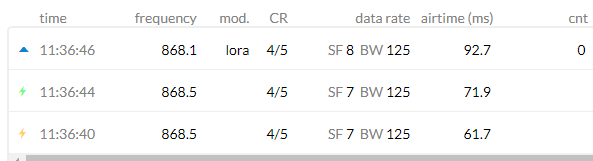
Thanks in advance and have a great day
-
@gaet I made the experience that the LoRa needs a power cycle to recover. machine.deepsleep() does not power-cycle the board. If you have a Pycom expansion board of any type, you could try pycoproc.go_to_sleep(), which switches off the LoPy4 power.
-
@robert-hh I thought this library was only working with PySense or PyTrack but not with expansion board V3.1 ?
Thank you for your answer
-
@gaet I have no pyboard 3.x, so I cannot test. And teher is no technical information available for the boards. But it uses the same PIC chip as the other boards.
-
@robert-hh I just tried with a PySense and py.go_to_sleep() instead of machine.deepsleep(), but the result is still the same, no packet is transfered by my gateway after the deep sleep
-
UPDATE :
I used an other Lopy4 and it works fine... The counter is reseting though but it works. -
@gaet Do the two models have the same firmware?
-
@robert-hh Yeah they have the same firmware, the only thing I think I changed is the pin of the sensor, I switceh from P3 to P4, but I don't see why the first would have caused issue according to the pinout.
-
@gaet P4 can be used unless you have an SD card inserted.
-
@robert-hh I tried my code with all the lopy I had and P4, and it works well with all except with the first, I've updated his firmware but the data sent after deep sleep never arrive
-
@robert-hh Not Expansion Board v2.x, which doesn't have the PIC microcontroller.


Hello! It looks like you're interested in this conversation, but you don't have an account yet.
Getting fed up of having to scroll through the same posts each visit? When you register for an account, you'll always come back to exactly where you were before, and choose to be notified of new replies (either via email, or push notification). You'll also be able to save bookmarks and upvote posts to show your appreciation to other community members.
With your input, this post could be even better 💗
Register Login