Not all the transmitted packets are received
-
Hello all,
My project is lopy4 to lopy4 communication(pure LoRa). I am sending data (GPS and timestamp) from one lopy4 to other. To calculate number of packets sent i kept a SD card in transmitter and wrote a command to write all the packets that are being transmitted. So as per my SD card, it is sending 300 packets per min, so 5 same timestamps in a second.To calculate packet loss i kept one more SD card in receiver and wrote command in the code to write all the data packets that are received . i kept devices next to each other and start doing experiment. Out of 300 packets it is receiving 30 packets only, repetitive packets are not receiving by the receiver. so i am confused to calculate the packet loss.
My question is why repetitive packets are not being received ?
-
@sita 5 messages per second or 200 ms per message is pretty fast, way beyond a transmission rate for which Lora is designed, and which you are allowed to use. To answer your question, I need more information:
- How long were the messages you have sent?
- Which send parameters did you use, like SFx, data rate and Coding.
- Did you add sequence numbers to your messages to tell, which messages were lost? There might be a regular pattern.
- If you lower the message speed, like every two seconds, does that affect the loss rate?
I assume that you did a kind of desk test, with transmitter and receiver in a comfortable distance of a few meters. (not too close, and not too far away). LoRa is not a reliable transmission method. Packets may get lost without notice.
-
Hello @robert-hh ,
=> I am assuming how long means, how much time i am transmitting signal. Around 10 min i have transmitted. but i have done same test several times
= > Parameters are
lora = LoRa(mode=LoRa.LORA, region=LoRa.EU868, frequency=433000000, power_mode=LoRa.ALWAYS_ON, tx_power=10, bandwidth=LoRa.BW_125KHZ, sf=7, preamble=8, coding_rate=LoRa.CODING_4_8)
But i changed SF from 7 to 12=> At the transmitter side SD card, it is writing like below.
53.058019 8.800648 20200127174856
53.058019 8.800648 20200127174856
53.058019 8.800648 20200127174856
53.058019 8.800648 20200127174856
53.058019 8.800648 20200127174856
53.058019 8.800648 20200127174856
53.058019 8.800648 20200127174856
53.058019 8.800648 20200127174856
53.058019 8.800648 20200127174856
53.058019 8.800648 20200127174856
53.058019 8.801473 20200127174858
53.058019 8.801473 20200127174858
53.058019 8.801473 20200127174858
53.058019 8.801473 20200127174858
53.058019 8.801473 20200127174858
53.058019 8.801473 20200127174858
53.058019 8.801473 20200127174858
53.058019 8.801473 20200127174858
53.058019 8.801473 20200127174858
53.058019 8.801473 20200127174858To identify the packet loss i am doing
- for a fixed duration of time (for example 2 min) i am transmitting the data. In the code(transmitter side) i have wrote a command to store all the data that is being transmitted. like above data is being stored in the SD card with the timestamp
- At the receiver side also i kept SD card and it will store the received data.
- After the experiment the am comparing the data on both SD cards with the that fixed duration.
The above pattern i am following for packet loss calculation.
=> I didn't tried lowering the message speed. i will do it and let you know
=> i have done both desk test and with some distance(50m) test also.I hope i answered your questions, if anything needed i will tell you.
Thanks
-
@sita SF7 is faster than SF12. At SF7, the data rate is 5470 bits/s, and SF12 it is 250 bits/s. At SF12 and Coding 4_8, it takes about 3-4 seconds to send a single message.
Using SF7 should improve it, as well as reducing the message rate. -
@robert-hh I just tried SF = 12 & Coding 4_8. It is sending messages as you said (3-4 seconds per message). But while writing in SD card it is writing like below. Same number of bits only it is writing in the SD card if i changed the values also. Is there any other way to calculate the packet loss not like writing in the SD card ??
53.0581,8.801528,20200128164155
53.0581,8.801528,20200128164155
53.0581,8.801528,20200128164155
53.0581,8.801528,20200128164155
53.0581,8.801528,20200128164155
53.0581,8.801528,20200128164155
53.0581,8.801528,20200128164155
53.0581,8.801528,20200128164155
53.0581,8.801528,20200128164155
53.0581,8.801528,20200128164155
53.0581,8.801532,20200128164157
53.0581,8.801532,20200128164157
53.0581,8.801532,20200128164157
53.0581,8.801532,20200128164157
53.0581,8.801532,20200128164157
53.0581,8.801532,20200128164157
53.0581,8.801532,20200128164157
53.0581,8.801532,20200128164157
53.0581,8.801532,20200128164157
53.0581,8.801532,20200128164157
53.0581,8.801519,20200128164158
53.0581,8.801519,20200128164158
53.0581,8.801519,20200128164158
53.0581,8.801519,20200128164158
53.0581,8.801519,20200128164158
53.0581,8.801519,20200128164158
53.0581,8.801519,20200128164158
53.0581,8.801519,20200128164158
53.0581,8.801519,20200128164158
53.0581,8.801519,20200128164158
53.0581,8.801519,20200128164213
53.0581,8.801519,20200128164213
53.0581,8.801519,20200128164213
53.0581,8.801519,20200128164213
53.0581,8.801519,20200128164213
53.0581,8.801519,20200128164213
53.0581,8.801519,20200128164213
53.0581,8.801519,20200128164213
53.0581,8.801519,20200128164213
53.0581,8.801519,20200128164213
53.0581,8.801519,20200128164215
53.0581,8.801519,20200128164215
53.0581,8.801519,20200128164215
53.0581,8.801519,20200128164215
53.0581,8.801519,20200128164215
53.0581,8.801519,20200128164215
53.0581,8.801519,20200128164215
53.0581,8.801519,20200128164215
53.0581,8.801519,20200128164215
53.0581,8.801519,20200128164215 -
@sita You can add a sequence number to the transmitted package and then check at the receiver side for gaps in the number. Or you
- start sending with number 0,
- count packets which you receive. Then the difference between the receive count and the sequence number will tell you the number of lost packates.
-
@robert-hh Thanks for the reply. Now i get it
so far at the sender side i am seeing 10 packets with same sequence number at the same time in the SD card like shown below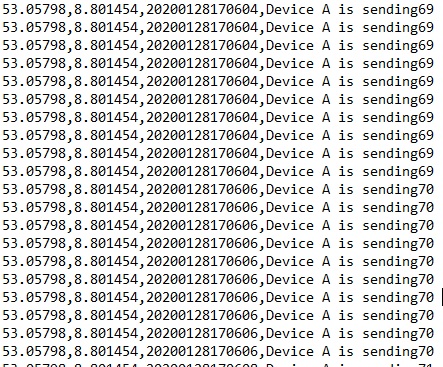 .
.where as at the receiver side i am able to see only one packet per sequence number
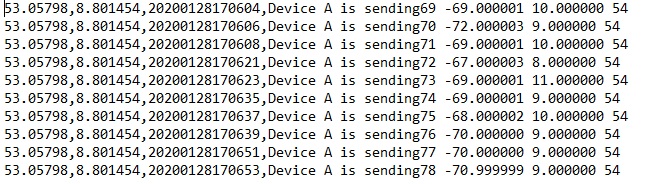 . From now i will calculate the packet loss by using the missing sequence number at the receiver side..
 -
@sita Are you actually sending all those identical packets? Are you sure you don't have an issue in your code and you are only sending it once?
You should increment the sequence number for each packet actually sent over the air, this would make things much easier to debug...
-
Hello @jcaron,
I am sending identical packets only, but in the SD card it it writing like this.
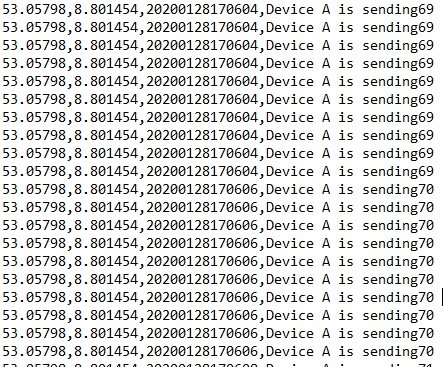
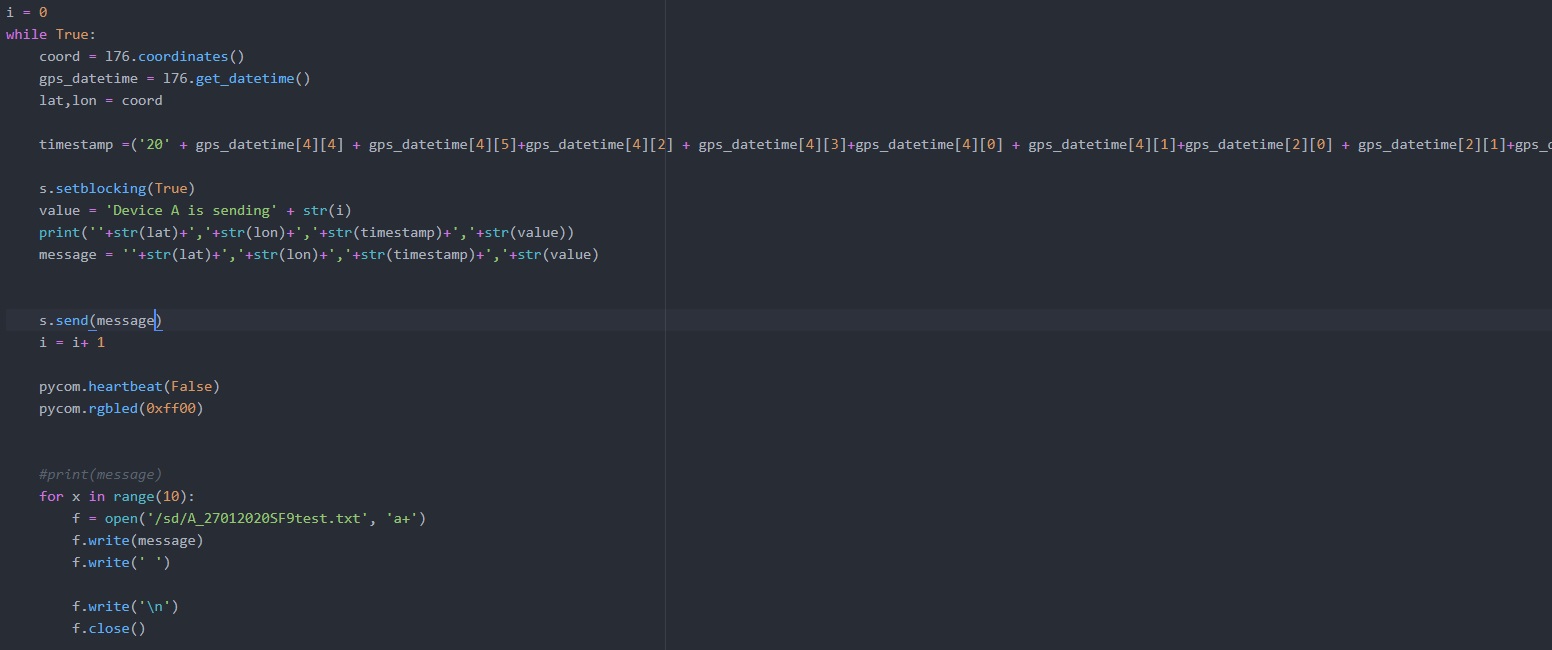
I think so i don't have problem in my code. FYI i have attached sending of part of code. If any problem is there could you please let me know, It would be very helpful for me.
Thanks
-
@sita You are sending the message once (
s.send) and writing it 10 times to your file (the wholeopen,f.write,f.closesequence). So it's quite normal the receiver only gets one copy of each message. -
@jcaron Thank you so much. It is fully my mistake, i forgot to remove that 10 and i am thinking it is sending 5 packets per sec. Now everything fine, Thanks a lot once again :) :)

Hello! It looks like you're interested in this conversation, but you don't have an account yet.
Getting fed up of having to scroll through the same posts each visit? When you register for an account, you'll always come back to exactly where you were before, and choose to be notified of new replies (either via email, or push notification). You'll also be able to save bookmarks and upvote posts to show your appreciation to other community members.
With your input, this post could be even better 💗
Register Login