Cannot detect wipy AP
-
Hi All
I just received my first wipy 3 and expansion board 3
I did the firmware update as suggested and all looks well but I cannot see the wipy AP anywhere - I tried several devices
I found a post suggesting a few things to try in REPL
Heres my log - but even manually setting the SSID etc - I still cant see the AP. I have even tried disconnecting from USB and running on battery but nothing - any suggestions welcome. Heres the REPL logrst:0x1 (POWERON_RESET),boot:0x13 (SPI_FAST_FLASH_BOOT)
configsip: 0, SPIWP:0xee
clk_drv:0x00,q_drv:0x00,d_drv:0x00,cs0_drv:0x00,hd_drv:0x00,wp_drv:0x00
mode:DIO, clock div:1
load:0x3fff8020,len:8
load:0x3fff8028,len:2176
load:0x4009fa00,len:19760
entry 0x400a05bc
Smart Provisioning started in the background
See https://docs.pycom.io/smart for details
Pycom MicroPython 1.20.2.rc3 [v1.11-2037465] on 2020-02-05; WiPy with ESP32
Pybytes Version: 1.3.1
Type "help()" for more information.
Connecting to COM7...import pycom
from network import WLAN
wlan=WLAN()
wlan.mode()
1
wlan.init()
wlan.mode()
1
wlan.ssid()
wlan.init(mode=WLAN.AP, ssid='wipy-wlan', auth=(WLAN.WPA2,'www.wipy.io'), channel=7, antenna=WLAN.INT_ANT)
wlan.ssid()
'wipy-wlan'
wlan.mode()
2 -
I tried reflashing the wipy but this time I unticked
"enable Pybytes/SmartCofig support"
and I can see the AP on my PC now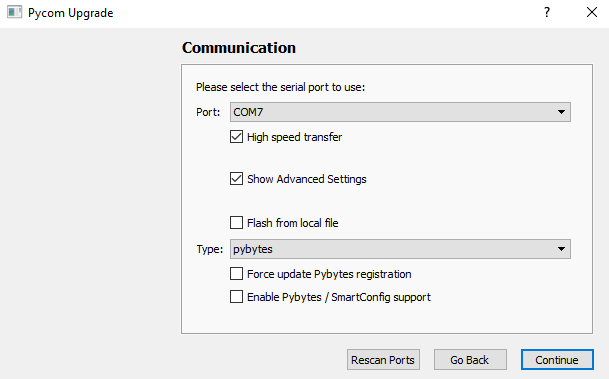
Hello! It looks like you're interested in this conversation, but you don't have an account yet.
Getting fed up of having to scroll through the same posts each visit? When you register for an account, you'll always come back to exactly where you were before, and choose to be notified of new replies (either via email, or push notification). You'll also be able to save bookmarks and upvote posts to show your appreciation to other community members.
With your input, this post could be even better 💗
Register Login