understanding accelerometer wake example
-
Hi to everyone,
I have one Lopy4 and one pytrack ex. board (version 1.1)
I'm trying to run the example of the site:
https://docs.pycom.io/pytrackpysense/apireference/sleep/
but I really dont understand how it works.
My purpose is to get the type of the interrupt (time or accelerometer) and to send some data via LoraWan.
For now I just want to test this example (No Lorawan).
I'm using visual studio code IDE and the operation I do is simply :- click "upload" button
- click the "run" button
The problem is : what should I expect from this script in the terminal you see attached?
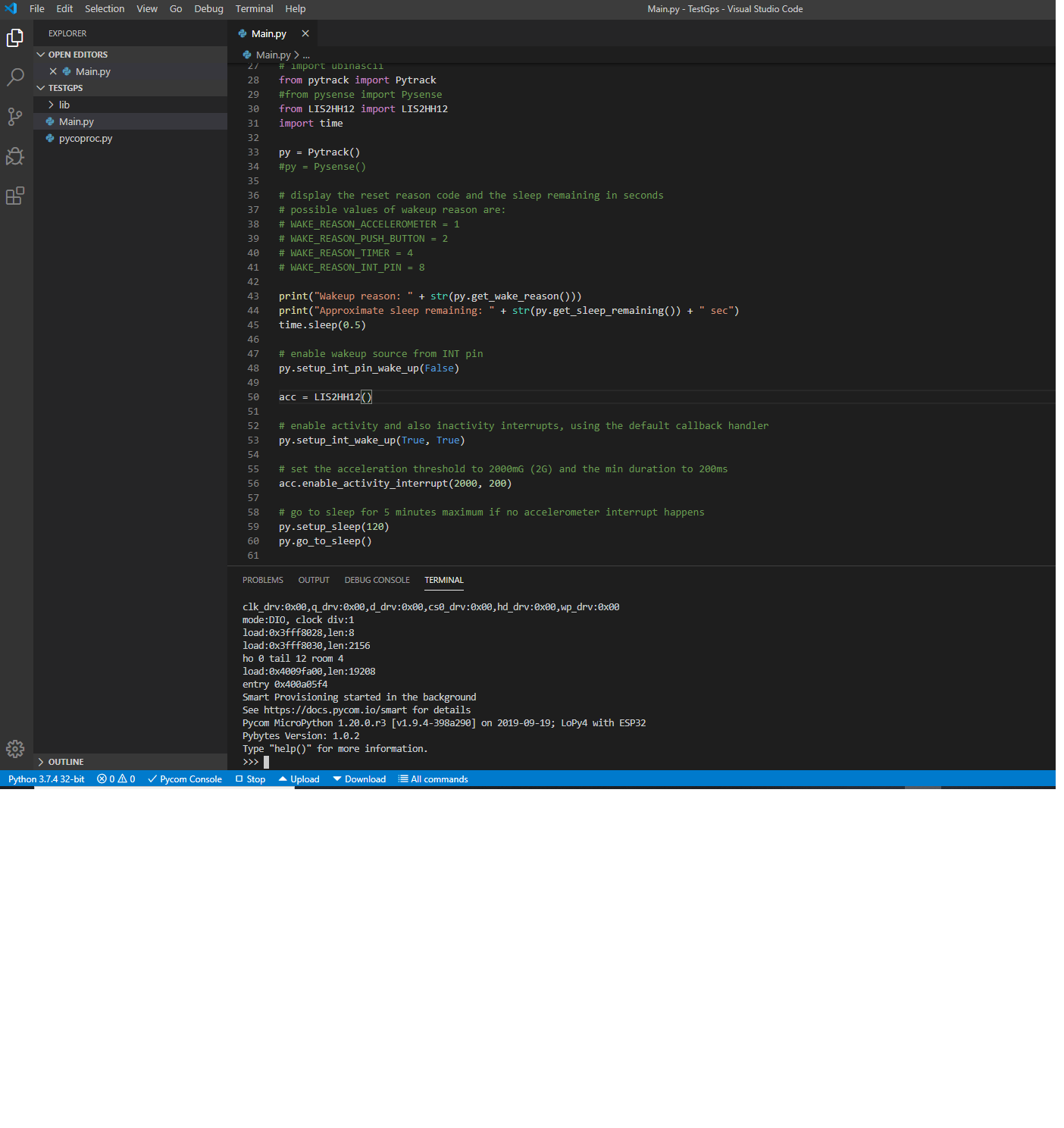
It seems the code is running ! am right?
but if I shake the board nothing happens.Please advice on what I'm doing wrong!
Thanks
Nico -
@NicolaC One problem with that code is that when it goes to sleep it will disconnect USB, and when it wakes up it takes a little while for USB to come back up, but it will go back to sleep before it's up.
You should probably change the LED color on boot, based on the wake reason, if you want to see what happens.
-
Dear Nicola,
the code you are showing is probably not even starting. Please try to rename your file from
Main.pytomain.pyand try again.With kind regards,
Andreas. -
@jcaron said in understanding accelerometer wake example:
Hi jcaron,
thanks for reply,
I have put a comment to the print statements at the begining and I have put the following code:#print("Wakeup reason: " + str(py.get_wake_reason())) #print("Approximate sleep remaining: " + str(py.get_sleep_remaining()) + " sec") pycom.heartbeat(False) if (str(py.get_wake_reason())==1): pycom.rgbled(0x007f00) # green time.sleep(2) pycom.heartbeat(False) else: pycom.rgbled(0x7f7f00) # yellow time.sleep(2) pycom.heartbeat(False)but it doesnt seem to work .
Do I have to close the IDE ?
Do I have to power from external power supply?
I really dont understand the flow of the code.Please help
Thanks -
@andreas thanks,
I have the file to "main.py" and it seems to work but:- at the boot when no accelermoter event occurs it gives me the yellow led (its right)
- then when I shake it , it seems to give me the green led but it doesnt take 2 sec. as designed in the code and it soon
switches to the yellow again .
Do you know why?
Thanks
-
Hi @jcaron,
I have make steps forward in order to send LoraWan packet on GPS event but I cant discriminate the accelerometer wake event from boot one. this is what i did:
1)configured one Fipy as nanogateway (properly connected to TTN)
2)flashed the following fw on the end device :
theif (str(py.get_wake_reason())==1)
doesnt seem to work since the led is always yellow.
Any Ideas?
These is my code:import machine import math import network import os import time import utime import gc import pycom from machine import RTC from machine import SD from L76GNSS import L76GNSS from pytrack import Pytrack from LIS2HH12 import LIS2HH12 from pytrack import Pytrack from network import LoRa import socket import ubinascii import binascii import struct time.sleep(2) gc.enable() py = Pytrack() l76 = L76GNSS(py, timeout=30) #lora = LoRa(mode=LoRa.LORAWAN, region=LoRa.EU868,device_class=LoRa.CLASS_A) #lora.nvram_restore() def loraSend (msg): # Initialize LoRa in LORAWAN mode. # Please pick the region that matches where you are using the device: # Asia = LoRa.AS923 # Australia = LoRa.AU915 # Europe = LoRa.EU868 # United States = LoRa.US915 print("dentro:sto mandando....."+msg) lora = LoRa(mode=LoRa.LORAWAN, region=LoRa.EU868) # create an ABP authentication params dev_addr = struct.unpack(">l", binascii.unhexlify('xxxxxxx'))[0] nwk_swkey = binascii.unhexlify('xxxxxxxxxxxxxx') app_swkey = binascii.unhexlify('xxxxxxxxxxxxxxxxxxxxxx') # join a network using ABP (Activation By Personalization) lora.join(activation=LoRa.ABP, auth=(dev_addr, nwk_swkey, app_swkey)) print("join finito") # create a LoRa socket s = socket.socket(socket.AF_LORA, socket.SOCK_RAW) # set the LoRaWAN data rate s.setsockopt(socket.SOL_LORA, socket.SO_DR, 5) # make the socket blocking # (waits for the data to be sent and for the 2 receive windows to expire) s.setblocking(True) # send some data print("scoppio?") #s.send(bytes(msg)) s.send(msg.encode('utf-8')) print("non scoppio") # make the socket non-blocking # (because if there's no data received it will block forever...) s.setblocking(False) print("fine") def returnGps (): lat=None lng=None gpsResult=None timer=30 while(timer!=0 and ((lat==None)or(lng==None))): print("getting coordinate") time.sleep(0.9) timer=timer-1 gpsResult = l76.coordinates() lat=gpsResult[0] lng=gpsResult[1] print ("LAT is: "+str(lat)+"\r\n") print ("LONG is: "+str(lng)+"\r\n") if (lat!=None and lng!=None): print ("found coordinate") break return gpsResult if (str(py.get_wake_reason())==1): pycom.heartbeat(False) pycom.rgbled(0xFF0000) # red time.sleep(5) pycom.heartbeat(False) c=returnGps() print ("prparing data") strToSend="shake\LAT:"+str(c[0])+"\LONG:"+str(c[1]) loraSend(strToSend) print("sending lora data") print ("LAT is: "+str(c[0])+"\r\n") else: pycom.heartbeat(False) pycom.rgbled(0x7f7f00) # yellow time.sleep(5) pycom.heartbeat(False) c=returnGps() print ("prparing data") strToSend="Alive\LAT:"+str(c[0])+"\LONG:"+str(c[1]) print("sending lora data") loraSend(strToSend) print ("LAT is: "+str(c[0])+"\r\n") # enable wakeup source from INT pin py.setup_int_pin_wake_up(False) acc = LIS2HH12() # enable activity and also inactivity interrupts, using the default callback handler py.setup_int_wake_up(True, True) # set the acceleration threshold to 2000mG (2G) and the min duration to 200ms acc.enable_activity_interrupt(2000, 200) # go to sleep for 5 minutes maximum if no accelerometer interrupt happens py.setup_sleep(60) py.go_to_sleep() ################################################ # while True: # time.sleep_ms(300) # print("xxxxxxxxxxxxxxxxxxxxxrikkion") # c=returnGps() # print ("LAT is: "+str(c[0])+"\r\n")Any suggestion non what I 'm doing wrong?
Thanks
Nicola -
Dear @NicolaC,
str(number) == 1will always yield
Falseas any string will never equal a number. You should probably omit the conversion to String bystr().With kind regards,
Andreas. -
Hi @andreas
thanks ,
now it seems to work.
I will test and let you know. -
Hi Andreas,
I'm doing some test to understand if it works but I would like to shutdown GPS before going to sleep and turn on it when it wakes up.
I'm using :py.set_bits_in_memory(PORTC_ADDR, 1 << 7)to shut down and
py.set_bits_in_memory(PORTC_ADDR, 1 << 7)for turning on. But how can I define PORTC_ADDR?
I have an error because its not defined
Could you help me ?
Thanks
Nicola -
Hi guys,
I have modified the code by defining a new method in the pycropoc.py file:def gps_state(self, gps=True): # enable or disable back-up power to the GPS receiver if gps: self.set_bits_in_memory(PORTC_ADDR, 1 << 7) else: self.mask_bits_in_memory(PORTC_ADDR, ~(1 << 7)and I shutdown the GPS before to go into sleep while I switch on it when i wake up.
At the moment I have these issues:-
even with this new function the power consumption does not change
-
When I wake up from cyclic sleep the LED is RED ("shock" event ) and not yellow (only sometimes is yellow) as I expected. However The shock waking event seems to work (always red as expected)
Could you please advice on what I'm doing worng for both issues ?
Awaitng your reply
Thanks
Nicola -
-
@NicolaC The
PORTCconfiguration will be changed during thego_to_sleepcall. You should just add an argumentfalseto that call to disable the GPS (the argument is optional and defaults totrue).
Hello! It looks like you're interested in this conversation, but you don't have an account yet.
Getting fed up of having to scroll through the same posts each visit? When you register for an account, you'll always come back to exactly where you were before, and choose to be notified of new replies (either via email, or push notification). You'll also be able to save bookmarks and upvote posts to show your appreciation to other community members.
With your input, this post could be even better 💗
Register Login