Welcome to the Pycom forum Forum
    • \[\[global:header.categories\]\]
    • \[\[global:header.recent\]\]
    • \[\[global:header.tags\]\]
    • \[\[global:header.popular\]\]
    • Login

    Explore Pybytes | Official Documentation | Report a Firmware Bug/Issue | GitHub

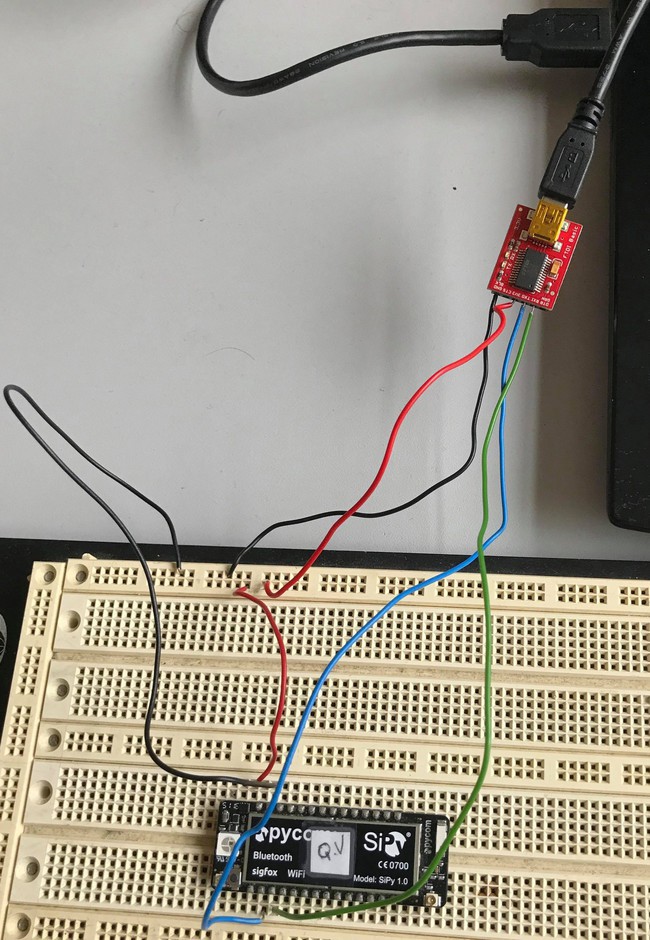
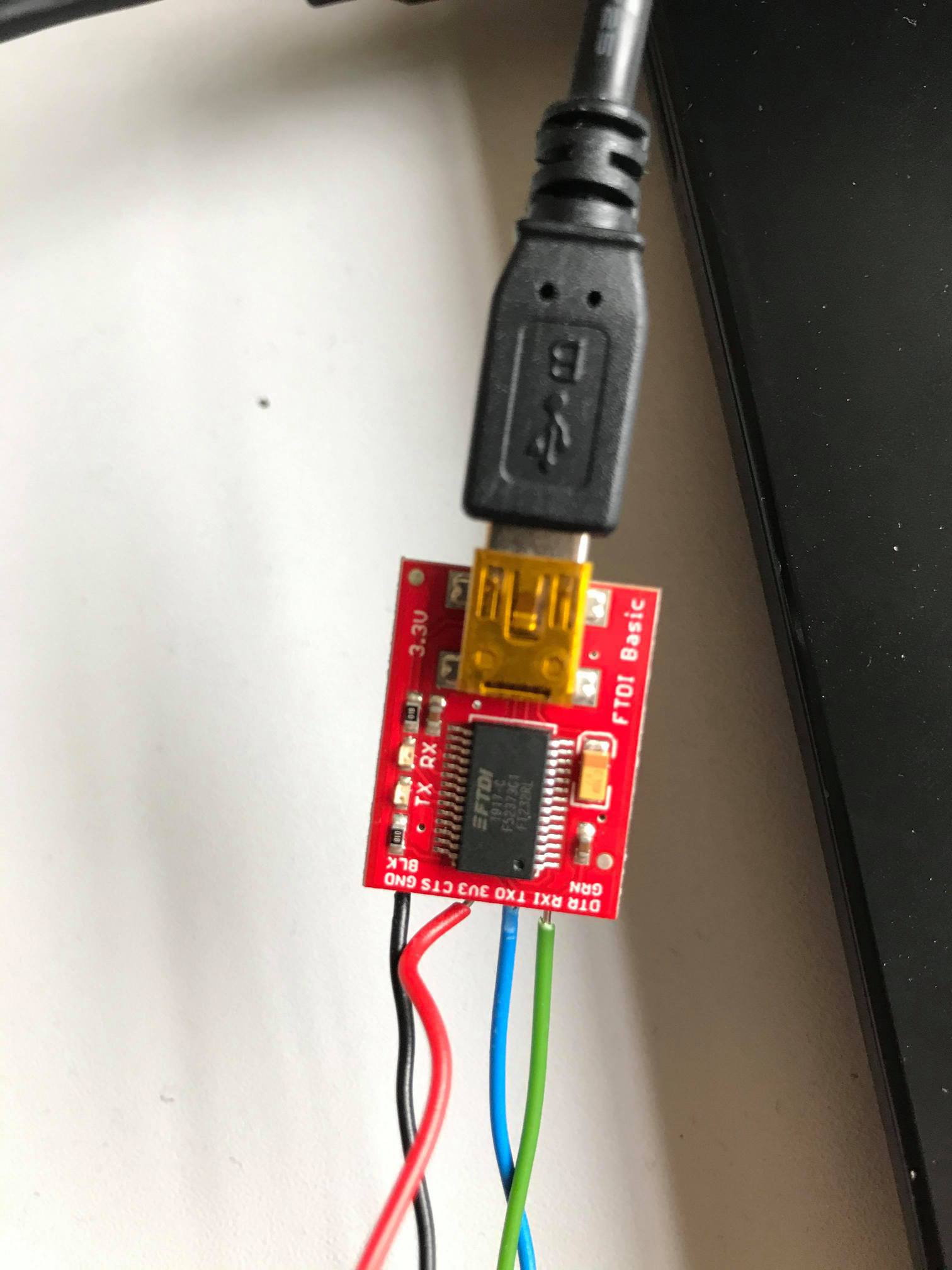
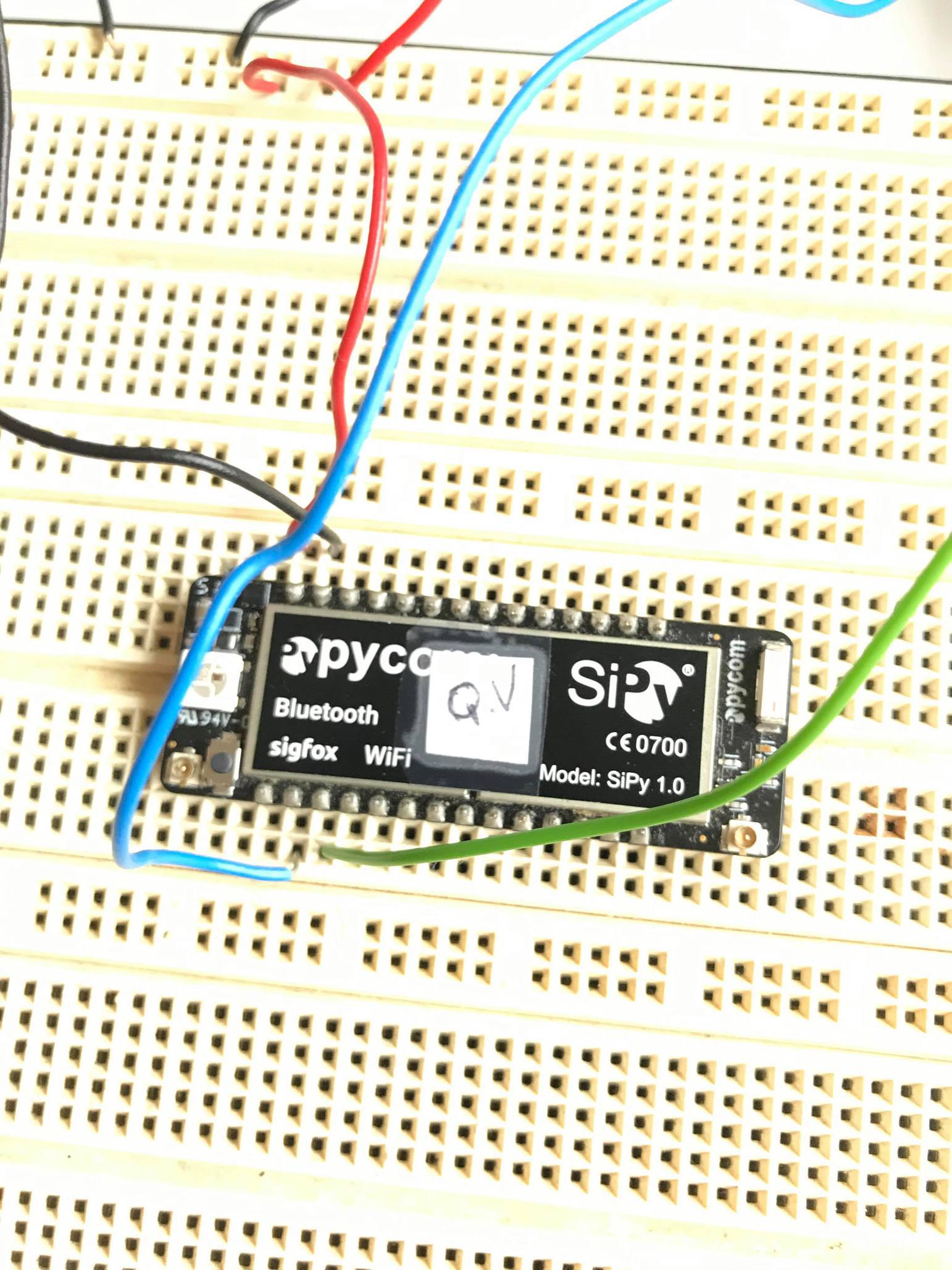
    UART connexion failled
    Scheduled Pinned Locked Moved SiPy
    22 Posts 4 Posters 414 Views 4 Watching
    Loading More Posts
    • Oldest to Newest
    • Newest to Oldest
    • Most Votes
    Reply
    • Reply as topic
    Log in to reply
    This topic has been deleted. Only users with topic management privileges can see it.
    • T Offline
      thibault @quentho
      last edited by thibault

      @quentho don't hesitate to check this page: https://docs.pycom.io/gettingstarted/programming/repl/serial/

      The baudrate was (by default) 115200 so i think is that your problem. (maybe you need to remove the flow control too)

      Q 1 Reply Last reply Reply Quote 0
      • Q Offline
        quentho @thibault
        last edited by

        @thibault

        i try with 115200 , with and without flow control but i always have :
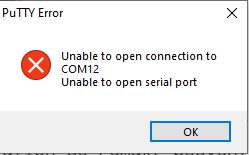
        puttty_erro.JPG

        robert-hhR 2 Replies Last reply Reply Quote 0
        • robert-hhR Offline
          robert-hh @robert-hh
          last edited by

          @robert-hh the baud rate is 115200, and you have to turn off flow control.

          1 Reply Last reply Reply Quote 0
          • robert-hhR Offline
            robert-hh @quentho
            last edited by

            @quentho close atom.

            1 Reply Last reply Reply Quote 0
            • robert-hhR Offline
              robert-hh @quentho
              last edited by

              @quentho you can check whether it is COM12 in the device manager. The device should appear and disappear when you plug and unplug the FTDI board.

              Q 1 Reply Last reply Reply Quote 0
              • Q Offline
                quentho @robert-hh
                last edited by

                @robert-hh i did what you said but i always have the seem result.
                Unable to open connection to COM12

                robert-hhR 1 Reply Last reply Reply Quote 0
                • robert-hhR Offline
                  robert-hh @quentho
                  last edited by

                  @quentho Are you sure that COM12 exists and is the proper port? Putty will not tell you.

                  Q 1 Reply Last reply Reply Quote 0
                  • Q Offline
                    quentho @robert-hh
                    last edited by

                    @robert-hh
                    i see the connection on putty but i haven't the prompt.
                    I had install the FTDI driver but it's not working.
                    i chaned the sipy , the ftdi , the wire but it's not working.
                    when i connect with a pysense or pytrack it's working. I don't understand...

                    robert-hhR 1 Reply Last reply Reply Quote 0
                    • robert-hhR Offline
                      robert-hh @quentho
                      last edited by

                      @quentho A few things to check:

                      • Please ensure, that the flow control setting of putty is disabled.
                      • Try to swap RX and TX
                      • Windows assigns COMxx numbers based on the USB ID. So if Pysense uses COM12, the FTDI will most probably be assigned to a different COMxx number. Open the device manage in Windows, section COM ports, and look, which COM ports are active, when the FTDI is connected. It shoul disappear when you disconnect the FTDI adapter.
                      Q 1 Reply Last reply Reply Quote 0
                      • Q Offline
                        quentho @robert-hh
                        last edited by

                        @robert-hh
                        "Please ensure, that the flow control setting of putty is disabled."

                        When i disconnect and reconnect my sipy, the flow controle set at XOn/XOFF. The speed is 9600. But after i change to none and 115200 for the speed bhut it's not working.

                        "Try to swap RX and TX"
                        i did both each time.

                        "Windows assigns COMxx numbers based on the USB ID. So if Pysense uses COM12, the FTDI will most probably be assigned to a different COMxx number. Open the device manage in Windows, section COM ports, and look, which COM ports are active, when the FTDI is connected. It shoul disappear when you disconnect the FTDI adapter."
                        i had check this one and it's on the good port. My bord is connected but i don't have the prompt . sometimes I have strange characters parading

                        robert-hhR 1 Reply Last reply Reply Quote 0
                        • robert-hhR Offline
                          robert-hh @quentho
                          last edited by robert-hh

                          @quentho Strange characters are a sign of wrong baud rate. What happens if you are connected with 115200 baud and push reset on the SiPy?
                          As terminal emulator you may also try TeraTerm. TeraTerm remembers the recent setting ant lets you only use active COM ports.

                          Edit: You can also start Putty from the command line, specifying Port and speed, e.g.:

                          putty -serial COM12 115200

                          Q 1 Reply Last reply Reply Quote 0
                          • Q Offline
                            quentho @robert-hh
                            last edited by

                            @robert-hh
                            i have a prompt but in can't write inside. And i can't run or download!!

                            bug_ftdi.JPG

                            robert-hhR 1 Reply Last reply Reply Quote 0
                            • robert-hhR Offline
                              robert-hh @quentho
                              last edited by

                              @quentho that looks like a flow control issue, or a problem with the wire into RX of the sipy.

                              Q 1 Reply Last reply Reply Quote 0
                              • Q Offline
                                quentho @robert-hh
                                last edited by

                                @robert-hh said in UART connexion failled:

                                that looks like a flow control issue, or a problem with the wire into RX of the sipy.

                                I had chane rx to tx , i set the bit flow controle with tera term and i had change my sipy and it's working thank you for your time !

                                robert-hhR 1 Reply Last reply Reply Quote 1
                                • robert-hhR Offline
                                  robert-hh @quentho
                                  last edited by

                                  @quentho That is good. Just to add some more information for those who are in a similar situation: with Putty you can also specify all settings on the command line, e.g.:

                                  putty -serial COM12 -sercfg 115200,8,1,n,N

                                  And I faintly recall, that one of either Putty or TeraTerm is using it's own drivers. So it may still be a driver problem.

                                  L 1 Reply Last reply Reply Quote 0
                                  • L Offline
                                    leila @robert-hh
                                    last edited by

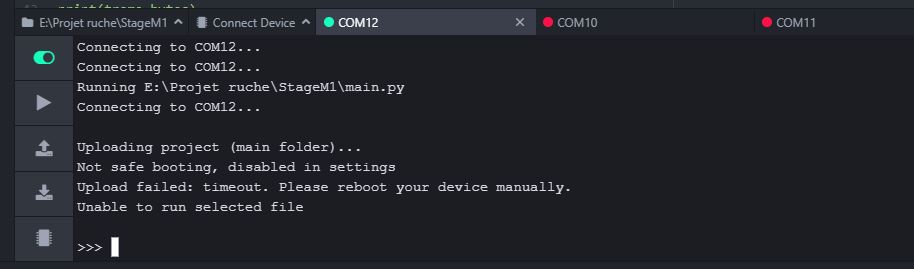
                                    @robert-hh hi i m actually having the same problem i can read the port com with putty but in atom i had the same error need help

                                    robert-hhR 1 Reply Last reply Reply Quote 0
                                    • robert-hhR Offline
                                      robert-hh @leila
                                      last edited by

                                      @leila Sorry, I cannot tell anything about using atom or VS Code with pymakr. I do not use this configuration.

                                      1 Reply Last reply Reply Quote 0

                                      Hello! It looks like you're interested in this conversation, but you don't have an account yet.

                                      Getting fed up of having to scroll through the same posts each visit? When you register for an account, you'll always come back to exactly where you were before, and choose to be notified of new replies (either via email, or push notification). You'll also be able to save bookmarks and upvote posts to show your appreciation to other community members.

                                      With your input, this post could be even better 💗

                                      Register Login
                                      • 1
                                      • 2
                                      • 1 / 2
                                      • First post
                                        Last post

                                      Pycom on Twitter

                                      Pycom